5. TML REST API Endpoints and Examples
This service exposes endpoints to create topics, preprocess data, run machine learning pipelines, generate predictions, and consume data from topics through the Viper backend.
5.1. TML Server Plugin Container
Before you can use the TML Server Plugin you need to RUN The TML Server Plugin Container:
TML Server Plugin Container |
5.2. Reference Architecture
Below is a reference architecture of the powerful capabilities of controlling the TML Server remotely using a REST API
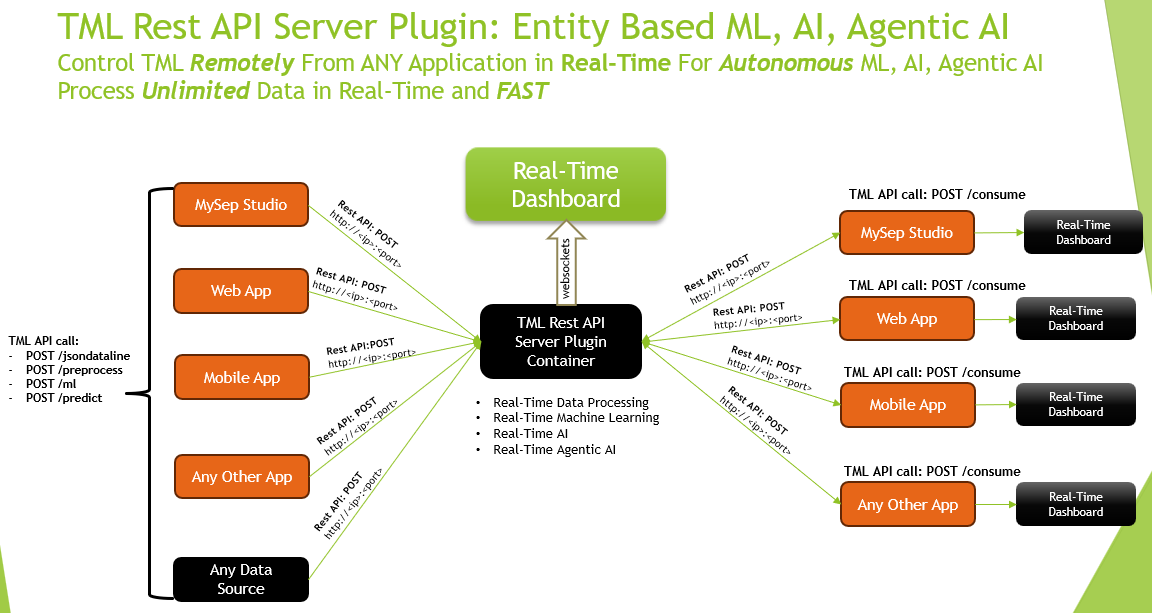
5.2.1. TML API Quick Reference
5.3. API For Kafka Topic Creation
POST /api/v1/createtopic- [click] Create Kafka topics (topics, numpartitions) → 200,400
5.4. API For Preprocessing / ML / Predictions
5.5. API For AI and Agentic AI
5.6. API For Reading or Consuming Data From Kafka Topics
POST /api/v1/consume- [click] Consume messages (topic, forwardurl) → 200,400,500
5.7. API For Writing or Producing Raw Data to Kafka Topics
5.8. Industrial API For Ingesting Data From SCADA and MQTT
See TML Processing Using SCADA and MQTT
POST /api/v1/scada_modbus_read- [click] Directly connect to a SCADA/Modbus system and ingest real-time data → 200,400POST /api/v1/scada_modbus_carryover- [click] Initiate the TML Simulator to compute carryover → 200,400 - See SCADA ExamplePOST /api/v1/mqtt_subscribe- [click] Directly connect to a MQTT system and ingest real-time data → 200,400 - See MQTT Example
5.9. API For System Maintenance
5.10. RUN The TML Server Plugin Container
- TML Server Plugin Build Documentation:
Click for Documentation for the TML Server Plugin
- TML Client Build Documentation: (Recommended for users)
Click for Documentation for the TML Client Plugin
Note
The only difference between the above two documentation sources is:
TML Server Plugin Build Documentation: is built by the TSS and has port assignments for TSS
TML Client Build Documentation: is auto-built when users run the TML Server Plugin and has port assignment specific for the client
To use the TML Endpoints you MUST run the TML Server Plugin Container
docker run -d --net=host -p 5050:5050 -p 4040:4040 -p 6060:6060 -p 9002:9002 \
       --env TSS=0 \
       --env SOLUTIONNAME=tml-server-v1-plugin-3f10-ml_agenticai_restapi \
       --env SOLUTIONDAG=solution_preprocessing_ml_agenticai_restapi_dag-tml-server-v1-plugin-3f10 \
       --env GITUSERNAME=<Enter Github Username> \
       --env GITPASSWORD='<Enter Github Password>' \
       --env GITREPOURL=<Enter Github Repo URL> \
       --env SOLUTIONEXTERNALPORT=5050 \
       -v /var/run/docker.sock:/var/run/docker.sock:z  \
       -v /your_localmachine/foldername:/rawdata:z \
       --env CHIP=amd64 \
       --env SOLUTIONAIRFLOWPORT=4040  \
       --env SOLUTIONVIPERVIZPORT=6060 \
       --env DOCKERUSERNAME='' \
       --env CLIENTPORT=9002  \
       --env EXTERNALPORT=39399 \
       --env KAFKABROKERHOST=127.0.0.1:9092 \
       --env KAFKACLOUDUSERNAME='<Enter API key>' \
       --env KAFKACLOUDPASSWORD='<Enter API secret>' \
       --env SASLMECHANISM=PLAIN \
       --env VIPERVIZPORT=49689 \
       --env MQTTUSERNAME='' \
       --env MQTTPASSWORD='' \
       --env AIRFLOWPORT=9000  \
       --env READTHEDOCS='<Enter Readthedocs token>' \
       maadsdocker/tml-server-v1-plugin-3f10-ml_agenticai_restapi-amd64
5.11. Docker Run Parameters
Command Overview Launches TML Server v1 Plugin (Aefa ML REST API) with Kafka, Airflow, Viper integration. For setting up tokens see here for details.
Docker Run Fields:
-d - Detached mode (background)
–net=host - Host networking (REQUIRED for Kafka/Viper)
-p 5050:5050 - External Port ↔ SOLUTIONEXTERNALPORT
-p 4040:4040 - Airflow DAGs/UI ↔ SOLUTIONAIRFLOWPORT
-p 6060:6060 - ViperViz dashboard ↔ SOLUTIONVIPERVIZPORT
-p 9002:9002 - REST API port ↔ CLIENTPORT
Required Environment Variables:
GITUSERNAME=**<Enter Github Username>**
GITPASSWORD=**’<Enter Github PAT>’** (quotes required)
GITREPOURL=**<Enter Github Repo URL>**
/your_localmachine/foldername:/rawdata:z (data volume)
Optional/Cloud Config:
TSS=0 (disable telemetry)
SOLUTIONNAME=tml-server-v1-plugin-aefa-ml_restapi
KAFKABROKERHOST=127.0.0.1:9092 (local) or cloud
KAFKACLOUDUSERNAME/API key (Confluent Cloud or AWS MSK)
KAFKACLOUDPASSWORD/API Secret (Confluent Cloud or AWS MSK)
READTHEDOCS=’<REATHEDOCS token>’
Architecture: - CHIP=amd64 (x86) or arm64
Port Summary:
5050: Solution External Port
4040: Airflow DAGs/UI
6060: ViperViz dashboard
9002: REST API endpoints - THIS IS THE PORT FOR YOUR REST API CALLS (Change as Needed)
Each endpoint expects JSON input via POST requests.
Important
Base URL: Will depend on the Port the TML Server is listening on i.e. port 9002
5.12. POST /api/v1/createtopic
Description: Create one or more topics in the Viper message broker.
Request JSON Parameters:
topics(string, required) – Comma-separated list of topic names.numpartitions(int, optional, default=3) – Number of partitions for each topic.replication(int, optional, default=1) – Replication factor.description(string, optional, default=”user topic”) – Description of the topic.enabletls(int, optional, default=1) – Enable TLS (1 = on, 0 = off).
Example Request:
{
    "topics": "raw-data,processed-data",
    "numpartitions": 6,
    "replication": 2,
    "description": "Industrial IoT streams",
    "enabletls": 1
}
Example Response:
- 200 – Topics created successfully (plain text).
- 400 – "Missing topics"
Example Request (Python - async):
import aiohttp
import asyncio

async def create_topics():
    url = "http://localhost:5000/api/v1/createtopic"
    payload = {
        "topics": "raw-data,processed-data",
        "numpartitions": 6,
        "replication": 2,
        "description": "Industrial IoT streams"
    }

    async with aiohttp.ClientSession() as session:
        async with session.post(url, json=payload) as response:
            print(f"Status: {response.status}, Response: {await response.text()}")

# Run the async function
asyncio.run(create_topics())
Example Request (JavaScript - async):
async function createTopics() {
    const url = 'http://localhost:5000/api/v1/createtopic';
    const payload = {
        topics: 'raw-data,processed-data',
        numpartitions: 6,
        replication: 2,
        description: 'Industrial IoT streams'
    };

    try {
        const response = await fetch(url, {
            method: 'POST',
            headers: { 'Content-Type': 'application/json' },
            body: JSON.stringify(payload)
        });
        const data = await response.text();
        console.log('Success:', data);
    } catch (error) {
        console.error('Error:', error);
    }
}

createTopics();
Example Request (React - async):
import { useState } from 'react';

function CreateTopic() {
    const [status, setStatus] = useState('');

    const handleSubmit = async (e) => {
        e.preventDefault();
        const payload = {
            topics: 'raw-data,processed-data',
            numpartitions: 6,
            replication: 2,
            description: 'Industrial IoT streams'
        };

        try {
            const response = await fetch('http://localhost:5000/api/v1/createtopic', {
                method: 'POST',
                headers: { 'Content-Type': 'application/json' },
                body: JSON.stringify(payload)
            });
            setStatus(response.ok ? 'Topics created!' : 'Failed');
        } catch (error) {
            setStatus('Error: ' + error.message);
        }
    };

    return (
        <form onSubmit={handleSubmit}>
            <button type="submit">Create Topics</button>
            <p>{status}</p>
        </form>
    );
}
Responses:
- 200 – Topics created successfully.
- 400 – "Missing topics"
5.13. POST /api/v1/preprocess
Description: Trigger preprocessing steps for data streams. To learn different TML preprocessing types see here for details: preprocessing types
Request JSON Parameters:
step(string, required) – Processing mode (“4”).rawdatatopic(string, required) – Source topic with raw data.
For step = ‘4’:
- preprocessdatatopic, preprocesstypes, jsoncriteria, rollbackoffset, windowinstance (optional)
Example Request (step=4):
{
    "step": "4",
    "rawdatatopic": "raw-sensor-data",
    "preprocessdatatopic": "clean-sensor-data",
    "preprocesstypes": "normalize,filter",
    "jsoncriteria": "{\"min_value\": 0, \"max_value\": 1000}",
    "rollbackoffset": 500,
    "windowinstance": "sensor-batch-1"
}
Important Note on `jsoncriteria` Format:
Refer to this JSON Processing Section.
Users must specify the Json paths in the Json criteria - so TML can extract the values from the keys.
Important
All endpoints using jsoncriteria (primarily POST /preprocess) require this multiline format:
{
    "jsoncriteria": "uid=metadata.dsn,filter:allrecords~" +
                    "subtopics=metadata.property_name~" +
                    "values=datapoint.value~" +
                    "identifiers=metadata.display_name~" +
                    "datetime=datapoint.updated_at~" +
                    "msgid=datapoint.id~" +
                    "latlong=lat:long"
}
Example Response:
- 200 – Preprocessing started (plain text).
- 400 – "Missing preprocess or invalid preprocess"
Example Request (Python - async) - Correct jsoncriteria:
async def start_preprocessing():
    json_criteria = """uid=metadata.dsn,filter:allrecords~
     subtopics=metadata.property_name~
     values=datapoint.value~
     identifiers=metadata.display_name~
     datetime=datapoint.updated_at~
     msgid=datapoint.id~
     latlong=lat:long"""

    payload = {
        "step": "4",
        "rawdatatopic": "raw-sensor-data",
        "preprocessdatatopic": "clean-sensor-data",
        "preprocesstypes": "normalize,filter",
        "jsoncriteria": json_criteria,  # Multiline TML format
        "rollbackoffset": 500,
        "windowinstance": "sensor-batch-1"
    }

    async with aiohttp.ClientSession() as session:
        async with session.post("http://localhost:5000/api/v1/preprocess", json=payload) as response:
            print(await response.text())
Example Request (JavaScript - async) - Correct jsoncriteria:
async function preprocessData() {
    const jsonCriteria = `uid=metadata.dsn,filter:allrecords~\
    subtopics=metadata.property_name~\
    values=datapoint.value~\
    identifiers=metadata.display_name~\
    datetime=datapoint.updated_at~\
    msgid=datapoint.id~\
    latlong=lat:long`;

    const payload = {
        step: '4',
        rawdatatopic: 'raw-sensor-data',
        preprocessdatatopic: 'clean-sensor-data',
        preprocesstypes: 'normalize,filter',
        jsoncriteria: jsonCriteria,  // TML multiline format with ~
        rollbackoffset: 500,
        windowinstance: 'sensor-batch-1'
    };

    const response = await fetch('http://localhost:5000/api/v1/preprocess', {
        method: 'POST',
        headers: { 'Content-Type': 'application/json' },
        body: JSON.stringify(payload)
    });
    console.log(await response.text());
}
Example Request (React - async) - Correct jsoncriteria:
function PreprocessStep4() {
    const [status, setStatus] = useState('');

    const handlePreprocess = async () => {
        const jsonCriteria = `uid=metadata.dsn,filter:allrecords~\
        subtopics=metadata.property_name~\
        values=datapoint.value~\
        identifiers=metadata.display_name~\
        datetime=datapoint.updated_at~\
        msgid=datapoint.id~\
        latlong=lat:long`;

        const payload = {
            step: '4',
            rawdatatopic: 'raw-sensor-data',
            preprocessdatatopic: 'clean-sensor-data',
            preprocesstypes: 'normalize,filter',
            jsoncriteria: jsonCriteria,
            rollbackoffset: 500,
            windowinstance: 'sensor-batch-1'
        };

        try {
            const response = await fetch('http://localhost:5000/api/v1/preprocess', {
                method: 'POST',
                headers: { 'Content-Type': 'application/json' },
                body: JSON.stringify(payload)
            });
            setStatus(response.ok ? 'Preprocessing started' : 'Failed');
        } catch (error) {
            setStatus('Error: ' + error.message);
        }
    };

    return <button onClick={handlePreprocess}>Start Preprocessing</button>;
}
Key Requirements: - Uses ~\ (tilde-backslash) field separators - Multiline format preserved as single string - Matches TML ReadTheDocs specification: https://tml.readthedocs.io/en/latest/jsonprocessing.html - Invalid formats will fail preprocessing step 4
5.14. POST /api/v1/ml
Description: Train a machine learning model using preprocessed data.
Request JSON Parameters (step=’5’):
- trainingdatafolder, ml_data_topic, preprocess_data_topic
- islogistic, dependentvariable, independentvariables, processlogic
- rollbackoffsets, windowinstance
Example Request:
{
    "step": "5",
    "trainingdatafolder": "/data/training/2026Q1",
    "ml_data_topic": "ml-features",
    "preprocess_data_topic": "clean-sensor-data",
    "islogistic": 1,
    "dependentvariable": "equipment_failure",
    "independentvariables": "temp,vibration,pressure",
    "processlogic": "balance_classes=true",
    "rollbackoffsets": 100,
    "windowinstance": "ml-training-v1"
}
Example Response:
- 200 – Training initiated.
- 400 – "Missing ml or invalid ml"
Example Request (Python - async):
import aiohttp
import asyncio

async def train_ml_model():
    payload = {
        "step": "5",
        "trainingdatafolder": "/data/training/2026Q1",
        "ml_data_topic": "ml-features",
        "preprocess_data_topic": "clean-sensor-data",
        "islogistic": 1,
        "dependentvariable": "equipment_failure",
        "independentvariables": "temp,vibration,pressure",
        "processlogic": "balance_classes=true",
        "rollbackoffsets": 100,
        "windowinstance": "ml-training-v1"
    }

    async with aiohttp.ClientSession() as session:
        async with session.post("http://localhost:5000/api/v1/ml", json=payload) as response:
            print(f"Status: {response.status}, Response: {await response.text()}")

asyncio.run(train_ml_model())
Example Request (JavaScript - async):
async function trainMLModel() {
    const payload = {
        step: '5',
        trainingdatafolder: '/data/training/2026Q1',
        ml_data_topic: 'ml-features',
        preprocess_data_topic: 'clean-sensor-data',
        islogistic: 1,
        dependentvariable: 'equipment_failure',
        independentvariables: 'temp,vibration,pressure',
        rollbackoffsets: 100
    };

    try {
        const response = await fetch('http://localhost:5000/api/v1/ml', {
            method: 'POST',
            headers: { 'Content-Type': 'application/json' },
            body: JSON.stringify(payload)
        });
        const data = await response.text();
        console.log('Training status:', data);
    } catch (error) {
        console.error('Training failed:', error);
    }
}

trainMLModel();
Example Request (React - async):
import { useState } from 'react';

function TrainML() {
    const [status, setStatus] = useState('');
    const [loading, setLoading] = useState(false);

    const trainModel = async () => {
        setLoading(true);
        const payload = {
            step: '5',
            trainingdatafolder: '/data/training/2026Q1',
            ml_data_topic: 'ml-features',
            preprocess_data_topic: 'clean-sensor-data',
            islogistic: 1,
            dependentvariable: 'equipment_failure',
            independentvariables: 'temp,vibration,pressure',
            rollbackoffsets: 100
        };

        try {
            const response = await fetch('http://localhost:5000/api/v1/ml', {
                method: 'POST',
                headers: { 'Content-Type': 'application/json' },
                body: JSON.stringify(payload)
            });
            setStatus(response.ok ? 'Training started!' : 'Training failed');
        } catch (error) {
            setStatus('Error: ' + error.message);
        } finally {
            setLoading(false);
        }
    };

    return (
        <div>
            <button onClick={trainModel} disabled={loading}>
                {loading ? 'Training...' : 'Train Model'}
            </button>
            <p>{status}</p>
        </div>
    );
}
Responses:
- 200 – Training initiated.
- 400 – "Missing ml or invalid ml"
5.15. POST /api/v1/predict
Description: Run prediction using trained ML models and streaming data.
Request JSON Parameters (step=’6’):
- pathtoalgos, maxrows, consumefrom, inputdata, streamstojoin
- ml_prediction_topic, preprocess_data_topic, windowinstance
Example Request:
{
    "step": "6",
    "pathtoalgos": "/models/equipment_failure_v1",
    "rollbackoffsets": 1000,
    "consumefrom": "live-sensor-stream",
    "inputdata": "{\"sensor_id\": \"SENSOR_123\"}",
    "streamstojoin": "metadata,alerts",
    "ml_prediction_topic": "failure_predictions",
    "preprocess_data_topic": "clean-sensor-data",
    "windowinstance": "prediction-stream-1"
}
Example Response:
- 200 – Prediction started.
- 400 – "Missing ml or invalid prediction"
Description: Run prediction using trained ML models and streaming data.
Example Request (Python - async):
async def run_predictions():
    payload = {
        "step": "6",
        "pathtoalgos": "/models/equipment_failure_v1",
        "rollbackoffsets": 1000,
        "consumefrom": "live-sensor-stream",
        "inputdata": "{\"sensor_id\": \"SENSOR_123\"}",
        "streamstojoin": "metadata,alerts",
        "ml_prediction_topic": "failure_predictions",
        "preprocess_data_topic": "clean-sensor-data",
        "windowinstance": "prediction-stream-1"
    }

    async with aiohttp.ClientSession() as session:
        async with session.post("http://localhost:5000/api/v1/predict", json=payload) as response:
            print(f"Status: {response.status}, Response: {await response.text()}")

asyncio.run(run_predictions())
Example Request (JavaScript - async):
async function runPredictions() {
    const payload = {
        step: '6',
        pathtoalgos: '/models/equipment_failure_v1',
        rollbackoffsets: 1000,
        consumefrom: 'live-sensor-stream',
        inputdata: '{"sensor_id": "SENSOR_123"}',
        streamstojoin: 'metadata,alerts',
        ml_prediction_topic: 'failure_predictions',
        preprocess_data_topic: 'clean-sensor-data'
    };

    try {
        const response = await fetch('http://localhost:5000/api/v1/predict', {
            method: 'POST',
            headers: { 'Content-Type': 'application/json' },
            body: JSON.stringify(payload)
        });
        const data = await response.text();
        console.log('Prediction status:', data);
    } catch (error) {
        console.error('Prediction failed:', error);
    }
}

runPredictions();
Example Request (React - async):
import { useState } from 'react';

function Predict() {
    const [status, setStatus] = useState('');
    const [loading, setLoading] = useState(false);

    const runPrediction = async () => {
        setLoading(true);
        const payload = {
            step: '6',
            pathtoalgos: '/models/equipment_failure_v1',
            rollbackoffsets: 1000,
            consumefrom: 'live-sensor-stream',
            inputdata: '{"sensor_id": "SENSOR_123"}',
            streamstojoin: 'metadata,alerts',
            ml_prediction_topic: 'failure_predictions',
            preprocess_data_topic: 'clean-sensor-data'
        };

        try {
            const response = await fetch('http://localhost:5000/api/v1/predict', {
                method: 'POST',
                headers: { 'Content-Type': 'application/json' },
                body: JSON.stringify(payload)
            });
            setStatus(response.ok ? 'Predictions started!' : 'Prediction failed');
        } catch (error) {
            setStatus('Error: ' + error.message);
        } finally {
            setLoading(false);
        }
    };

    return (
        <div>
            <button onClick={runPrediction} disabled={loading}>
                {loading ? 'Predicting...' : 'Run Predictions'}
            </button>
            <p>{status}</p>
        </div>
    );
}
Responses:
- 200 – Prediction started.
- 400 – "Missing ml or invalid prediction"
5.16. POST /api/v1/consume
Description: Consume messages from a given topic and optionally forward results.
Request JSON Parameters:
- topic (required), forwardurl (optional), osdu (optional)
- rollbackoffset, enabletls, offset, topicid
Example Request:
{
    "topic": "failure_predictions",
    "forwardurl": "https://webhook1.example.com,https://webhook2.example.com",
    "rollbackoffsets": 50,
    "osdu": "false",
    "enabletls": 1
}
Example Response (osdu=false):
{
    "status": "consumed",
    "topic": "failure_predictions",
    "messages": [{"offset": 123, "data": {...}}, {...}],
    "consumer_id": "tmlconsumerplugin"
}
Example Response (osdu=true + forwarding):
{
    "kind": "tml",
    "id": "osdu:tml:consume:failure_predictions:1640995200",
    "data": {
        "Topic": "failure_predictions",
        "Messages": [...],
        "meta": {...}
    },
    "forward_statuses": [
        {"url": "https://webhook1.example.com", "status": 200, "success": true},
        {"url": "https://webhook2.example.com", "status": 200, "success": true}
    ]
}
Responses: - 200 – Consumed messages returned. - 400 – Missing topic. - 500 – Consumption failed.
Example Request (Python - async):
async def consume_data():
    payload = {
        "topic": "failure_predictions",
        "rollbackoffsets": 50,
        "osdu": "false"
    }

    async with aiohttp.ClientSession() as session:
        async with session.post("http://localhost:5000/api/v1/consume", json=payload) as response:
            data = await response.json()
            print(f"Consumed {len(data.get('messages', []))} messages")

asyncio.run(consume_data())
Example Request (JavaScript - async):
async function consumeData() {
    const payload = {
        topic: 'failure_predictions',
        rollbackoffset: 50,
        osdu: 'false'
    };

    const response = await fetch('http://localhost:5000/api/v1/consume', {
        method: 'POST',
        headers: {'Content-Type': 'application/json'},
        body: JSON.stringify(payload)
    });
    const data = await response.json();
    console.log('Messages:', data.messages);
    return data;
}
Example Request (React - async):
import { useState } from 'react';

function ConsumeData() {
    const [messages, setMessages] = useState([]);
    const [loading, setLoading] = useState(false);

    const consumeTopic = async () => {
        setLoading(true);
        try {
            const response = await fetch('http://localhost:5000/api/v1/consume', {
                method: 'POST',
                headers: {'Content-Type': 'application/json'},
                body: JSON.stringify({
                    topic: 'failure_predictions',
                    rollbackoffsets: 50,
                    osdu: 'false'
                })
            });
            const data = await response.json();
            setMessages(data.messages || []);
        } catch (error) {
            console.error('Consume failed:', error);
        } finally {
            setLoading(false);
        }
    };

    return (
        <div>
            <button onClick={consumeTopic} disabled={loading}>
                {loading ? 'Consuming...' : 'Consume Latest'}
            </button>
            {messages.length > 0 && (
                <pre>{JSON.stringify(messages, null, 2)}</pre>
            )}
        </div>
    );
}
5.17. POST /api/v1/jsondataline
Description: Send a single JSON data object to a topic.
Tip
If you want to send the data to a specific topic then just add a sendtotopic field in the json:
“sendtotopic”: “mynewtopic”
Make sure the JSON is a valid JSON after this addtion. TML will then route the new data to the
new topic: mynewtopic (or whatever name you choose)
Example Request:
{
    "timestamp": "2026-03-01T21:54:00Z",
    "sensor_id": "SENSOR_123",
    "temperature": 72.5,
    "vibration": 0.8
}
Example Response:
"ok"
Example Request (Python - async):
async def send_sensor_data():
    payload = {
        "timestamp": "2026-03-01T22:24:00Z",
        "sensor_id": "SENSOR_123",
        "temperature": 72.5
    }

    async with aiohttp.ClientSession() as session:
        async with session.post("http://localhost:5000/api/v1/jsondataline", json=payload) as response:
            print(await response.text())

asyncio.run(send_sensor_data())
Example Request (JavaScript - async):
async function sendSensorData() {
    const payload = {
        timestamp: '2026-03-01T22:24:00Z',
        sensor_id: 'SENSOR_123',
        temperature: 72.5
    };

    const response = await fetch('http://localhost:5000/api/v1/jsondataline', {
        method: 'POST',
        headers: {'Content-Type': 'application/json'},
        body: JSON.stringify(payload)
    });
    console.log('Sent:', await response.text());
}
Example Request (React - async):
function SendDataLine() {
    const sendData = async () => {
        const payload = {
            timestamp: '2026-03-01T22:24:00Z',
            sensor_id: 'SENSOR_123',
            temperature: 72.5
        };

        const response = await fetch('http://localhost:5000/api/v1/jsondataline', {
            method: 'POST',
            headers: {'Content-Type': 'application/json'},
            body: JSON.stringify(payload)
        });
        console.log('Data sent');
    };

    return <button onClick={sendData}>Send Sensor Data</button>;
}
5.18. POST /api/v1/jsondataarray
Description: Send a JSON array of objects to a topic.
Tip
If you want to send the data to a specific topic then just add a sendtotopic field in EACH Json in the json array:
“sendtotopic”: “mynewtopic”
Make sure the JSON is a valid JSON after this addtion. TML will then route the new data to the
new topic: mynewtopic (or whatever name you choose)
Example Request:
{
    "topic": "raw-sensor-data",
    [...]
}
Example body (array directly):
[
    {
        "timestamp": "2026-03-01T21:54:00Z",
        "sensor_id": "SENSOR_123",
        "temperature": 72.5
    },
    {
        "timestamp": "2026-03-01T21:55:00Z",
        "sensor_id": "SENSOR_124",
        "temperature": 73.2
    }
]
Example Response:
"ok"
Example Request (Python - async):
import aiohttp
import asyncio
import json

async def send_batch_data():
    data_array = [
        {
            "timestamp": "2026-03-01T22:39:00Z",
            "sensor_id": "SENSOR_123",
            "temperature": 72.5,
            "vibration": 0.8
        },
        {
            "timestamp": "2026-03-01T22:39:05Z",
            "sensor_id": "SENSOR_124",
            "temperature": 73.2,
            "vibration": 1.2
        }
    ]

    async with aiohttp.ClientSession() as session:
        async with session.post(
            "http://localhost:5000/api/v1/jsondataarray",
            json=data_array  # Sends raw array directly
        ) as response:
            print(f"Status: {response.status}, Response: {await response.text()}")

asyncio.run(send_batch_data())
Example Request (JavaScript - async):
async function sendBatchData() {
    const dataArray = [
        {
            timestamp: '2026-03-01T22:39:00Z',
            sensor_id: 'SENSOR_123',
            temperature: 72.5,
            vibration: 0.8
        },
        {
            timestamp: '2026-03-01T22:39:05Z',
            sensor_id: 'SENSOR_124',
            temperature: 73.2,
            vibration: 1.2
        }
    ];

    try {
        const response = await fetch('http://localhost:5000/api/v1/jsondataarray', {
            method: 'POST',
            headers: { 'Content-Type': 'application/json' },
            body: JSON.stringify(dataArray)  // Raw array as JSON
        });
        console.log('Batch sent:', await response.text());
    } catch (error) {
        console.error('Batch send failed:', error);
    }
}

sendBatchData();
Example Request (React - async):
import { useState } from 'react';

function SendDataArray() {
    const [status, setStatus] = useState('');
    const [loading, setLoading] = useState(false);

    const dataArray = [
        {
            timestamp: '2026-03-01T22:39:00Z',
            sensor_id: 'SENSOR_123',
            temperature: 72.5,
            vibration: 0.8
        },
        {
            timestamp: '2026-03-01T22:39:05Z',
            sensor_id: 'SENSOR_124',
            temperature: 73.2,
            vibration: 1.2
        }
    ];

    const sendBatch = async () => {
        setLoading(true);
        try {
            const response = await fetch('http://localhost:5000/api/v1/jsondataarray', {
                method: 'POST',
                headers: { 'Content-Type': 'application/json' },
                body: JSON.stringify(dataArray)  // Direct array submission
            });
            setStatus(response.ok ? 'Batch sent successfully!' : 'Failed');
        } catch (error) {
            setStatus('Error: ' + error.message);
        } finally {
            setLoading(false);
        }
    };

    return (
        <div>
            <button onClick={sendBatch} disabled={loading}>
                {loading ? 'Sending batch...' : `Send ${dataArray.length} records`}
            </button>
            <p>{status}</p>
        </div>
    );
}
Important Notes: - Request body must be a raw JSON array [{…}, {…}] (not {data: […]}) - Endpoint iterates through array and calls readdata() for each item - All items share the same topic (specified in code, not payload)
Response: "ok" (200)
5.19. POST /api/v1/external_payload
Description: External applications can send a JSON to this API. TML will write the JSON to a Kafka topic for processing.
Request JSON Parameters:
Valid JSON - this JSON must include the following two fields in the JSON:
sendtotopic - This is the topic you want TML to store the JSON
base_url - This is the url that TML server plugin is listening on i.e. http://localhost:9002
Response: "ok" (200) or Error
5.20. POST /api/v1/terminatewindow
Description: Terminate a window instance: If you have too many windows processing data this could cause memory issues - this API helps you terminate unneeded windows.
Request JSON Parameters:
step(int, optional) – 4, 5, or 6windowname(string, required) – Windowname to terminate - or use: all, all windows will terminate and you start refesh.
Example Request:
{
    "step": 4,
    "windowname": 'all',
}
Example Response:
- 200 – Topics created successfully (plain text).
- 400 – "Missing topics"
Example Request (Python - async):
import aiohttp
import asyncio

async def terminatewindow():
    url = "http://localhost:5000/api/v1/terminatewindow"
    payload = {
        "step": 4,
        "windowname": 'all'
    }

    async with aiohttp.ClientSession() as session:
        async with session.post(url, json=payload) as response:
            print(f"Status: {response.status}, Response: {await response.text()}")

# Run the async function
asyncio.run(terminatewindow())
Example Request (JavaScript - async):
async function terminatewindow() {
    const url = 'http://localhost:5000/api/v1/terminatewindow';
    const payload = {
        "step": 4,
        "windowname": 'all'
    };

    try {
        const response = await fetch(url, {
            method: 'POST',
            headers: { 'Content-Type': 'application/json' },
            body: JSON.stringify(payload)
        });
        const data = await response.text();
        console.log('Success:', data);
    } catch (error) {
        console.error('Error:', error);
    }
}

terminatewindow();
Example Request (React - async):
 const TerminateWindow = () => {  // ← Proper component
   const [status, setStatus] = useState('');

   const handleSubmit = async (e) => {
     e.preventDefault();
     const payload = {
         "step": 4,
         "windowname": 'all'  // 'all' = kill plugin_* tmux windows
     };

     try {
         const response = await fetch('http://localhost:5000/api/v1/terminatewindow', {
             method: 'POST',
             headers: { 'Content-Type': 'application/json' },
             body: JSON.stringify(payload)
         });

         if (response.ok) {
             const result = await response.json();  // ✅ Get response data
             setStatus('Windows terminated!');
         } else {
             const error = await response.text();
             setStatus(`Failed: ${error}`);
         }
       } catch (error) {
         setStatus('Network error: ' + error.message);
       }
   };

   return (
     <form onSubmit={handleSubmit}>
         <button type="submit">Terminate Window</button>
         <p>{status}</p>
     </form>
   );
};

export default TerminateWindow;  // ✅ Export
Responses:
- 200 – Topics created successfully.
- 400 – "Missing topics"
5.21. POST /api/v1/health
Description: Get a health check on the sessions running in the TML server plugin.
Example Request (Python - async):
import aiohttp
import asyncio

async def health():
    url = "http://localhost:5000/api/v1/health"

    async with aiohttp.ClientSession() as session:
        async with session.post(url) as response:
            print(f"Status: {response.status}, Response: {await response.text()}")

# Run the async function
asyncio.run(health())
Example Request (JavaScript - async):
async health() {
    const url = 'http://localhost:5000/api/v1/health';

    try {
        const response = await fetch(url, {
            method: 'POST',
            headers: { 'Content-Type': 'application/json' },
        });
        const data = await response.text();
        console.log('Success:', data);
    } catch (error) {
        console.error('Error:', error);
    }
}

health();
Example Request (React - async):
import { useState } from 'react';

function health() {
    const [status, setStatus] = useState('');

    const handleSubmit = async (e) => {
        e.preventDefault();

        try {
            const response = await fetch('http://localhost:5000/api/v1/health', {
                method: 'POST',
                headers: { 'Content-Type': 'application/json' },
            });
            setStatus(response.ok ? 'health ok!' : 'Failed');
        } catch (error) {
            setStatus('Error: ' + error.message);
        }
    };

    return (
        <form onSubmit={handleSubmit}>
            <button type="submit">Health Check</button>
            <p>{status}</p>
        </form>
    );
}
Responses:
- 200 – Health successful.
- 400 – "Health failed"
5.22. POST /api/v1/ai
Description: Run powerful AI analysis on data streams. This allows users to use LLM to automate workflows in real-time.
Request JSON Parameters:
step(string, required) – This step is 9.vectordimension(string, optional).contextwindowsize(string, optional).vectorsearchtype(string, optional).temperature(string, optional).docfolderingestinterval(string, optional).docfolder(string, optional).vectordbcollectionname(string, optional).hyperbatch(string, optional).keyprocesstype(string, optional).keyattribute(string, optional).context(string, required).prompt(string, required).pgptport(string, required).pgpthost(string, required).pgpt_data_topic(string, required).consumefrom(string, required).rollbackoffset(string, required).pgptcontainername(string, required).windowinstance(string, optional).
Example Request:
See Dag 9 configurations here.
payload = {
    "step": step,
    "vectordimension": vectordimension, # dimension of the embedding
    "contextwindowsize": contextwindowsize, # context window size for LLM
    "vectorsearchtype": vectorsearchtype, # RAG vector search type
    "temperature": temperature, # LLM temperature setting
    "docfolderingestinterval": docfolderingestinterval, # how how to reload documents in vector DB
    "docfolder": docfolder, # you can place your documents in /rawdata folder i.e. /rawdata/mylogs
    "vectordbcollectionname": vectordbcollectionname,
    "hyperbatch": hyperbatch, # set to 1 or 0 - if 0 TML sends line by line to Pgpt or in batch all of the data in consumefrom topic
    "keyprocesstype": keyprocesstype, # anomprob, max, min, etc any TML processtypes
    "keyattribute": keyattribute, # any attribute in the data you are processing: Power, Voltage, Current
    "context": context, # prompt context
    "prompt": prompt, # the prompt
    "pgptport": pgptport, # pgpt container port
    "pgpthost": pgpthost, # pgpt container host
    "pgpt_data_topic": pgpt_data_topic,  # topic that tml/pgpt will store its responses
    "consumefrom": consumefrom, # topic tml/pgpt will consume data and apply the prompt
    "rollbackoffset": rollbackoffset,  # how much data pgpt to process
    "pgptcontainername": pgptcontainername, # pgpt container name
    "windowinstance": windowinstance # window instance
}
Example Request (Python - async):
async def run_ai(API_ENDPOINT,step,vectordimension,contextwindowsize,vectorsearchtype,temperature,docfolderingestinterval,docfolder,vectordbcollectionname,
       hyperbatch,keyprocesstype,keyattribute,context,prompt,pgptport,pgpthost,pgpt_data_topic,consumefrom,rollbackoffset,pgptcontainername,windowinstance):

    payload = {
        "step": step,
        "vectordimension": vectordimension, # dimension of the embedding
        "contextwindowsize": contextwindowsize, # context window size for LLM
        "vectorsearchtype": vectorsearchtype, # RAG vector search type
        "temperature": temperature, # LLM temperature setting
        "docfolderingestinterval": docfolderingestinterval, # how how to reload documents in vector DB
        "docfolder": docfolder, # you can place your documents in /rawdata folder i.e. /rawdata/mylogs
        "vectordbcollectionname": vectordbcollectionname,
        "hyperbatch": hyperbatch, # set to 1 or 0 - if 0 TML sends line by line to Pgpt or in batch all of the data in consumefrom topic
        "keyprocesstype": keyprocesstype, # anomprob, max, min, etc any TML processtypes
        "keyattribute": keyattribute, # any attribute in the data you are processing: Power, Voltage, Current
        "context": context, # prompt context
        "prompt": prompt, # the prompt
        "pgptport": pgptport, # pgpt container port
        "pgpthost": pgpthost, # pgpt container host
        "pgpt_data_topic": pgpt_data_topic,  # topic that tml/pgpt will store its responses
        "consumefrom": consumefrom, # topic tml/pgpt will consume data and apply the prompt
        "rollbackoffset": rollbackoffset,  # how much data pgpt to process
        "pgptcontainername": pgptcontainername, # pgpt container name
        "windowinstance": windowinstance # window instance
    }

    payload=json.dumps(payload, indent=2)
    payload=json.loads(payload)
    async with aiohttp.ClientSession() as session:
        async with session.post(API_ENDPOINT, json=payload) as response:
            print(f"Status: {response.status}, Response: {await response.text()}")
Example Request (Javascript - async):
async function runAi(
  API_ENDPOINT,
  step,
  vectordimension,
  contextwindowsize,
  vectorsearchtype,
  temperature,
  docfolderingestinterval,
  docfolder,
  vectordbcollectionname,
  hyperbatch,
  keyprocesstype,
  keyattribute,
  context,
  prompt,
  pgptport,
  pgpthost,
  pgpt_data_topic,
  consumefrom,
  rollbackoffset,
  pgptcontainername,
  windowinstance
) {
  const payload = {
    step,
    vectordimension,
    contextwindowsize,
    vectorsearchtype,
    temperature,
    docfolderingestinterval,
    docfolder,
    vectordbcollectionname,
    hyperbatch,
    keyprocesstype,
    keyattribute,
    context,
    prompt,
    pgptport,
    pgpthost,
    pgpt_data_topic,
    consumefrom,
    rollbackoffset,
    pgptcontainername,
    windowinstance,
  };

  // Optional: allow override, else use default
  API_ENDPOINT = API_ENDPOINT || "http://localhost:5000/api/v1/ai";

  try {
    const response = await fetch(API_ENDPOINT, {
      method: "POST",
      headers: {
        "Content-Type": "application/json",
      },
      body: JSON.stringify(payload),
    });

    const responseText = await response.text();
    console.log(`Status: ${response.status}, Response: ${responseText}`);

    if (!response.ok) {
      throw new Error(`HTTP ${response.status}: ${responseText}`);
    }

    return JSON.parse(responseText);
  } catch (error) {
    console.error("AI request failed:", error);
    throw error;
  }
}
Example Request (React - async):
import { useState, useCallback } from 'react';

export function useAI() {
  const [loading, setLoading] = useState(false);
  const [error, setError] = useState(null);
  const [data, setData] = useState(null);

  const runAi = useCallback(async (
    endpoint,  // renamed for clarity
    step,
    vectordimension,
    contextwindowsize,
    vectorsearchtype,
    temperature,
    docfolderingestinterval,
    docfolder,
    vectordbcollectionname,
    hyperbatch,
    keyprocesstype,
    keyattribute,
    context,
    prompt,
    pgptport,
    pgpthost,
    pgpt_data_topic,
    consumefrom,
    rollbackoffset,
    pgptcontainername,
    windowinstance
  ) => {
    setLoading(true);
    setError(null);

    try {
      const payload = {
        step, vectordimension, contextwindowsize, vectorsearchtype,
        temperature, docfolderingestinterval, docfolder,
        vectordbcollectionname, hyperbatch, keyprocesstype,
        keyattribute, context, prompt, pgptport, pgpthost,
        pgpt_data_topic, consumefrom, rollbackoffset,
        pgptcontainername, windowinstance
      };

      // Use passed endpoint or default
      const API_ENDPOINT = endpoint || "http://localhost:5000/api/v1/ai";

      const response = await fetch(API_ENDPOINT, {
        method: 'POST',
        headers: { 'Content-Type': 'application/json' },
        body: JSON.stringify(payload)
      });

      if (!response.ok) {
        const responseText = await response.text();
        throw new Error(`HTTP ${response.status}: ${responseText}`);
      }

      const result = await response.json();  // Better than text() + parse()
      setData(result);
      return result;
    } catch (err) {
      setError(err.message);
      throw err;
    } finally {
      setLoading(false);
    }
  }, []);  // Empty deps OK since no external state used inside

  return { runAi, loading, error, data };
}
Example Response:
- 200 – AI created and initiated (plain text).
- 400 – "Missing or invalid request"
5.23. POST /api/v1/agenticai
Description: Run powerful agentic AI analysis on data streams. This allows users to use agents to automate workflows in real-time.
Request JSON Parameters:
step(string, required) – This step is 9b.rollbackoffsets(int, required, default=10) – how far to rollback the datastreamollama-model(string, required, default=”phi3:3.8b,phi3:3.8b,llama3.2:3b”) – The LLM models to use for individual agents, team lead agent and supervisor agentvectordbpath(string, required, default=’/rawdata/vectordb’) – This the path to store the vector DBtemperature(string, required, dfeault=”0.1”) – The temperature setting for the LLMsvectordbcollectionname(string, required, default=”tml-llm-model”) – The name of the vector collectionollamacontainername(string, required, default=’maadsdocker/tml-privategpt-with-gpu-nvidia-amd64-llama3-tools’) – The Ollama container to use. For CPU use: maadsdocker/tml-privategpt-with-cpu-amd64-llama3-toolsembedding(string, required, default=”nomic-embed-text”) – The embedding model to use for LLMagents_topic_prompt(string, required) – See Dag 9b detailsteamlead_topic(string, required, default=”team-lead-responses”) – The topic that stores team lead responsesteamleadprompt(string, required) – See Dag 9b detailssupervisor_topic(string, required, default=”supervisor-responses”) – Topic that stores supervisor topicsupervisorprompt(string, required) – See Dag 9b detailsagenttoolfunctions(string, required) – See agenttools detailsagent_team_supervisor_topic(string, required, default=”all-agents-responses”) – Stores all of the responses from the agentscontextwindow(string, required, default=”4096”) – The size of the LLM context windowlocalmodelsfolder(string, required, default=”/rawdata/ollama”) – Local folder for the LLM models.agenttopic(string, required, default=”agent-responses”) – This topic stores the individual agents’ responseswindowinstance(string, required, default=”default”) – The name of the window instance that runs Dag 9b
Example Request:
See Dag 9b configurations here.
payload = {
    "step": step,
    "rollbackoffsets": rollbackoffsets,
    "ollama-model": ollamamodel,
    "vectordbpath": vectordbpath,
    "temperature": temperature,
    "vectordbcollectionname": vectordbcollectionname,
    "ollamacontainername": ollamacontainername,
    "embedding": embedding,
    "agents_topic_prompt": agents_topic_prompt,
    "teamlead_topic": teamlead_topic,
    "teamleadprompt": teamleadprompt,
    "supervisor_topic": supervisor_topic,
    "supervisorprompt": supervisorprompt,
    "agenttoolfunctions": agenttoolfunctions,
    "agent_team_supervisor_topic": agent_team_supervisor_topic,
    "contextwindow": contextwindow,
    "localmodelsfolder": localmodelsfolder,
    "agenttopic": agenttopic,
    "windowinstance": windowinstance
}
Example Request (Python - async):
async def run_agenticai(API_ENDPOINT, step, rollbackoffsets, ollamamodel, vectordbpath, temperature, vectordbcollectionname, ollamacontainername, embedding,      agents_topic_prompt, teamlead_topic, teamleadprompt, supervisor_topic, supervisorprompt, agenttoolfunctions, agent_team_supervisor_topic, contextwindow,
localmodelsfolder, agenttopic, windowinstance):

   payload = {
       "step": step,
       "rollbackoffsets": rollbackoffsets,
       "ollama-model": ollamamodel,
       "vectordbpath": vectordbpath,
       "temperature": temperature,
       "vectordbcollectionname": vectordbcollectionname,
       "ollamacontainername": ollamacontainername,
       "embedding": embedding,
       "agents_topic_prompt": agents_topic_prompt,
       "teamlead_topic": teamlead_topic,
       "teamleadprompt": teamleadprompt,
       "supervisor_topic": supervisor_topic,
       "supervisorprompt": supervisorprompt,
       "agenttoolfunctions": agenttoolfunctions,
       "agent_team_supervisor_topic": agent_team_supervisor_topic,
       "contextwindow": contextwindow,
       "localmodelsfolder": localmodelsfolder,
       "agenttopic": agenttopic,
       "windowinstance": windowinstance
   }
   API_ENDPOINT="http://localhost:5000/api/v1/agenticai"
   payload=json.dumps(payload, indent=2)
   payload=json.loads(payload)
   async with aiohttp.ClientSession() as session:
       async with session.post(API_ENDPOINT, json=payload) as response:
           print(f"Status: {response.status}, Response: {await response.text()}")
Example Request (Javascript - async):
async function runAgenticai(
  API_ENDPOINT,
  step,
  rollbackoffsets,
  ollamamodel,
  vectordbpath,
  temperature,
  vectordbcollectionname,
  ollamacontainername,
  embedding,
  agents_topic_prompt,
  teamlead_topic,
  teamleadprompt,
  supervisor_topic,
  supervisorprompt,
  agenttoolfunctions,
  agent_team_supervisor_topic,
  contextwindow,
  localmodelsfolder,
  agenttopic,
  windowinstance
) {
  const payload = {
    step,
    rollbackoffsets,
    ollamamodel,           // Simplified - no need for "ollama-model"
    vectordbpath,
    temperature,
    vectordbcollectionname,
    ollamacontainername,
    embedding,
    agents_topic_prompt,
    teamlead_topic,
    teamleadprompt,
    supervisor_topic,
    supervisorprompt,
    agenttoolfunctions,
    agent_team_supervisor_topic,
    contextwindow,
    localmodelsfolder,
    agenttopic,
    windowinstance
  };

  // Respect passed endpoint or use default
  const url = API_ENDPOINT || "http://localhost:5000/api/v1/agenticai";

  try {
    const response = await fetch(url, {
      method: 'POST',
      headers: {
        'Content-Type': 'application/json',
      },
      body: JSON.stringify(payload)
    });

    if (!response.ok) {
      const responseText = await response.text();
      throw new Error(`HTTP ${response.status}: ${responseText}`);
    }

    return await response.json();  // Cleaner than text() + parse()
  } catch (error) {
    console.error('Agentic AI request failed:', error);
    throw error;
  }
}
Example Request (React - async):
import { useState, useCallback } from 'react';

export function useAgenticAI() {
  const [loading, setLoading] = useState(false);
  const [error, setError] = useState(null);
  const [data, setData] = useState(null);

  const runAgenticai = useCallback(async (
    endpoint,           // renamed to avoid confusion
    step,
    rollbackoffsets,
    ollamamodel,
    vectordbpath,
    temperature,
    vectordbcollectionname,
    ollamacontainername,
    embedding,
    agents_topic_prompt,
    teamlead_topic,
    teamleadprompt,
    supervisor_topic,
    supervisorprompt,
    agenttoolfunctions,
    agent_team_supervisor_topic,
    contextwindow,
    localmodelsfolder,
    agenttopic,
    windowinstance
  ) => {
    setLoading(true);
    setError(null);

    try {
      const payload = {
        step,
        rollbackoffsets,
        'ollama-model': ollamamodel,      // consistent quoting
        vectordbpath,
        temperature,
        vectordbcollectionname,
        ollamacontainername,
        embedding,
        'agents_topic_prompt': agents_topic_prompt,
        'teamlead_topic': teamlead_topic,
        teamleadprompt,
        'supervisor_topic': supervisor_topic,
        supervisorprompt,
        agenttoolfunctions,
        'agent_team_supervisor_topic': agent_team_supervisor_topic,
        contextwindow,
        localmodelsfolder,
        agenttopic,
        windowinstance
      };

      const url = endpoint || "http://localhost:5000/api/v1/agenticai";  // ✅ FIXED

      const response = await fetch(url, {
        method: 'POST',
        headers: { 'Content-Type': 'application/json' },
        body: JSON.stringify(payload)
      });

      if (!response.ok) {
        const responseText = await response.text();
        throw new Error(`HTTP ${response.status}: ${responseText}`);
      }

      const result = await response.json();  // ✅ Cleaner
      setData(result);
      return result;
    } catch (err) {
      setError(err.message);
      throw err;
    } finally {
      setLoading(false);
    }
  }, []);

  return { runAgenticai, loading, error, data };
}
Example Response:
- 200 – Agents created and initiated (plain text).
- 400 – "Missing or invalid request"
5.24. POST /api/v1/scada_modbus_read
Description: Directly connect to a SCADA/modbus system and extract or ingest real-time data and perform advanced processing, machine learning and AI: No PI Historian is needed. This is a very powerful way to perform low-cost, highly advanced processing in a matter of seconds.
Request JSON Parameters:
scada_host(string, required) - Host of the SCADA systemscada_port(int, required) - Port of the SCADA systemslave_id(int, required default=1) - Slave ID of the SCADA systemread_interval_seconds(int, required default=2) - Interval in seconds to read SCADAcallback_url(string, required) - This is your callback url - TML will re-route and POST the output to this url. Separate multipe URL with commamax_reads(int, leave as is default=-1)start_register: 40001 (string, required default=40001) - This is the start of the register for the field data being captured.sendtotopic(string, optional) - This is the Kafka topic the SCADA data will be written to for TML processing. Change to any name.createvariables(string, optional) - This allows users to perform mathematical calculations on the SCADA variables that can be used in machine learning and AI.fields(array of string, required) - This is an array of strings to extract from the SCADA registers. Based on the start_register value TML will start reading the field values from start_register.scaling(dict, required) - This is the scaling for the fields.
Example Request (Python - async):
import httpx
import asyncio
import json

url = "http://localhost:9002/api/v1/scada_modbus_read"

async def read_modbus():
    # Load payload.json
    with open("payload.json", "r") as f:
        payload = json.load(f)

    headers = {
        "Content-Type": "application/json",
    }

    async with httpx.AsyncClient() as client:
        response = await client.post(url, json=payload, headers=headers)

    print("Status:", response.status_code)
    print("Response body:", response.text)


# Run it
if __name__ == "__main__":
    asyncio.run(read_modbus())
Example Request (Javascript - async):
import fetch from "node-fetch";  // or use native fetch on newer Node

const url = "http://localhost:9002/api/v1/scada_modbus_read";

// Load payload.json (or hard‑code if you prefer)
const fs = require("fs");

async function readModbus() {
  const payload = JSON.parse(fs.readFileSync("payload.json", "utf-8"));

  const res = await fetch(url, {
    method: "POST",
    headers: {
      "Content-Type": "application/json",
    },
    body: JSON.stringify(payload),
  });

  const text = await res.text();
  console.log("Status:", res.status);
  console.log("Response body:", text);
}

// Run
(async () => {
  await readModbus();
})();
Example Request (React - async):
import React, { useState } from "react";

const ModbusReader = () => {
  const [response, setResponse] = useState("");
  const [isLoading, setIsLoading] = useState(false);

  // Example payload (or load it how you prefer)
  const {
      "scada_host": "127.0.0.1",
      "scada_port": 2502,
      "slave_id": 1,
      "read_interval_seconds": 2,
      "callback_url":"http://localhost:9002/api/v1/vessel_data",
      "max_reads": 10,
      "start_register": 40001,
      "sendtotopic": "scada-raw-data",
      "createvariables": "carryover=(waterFlowRate + hclFlowRate + solidFlowRate) / gasFlowRate * 100,gas_reynolds= gasFlowRate * gasDensity / (gasViscosity * operatingPressure), water_reynolds= waterFlowRate * waterDensity / (waterViscosity * operatingPressure), reynolds_ratio= gas_reynolds / water_reynolds, stokes_number=(waterDensity-gasDensity) * waterViscosity / operatingPressure**2, inversion_risk= waterFlowRate/gasFlowRate - phseInversionCriticalWaterCut, emulsion_ratio= waterSurfaceTension / hclWaterSurfaceTension, density_ratio= waterDensity / gasDensity, flow_stability= reynolds_ratio * density_ratio",
      "fields": ["vesselIndex","operatingPressure","operatingTemperature","gasFlowRate","gasDensity","gasCompressabilityFactor","gasViscosity","hclFlowRate","hclDensity","hclViscosity","hclSurfaceTension","waterFlowRate","waterDensity","waterViscosity","waterSurfaceTension","hclWaterSurfaceTension","phseInversionCriticalWaterCut","solidFlowRate","solidDensity"],
      "scaling": {"vesselIndex":1,"operatingPressure":100,"operatingTemperature":100,"gasFlowRate":100,"gasDensity":1000,"gasCompressabilityFactor":1000,"gasViscosity":1000000000,"hclFlowRate":100,"hclDensity":1,"hclViscosity":1000000,"hclSurfaceTension":100000,"waterFlowRate":1000,"waterDensity":10,"waterViscosity":1000000,"waterSurfaceTension":100000,"hclWaterSurfaceTension":100000,"phseInversionCriticalWaterCut":1000,"solidFlowRate":100,"solidDensity":10}
    };

  const submitRequest = async () => {
    setIsLoading(true);
    try {
      const res = await fetch("http://localhost:9002/api/v1/scada_modbus_read", {
        method: "POST",
        headers: {
          "Content-Type": "application/json",
        },
        body: JSON.stringify(payload),
      });

      const text = await res.text();
      setResponse(`Status: ${res.status}\n\nBody:\n${text}`);
    } catch (err) {
      setResponse(`Error: ${err.message}`);
    }
    setIsLoading(false);
  };

  return (
    <div>
      <h2>SCADA Modbus Read</h2>
      <button onClick={submitRequest} disabled={isLoading}>
        {isLoading ? "Reading..." : "Read Modbus"}
      </button>
      <pre style={{ marginTop: "1rem" }}>{response}</pre>
    </div>
  );
};

export default ModbusReader;
Example Response:
- 200 – SCADA connected and read started.
- 400 – "Missing or invalid request"
5.25. POST /api/v1/scada_modbus_carryover
Description: Directly connect to a SCADA/modbus system, initiate the TML simulator and compute Oil and Gas carryover percentage.
Request JSON Parameters:
scada_host(string, required) - Host of the SCADA systemscada_port(int, required) - Port of the SCADA systemslave_id(int, required default=1) - Slave ID of the SCADA systemread_interval_seconds(int, required default=2) - Interval in seconds to read SCADAcallback_url(string, required) - This is your callback url - TML will re-route and POST the output to this url. Separate multipe URL with commamax_reads(int, leave as is default=-1)start_register: 40001 (string, required default=40001) - This is the start of the register for the field data being captured.sendtotopic(string, optional) - This is the Kafka topic the SCADA data will be written to for TML processing. Change to any name.createvariables(string, optional) - This allows users to perform mathematical calculations on the SCADA variables that can be used in machine learning and AI.fields(array of string, required) - This is an array of strings to extract from the SCADA registers. Based on the start_register value TML will start reading the field values from start_register.scaling(dict, required) - This is the scaling for the fields.
Example Request (Python - async):
import httpx
import asyncio
import json

url = "http://localhost:9002/api/v1/scada_modbus_carryover"

async def read_modbus():
    # Load payload.json
    with open("payload.json", "r") as f:
        payload = json.load(f)

    headers = {
        "Content-Type": "application/json",
    }

    async with httpx.AsyncClient() as client:
        response = await client.post(url, json=payload, headers=headers)

    print("Status:", response.status_code)
    print("Response body:", response.text)


# Run it
if __name__ == "__main__":
    asyncio.run(read_modbus())
Example Request (Javascript - async):
import fetch from "node-fetch";  // or use native fetch on newer Node

const url = "http://localhost:9002/api/v1/scada_modbus_carryover";

// Load payload.json (or hard‑code if you prefer)
const fs = require("fs");

async function readModbus() {
  const payload = JSON.parse(fs.readFileSync("payload.json", "utf-8"));

  const res = await fetch(url, {
    method: "POST",
    headers: {
      "Content-Type": "application/json",
    },
    body: JSON.stringify(payload),
  });

  const text = await res.text();
  console.log("Status:", res.status);
  console.log("Response body:", text);
}

// Run
(async () => {
  await readModbus();
})();
Example Request (React - async):
import React, { useState } from "react";

const ModbusReader = () => {
  const [response, setResponse] = useState("");
  const [isLoading, setIsLoading] = useState(false);

  // Example payload (or load it how you prefer)
  const {
      "scada_host": "127.0.0.1",
      "scada_port": 2502,
      "slave_id": 1,
      "read_interval_seconds": 2,
      "callback_url":"http://localhost:9002/api/v1/vessel_data",
      "max_reads": 10,
      "start_register": 40001,
      "sendtotopic": "scada-raw-data",
      "createvariables": "carryover=(waterFlowRate + hclFlowRate + solidFlowRate) / gasFlowRate * 100,gas_reynolds= gasFlowRate * gasDensity / (gasViscosity * operatingPressure), water_reynolds= waterFlowRate * waterDensity / (waterViscosity * operatingPressure), reynolds_ratio= gas_reynolds / water_reynolds, stokes_number=(waterDensity-gasDensity) * waterViscosity / operatingPressure**2, inversion_risk= waterFlowRate/gasFlowRate - phseInversionCriticalWaterCut, emulsion_ratio= waterSurfaceTension / hclWaterSurfaceTension, density_ratio= waterDensity / gasDensity, flow_stability= reynolds_ratio * density_ratio",
      "fields": ["vesselIndex","operatingPressure","operatingTemperature","gasFlowRate","gasDensity","gasCompressabilityFactor","gasViscosity","hclFlowRate","hclDensity","hclViscosity","hclSurfaceTension","waterFlowRate","waterDensity","waterViscosity","waterSurfaceTension","hclWaterSurfaceTension","phseInversionCriticalWaterCut","solidFlowRate","solidDensity"],
      "scaling": {"vesselIndex":1,"operatingPressure":100,"operatingTemperature":100,"gasFlowRate":100,"gasDensity":1000,"gasCompressabilityFactor":1000,"gasViscosity":1000000000,"hclFlowRate":100,"hclDensity":1,"hclViscosity":1000000,"hclSurfaceTension":100000,"waterFlowRate":1000,"waterDensity":10,"waterViscosity":1000000,"waterSurfaceTension":100000,"hclWaterSurfaceTension":100000,"phseInversionCriticalWaterCut":1000,"solidFlowRate":100,"solidDensity":10}
    };

  const submitRequest = async () => {
    setIsLoading(true);
    try {
      const res = await fetch("http://localhost:9002/api/v1/scada_modbus_carryover", {
        method: "POST",
        headers: {
          "Content-Type": "application/json",
        },
        body: JSON.stringify(payload),
      });

      const text = await res.text();
      setResponse(`Status: ${res.status}\n\nBody:\n${text}`);
    } catch (err) {
      setResponse(`Error: ${err.message}`);
    }
    setIsLoading(false);
  };

  return (
    <div>
      <h2>SCADA Modbus Read</h2>
      <button onClick={submitRequest} disabled={isLoading}>
        {isLoading ? "Reading..." : "Read Modbus"}
      </button>
      <pre style={{ marginTop: "1rem" }}>{response}</pre>
    </div>
  );
};

export default ModbusReader;
Example Response:
- 200 – SCADA connected and read started.
- 400 – "Missing or invalid request"
5.26. POST /api/v1/mqtt_subscribe
Description: Directly connect to a MQTT system and extract or ingest real-time data and perform advanced processing, machine learning and AI. This is a very powerful way to perform low-cost, highly advanced processing in a matter of seconds.
Request JSON Parameters:
mqtt_broker(string, required) - Broker of the MQTT clustermqtt_subscribe_topic(string, required) - The topic in the MQTT cluster to subscribe to and read the datamqtt_port(int, required default=8883) - Port of the MQTT systemsendtotopic(string, optional) - This is the Kafka topic to write the MQTT data to, and perform processing, machine learning, and AImqtt_enabletls(string, required default=”1”) - Security level of the MQTT system.
Example Request (Python - async):
import httpx
import asyncio
import json

url = "http://localhost:9002/api/v1/mqtt_subscribe"

async def mqtt_subscribe():
    with open("payload.json", "r") as f:
        payload = json.load(f)

    headers = {
        "Content-Type": "application/json",
    }

    async with httpx.AsyncClient() as client:
        response = await client.post(url, json=payload, headers=headers)

    print("Status:", response.status_code)
    print("Response body:", response.text)


if __name__ == "__main__":
    asyncio.run(mqtt_subscribe())
Example Request (Javascript - async):
import fetch from "node-fetch";  // or use native fetch on newer Node

const url = "http://localhost:9002/api/v1/mqtt_subscribe";

const fs = require("fs");

async function mqttSubscribe() {
  const payload = JSON.parse(fs.readFileSync("payload.json", "utf-8"));

  const res = await fetch(url, {
    method: "POST",
    headers: {
      "Content-Type": "application/json",
    },
    body: JSON.stringify(payload),
  });

  const text = await res.text();
  console.log("Status:", res.status);
  console.log("Response body:", text);
}

// Run
(async () => {
  await mqttSubscribe();
})();
Example Request (React - async):
import React, { useState } from "react";

const MqttSubscribe = () => {
  const [response, setResponse] = useState("");
  const [isLoading, setIsLoading] = useState(false);

  // Example payload (or load from file / input)
  const {
      "mqtt_broker": "08b9fcbd4d00421daa25c0ee4a44b494.s1.eu.hivemq.cloud",
      "mqtt_subscribe_topic": "tml/iot",
      "mqtt_port": 8883,
      "sendtotopic": "mqtt-raw-data",
      "mqtt_enabletls": "1"
    };

  const subscribe = async () => {
    setIsLoading(true);
    try {
      const res = await fetch("http://localhost:9002/api/v1/mqtt_subscribe", {
        method: "POST",
        headers: {
          "Content-Type": "application/json",
        },
        body: JSON.stringify(payload),
      });

      const text = await res.text();
      setResponse(`Status: ${res.status}\n\nBody:\n${text}`);
    } catch (err) {
      setResponse(`Error: ${err.message}`);
    }
    setIsLoading(false);
  };

  return (
    <div>
      <h2>MQTT Subscribe</h2>
      <button onClick={subscribe} disabled={isLoading}>
        {isLoading ? "Subscribing..." : "Subscribe"}
      </button>
      <pre style={{ marginTop: "1rem" }}>{response}</pre>
    </div>
  );
};

export default MqttSubscribe;
Example Response:
- 200 – MQTT subscribed to topic.
- 400 – "Missing or invalid request"
5.26.1. TML Endpoint Example
This section shows you how easy and powerful it is to remotely control TML server plugin using REST API from anywhere.
We will demonstrate how simple it is to use the TML Server Plugin.
5.27. STEP 1: Run the TML Server Plugin Container
Pull and Run the TML server plugin: TML Server Plugin Container Docker Run
Note
These Demo credentials (i.e. Github) are used by other people. They are meant for quick testing. You should use your own credentials for:
GITUSERNAME
GITPASSWORD (This is a Git Token - Leave empty for Demo accounts)
GITREPOURL
READTHEDOCS (https://about.readthedocs.com/)
For more details see here: TSS Pre-requsites
Below is a Docker Run with DEMO Credentials:
docker run -d --net=host -p 5050:5050 -p 4040:4040 -p 6060:6060 -p 9002:9002 \
       --env TSS=0 \
       --env SOLUTIONNAME=tml-server-v1-plugin-3f10-ml_agenticai_restapi \
       --env SOLUTIONDAG=solution_preprocessing_ml_agenticai_restapi_dag-tml-server-v1-plugin-3f10 \
       --env GITUSERNAME=tsstmldemo \
       --env GITPASSWORD= \
       --env GITREPOURL=https://github.com/tsstmldemo/tsstmldemo \
       --env SOLUTIONEXTERNALPORT=5050 \
       -v /var/run/docker.sock:/var/run/docker.sock:z  \
       -v /your_localmachine/foldername:/rawdata:z \
       --env CHIP=amd64 \
       --env SOLUTIONAIRFLOWPORT=4040  \
       --env SOLUTIONVIPERVIZPORT=6060 \
       --env DOCKERUSERNAME='' \
       --env CLIENTPORT=9002  \
       --env EXTERNALPORT=39399 \
       --env KAFKABROKERHOST=127.0.0.1:9092 \
       --env KAFKACLOUDUSERNAME='<Enter API key>' \
       --env KAFKACLOUDPASSWORD='<Enter API secret>' \
       --env SASLMECHANISM=PLAIN \
       --env VIPERVIZPORT=49689 \
       --env MQTTUSERNAME='' \
       --env MQTTPASSWORD='' \
       --env AIRFLOWPORT=9000  \
       --env READTHEDOCS='aefa71df39ad764ac2785b3167b77e8c1d7c553a' \
       maadsdocker/tml-server-v1-plugin-3f10-ml_agenticai_restapi-amd64
5.28. STEP 2: Download IoT Demo Data
Note
We are just reading a file to demo the APIs - you DO NOT need to store data in a file then send to TML - you can use the API to directly send data from devices to TML server.
Download IoT Data from Github
Unzip and save it to a local folder.
5.29. Step 3: Send some data to the TML Server Line by Line
Copy and Paste this code in Python and Run it.
import requests
import sys
from datetime import datetime
import time
import json
from concurrent.futures import ThreadPoolExecutor

sys.dont_write_bytecode = True

rest_port = "9001"
httpaddr = "http:"
apiroute = "jsondataline"

API_ENDPOINT = f"{httpaddr}//localhost:{rest_port}/api/v1/{apiroute}"

MAX_WORKERS = 5  # Reduced from 8
LOOP_DELAY = 0.001

sendtotopic="iot-raw-data" # this is the Kafka topic name where raw data is stored

session = requests.Session()
session.headers.update({'Content-Type': 'application/json'})

def send_tml_line(raw_line,sendtotopic=""):
    """Send single enriched JSON line - TIMEOUT SAFE."""
    processed = raw_line.strip().replace(";", " ")
    if not processed:
        return False

    try:
        # Parse + add sendtotopic
        base_obj = json.loads(processed)
        if sendtotopic != "":
          base_obj["sendtotopic"] = sendtotopic

        # Longer timeout + shorter connect timeout
        r = session.post(API_ENDPOINT, json=base_obj, timeout=(2, 5))  # (connect, read)
        return r.status_code == 200
    except:
        return False

def readdatafile(inputfile):
    print("🚀 LINE-BY-LINE ULTRA-PRODUCER Started:", datetime.now())
    line_count = 0

    while True:
        try:
            with open(inputfile, 'r') as f:
                for raw_line in f:
                    line_count += 1

                    # 🔥 FIRE-AND-FORGET (No blocking timeout)
                    with ThreadPoolExecutor(max_workers=MAX_WORKERS) as executor:
                        executor.submit(send_tml_line, raw_line)  # NO .result()!

                    if line_count % 100 == 0:
                        print(f"📊 Sent {line_count} lines")

                    time.sleep(LOOP_DELAY)

                print(f"🔄 EOF - Restarted ({line_count} total)")
                line_count = 0
                time.sleep(0.05)

        except FileNotFoundError:
            print("❌ IoTData.txt missing")
            time.sleep(1)
        except KeyboardInterrupt:
            print(f"\n🛑 Stopped at {line_count} lines")
            break

if __name__ == '__main__':
    readdatafile("IoTData.txt")
Important
To route your RAW DATA to a specific kafka topic add JSON field “sendtotopic” to each JSON: You can use any topic name - for example we use iot-raw-data
base_obj["sendtotopic"] = sendtotopic
def send_tml_line(raw_line,sendtotopic=""):
    """Send single enriched JSON line - TIMEOUT SAFE."""
    processed = raw_line.strip().replace(";", " ")
    if not processed:
        return False

    try:
        # Parse + add sendtotopic
        base_obj = json.loads(processed)
        if sendtotopic != "":
          base_obj["sendtotopic"] = sendtotopic

        # Longer timeout + shorter connect timeout
        r = session.post(API_ENDPOINT, json=base_obj, timeout=(2, 5))  # (connect, read)
        return r.status_code == 200
    except:
        return False
5.30. Step 3b: Send some data to the TML Server in Batch
import requests
from concurrent.futures import ThreadPoolExecutor
import sys
from datetime import datetime
import time
import json

sys.dont_write_bytecode = True

rest_port = "9001"
httpaddr = "http:"
apiroute = "jsondataarray"
API_ENDPOINT = f"{httpaddr}//localhost:{rest_port}/api/v1/{apiroute}"

BATCH_SIZE = 50
MAX_WORKERS = 3
LOOP_DELAY = 0.001

sendtotopic = "iot-raw-data"

session = requests.Session()
session.headers.update({'Content-Type': 'application/json'})

def send_tml_batch(raw_lines,sendtotopic=""):
    """🚀 Add sendtotopic INSIDE each JSON object."""
    jdata = []
    for line in raw_lines:
        processed = line.strip().replace(";", " ")
        if not processed:
            continue

        try:
            # Parse EXISTING JSON object from IoTData.txt
            base_obj = json.loads(processed)

            # ✅ ADD sendtotopic DIRECTLY to root object
            if sendtotopic != "":
              base_obj["sendtotopic"] = sendtotopic

            jdata.append(base_obj)  # Now perfect for your server!

        except json.JSONDecodeError:
            # Fallback for malformed lines
            jdata.append({"data": processed, "sendtotopic": "iot-raw-data"})

    print(f"🚀 Sending {len(jdata)} enriched objects")

    try:
        r = session.post(API_ENDPOINT, json=jdata, timeout=10)
        print(f"Status {r.status_code}: {r.text}")
        return r.text
    except Exception as e:
        print(f"Error: {e}")
        return None

def readdatafile(inputfile):
    print("🚀 ULTRA-FAST Producer Started:", datetime.now())

    while True:
        try:
            with open(inputfile, 'r') as f:
                batch = []
                for raw_line in f:
                    batch.append(raw_line)

                    if len(batch) >= BATCH_SIZE:
                        send_tml_batch(batch)
                        batch = []
                        time.sleep(LOOP_DELAY)

                if batch:
                    send_tml_batch(batch,sendtotopic)

                print("🔄 EOF - Restarting...")
                time.sleep(0.5)
        except FileNotFoundError:
            print("❌ IoTData.txt missing")
            time.sleep(1)
        except Exception as e:
            print(f"Error: {e}")
            time.sleep(0.1)

if __name__ == '__main__':
    readdatafile("IoTData.txt")
5.31. Step 4: Visualize The Output in a Dashboard
If you have everything running you should: Click to see the Dashboard
5.32. TML Endpoint Examples
Now that you are streaming the data to TML Server Plugin - you can connect to it and stream more data.
Copy and paste this code locally and run it.
import requests
import sys
from datetime import datetime
import time
import json

import aiohttp
import asyncio

rest_port = "9001"  # <<< ***** Change Port to match the Server Rest_PORT
httpaddr = "http:" # << Change to https or http

#----------------- TERMINATE WINDOW ENDPOINT ------------------------------
async def terminatewindow(API_ENDPOINT,step=0,windowname='all'):
    url = API_ENDPOINT
    payload = {
        "step": step,
        "windowname": windowname
    }

    async with aiohttp.ClientSession() as session:
        async with session.post(url, json=payload) as response:
            print(f"Status: {response.status}, Response: {await response.text()}")

#----------------- CREATETOPIC ENDPOINT ------------------------------
async def create_topics(API_ENDPOINT,mytopic):
    url = API_ENDPOINT
    payload = {
        "topics": mytopic,
        "numpartitions": 3, # number of partitions n topic
        "replication": 1, # replication factor must be 1 for local kafka and > 1 for cloud kafka
        "description": "Industrial IoT streams"
    }

    async with aiohttp.ClientSession() as session:
        async with session.post(url, json=payload) as response:
            print(f"Status: {response.status}, Response: {await response.text()}")

#----------------- PREPROCESS ENDPOINT ------------------------------
async def start_preprocessing(API_ENDPOINT,rawdatatopic,preprocesstopic,preprocesstypes,jsoncriteria,rollbackoffsets,windowinstance='default'):

    payload = {
        "step": "4",
        "rawdatatopic": rawdatatopic, # raw data containing the JSON you want to process: This is the JSON in POST /jsondataline or POST /jsondataarray
        "preprocessdatatopic": preprocesstopic, # Kafka Topic you want to store the Preprocessed data in
        "preprocesstypes": preprocesstypes, # The preprocesstypes you want to apply to the raw data
        "rollbackoffsets": rollbackoffsets,
        "jsoncriteria": jsoncriteria,  # Json criteria that are the "Json paths" you want to extract from the json and process
        "windowinstance": windowinstance # This willl create a new window instance in the TML server where these data will be processed
                                           # This allows users to "Process multiple data streams simultaneiously"
    }

    async with aiohttp.ClientSession() as session:
        async with session.post(API_ENDPOINT, json=payload) as response:
            print(await response.text())


#----------------- MACHINE LEARNING ENDPOINT ------------------------------

async def train_ml_model(API_ENDPOINT,step,trainingdatafolder,ml_data_topic,preprocess_data_topic,islogistic,dependentvariable,
                         independentvariables,processlogic,rollbackoffsets,windowinstance):
    payload = {
        "step": step,
        "trainingdatafolder": trainingdatafolder,
        "ml_data_topic": ml_data_topic,
        "preprocess_data_topic": preprocess_data_topic,
        "islogistic": islogistic,
        "dependentvariable": dependentvariable,
        "independentvariables": independentvariables,
        "processlogic": processlogic,
        "rollbackoffsets": rollbackoffsets,
        "windowinstance": windowinstance
    }

    async with aiohttp.ClientSession() as session:
        async with session.post(API_ENDPOINT, json=payload) as response:
            print(f"Status: {response.status}, Response: {await response.text()}")

#----------------- PREDICTION ENDPOINT ------------------------------

async def run_predictions(API_ENDPOINT,step,algofolder,rollbackoffsets,consumefrom,inputdata,streamstojoin,ml_prediction_topic,preprocess_data_topic,windowinstance):
    payload = {
        "step": step,
        "pathtoalgos": algofolder,
        "rollbackoffsets": rollbackoffsets,
        "consumefrom": consumefrom,
        "inputdata": inputdata,
        "streamstojoin": streamstojoin,
        "ml_prediction_topic": ml_prediction_topic,
        "preprocess_data_topic": preprocess_data_topic,
        "windowinstance": windowinstance
    }

    async with aiohttp.ClientSession() as session:
        async with session.post(API_ENDPOINT, json=payload) as response:
            print(f"Status: {response.status}, Response: {await response.text()}")


#----------------- AI ENDPOINT ------------------------------

async def run_ai(API_ENDPOINT,step,vectordimension,contextwindowsize,vectorsearchtype,temperature,docfolderingestinterval,docfolder,vectordbcollectionname,
                   hyperbatch,keyprocesstype,keyattribute,context,prompt,pgptport,pgpthost,pgpt_data_topic,consumefrom,rollbackoffset,pgptcontainername,windowinstance):

    payload = {
        "step": step,
        "vectordimension": vectordimension, # dimension of the embedding
        "contextwindowsize": contextwindowsize, # context window size for LLM
        "vectorsearchtype": vectorsearchtype, # RAG vector search type
        "temperature": temperature, # LLM temperature setting
        "docfolderingestinterval": docfolderingestinterval, # how how to reload documents in vector DB
        "docfolder": docfolder, # you can place your documents in /rawdata folder i.e. /rawdata/mylogs
        "vectordbcollectionname": vectordbcollectionname,
        "hyperbatch": hyperbatch, # set to 1 or 0 - if 0 TML sends line by line to Pgpt or in batch all of the data in consumefrom topic
        "keyprocesstype": keyprocesstype, # anomprob, max, min, etc any TML processtypes
        "keyattribute": keyattribute, # any attribute in the data you are processing: Power, Voltage, Current
        "context": context, # prompt context
        "prompt": prompt, # the prompt
        "pgptport": pgptport, # pgpt container port
        "pgpthost": pgpthost, # pgpt container host
        "pgpt_data_topic": pgpt_data_topic,  # topic that tml/pgpt will store its responses
        "consumefrom": consumefrom, # topic tml/pgpt will consume data and apply the prompt
        "rollbackoffset": rollbackoffset,  # how much data pgpt to process
        "pgptcontainername": pgptcontainername, # pgpt container name
        "windowinstance": windowinstance # window instance
    }

    payload=json.dumps(payload, indent=2)
    payload=json.loads(payload)
    async with aiohttp.ClientSession() as session:
        async with session.post(API_ENDPOINT, json=payload) as response:
            print(f"Status: {response.status}, Response: {await response.text()}")

#----------------- AGENTIC AI ENDPOINT ------------------------------

async def run_agenticai(API_ENDPOINT,step,rollbackoffsets,ollamamodel,vectordbpath,temperature,vectordbcollectionname,ollamacontainername,embedding,agents_topic_prompt,teamlead_topic,
      teamleadprompt,supervisor_topic,supervisorprompt,agenttoolfunctions,agent_team_supervisor_topic,contextwindow,localmodelsfolder,agenttopic,windowinstance):

    payload = {
        "step": step,
        "rollbackoffsets": rollbackoffsets,
        "ollama-model": ollamamodel,
        "vectordbpath": vectordbpath,
        "temperature": temperature,
        "vectordbcollectionname": vectordbcollectionname,
        "ollamacontainername": ollamacontainername,
        "embedding": embedding,
        "agents_topic_prompt": agents_topic_prompt,
        "teamlead_topic": teamlead_topic,
        "teamleadprompt": teamleadprompt,
        "supervisor_topic": supervisor_topic,
        "supervisorprompt": supervisorprompt,
        "agenttoolfunctions": agenttoolfunctions,
        "agent_team_supervisor_topic": agent_team_supervisor_topic,
        "contextwindow": contextwindow,
        "localmodelsfolder": localmodelsfolder,
        "agenttopic": agenttopic,
        "windowinstance": windowinstance
    }

    payload=json.dumps(payload, indent=2)
    payload=json.loads(payload)
    async with aiohttp.ClientSession() as session:
        async with session.post(API_ENDPOINT, json=payload) as response:
            print(f"Status: {response.status}, Response: {await response.text()}")

#----------------- CONSUME DATA ENDPOINT ------------------------------

async def consume_data(API_ENDPOINT,topic,rollbackoffsets,kind,legal,forwardurls,osdu="true"):
    payload = {
        "topic": topic,
        "rollbackoffsets": rollbackoffsets,
        "osdu": osdu,
        "kind": kind,
        "legal": legal,
        "forwardurls": forwardurls
    }

    async with aiohttp.ClientSession() as session:
        async with session.post(API_ENDPOINT, json=payload) as response:
            data = await response.json()
            print(json.dumps(data))
            #print(f"Consumed {len(data.get('messages', []))} messages")

#----------------- HEALTH ENDPOINT ------------------------------
async def health(API_ENDPOINT):


    async with aiohttp.ClientSession() as session:
        async with session.post(API_ENDPOINT) as response:
            data = await response.json()
            print(json.dumps(data))

#############################################################################################################

#                          CALL ENDPOINTS
#------------------------------------------------------------------------------------------------------------

#----------------- CALL TERMINATE ENDPOINT-----------------------------------------------------------------
print("** CALLING TERMINATE ENDPOINT **")
apiroute = "terminatewindow"
API_ENDPOINT = "{}//localhost:{}/api/v1/{}".format(httpaddr,rest_port,apiroute)
asyncio.run(terminatewindow(API_ENDPOINT,0,'all'))

print("=====================================================")
#----------------- CALL CREATETOPIC ENDPOINT-----------------------------------------------------------------
print("** CALLING CREATETOPIC ENDPOINT **")

apiroute = "createtopic"
API_ENDPOINT = "{}//localhost:{}/api/v1/{}".format(httpaddr,rest_port,apiroute)
topics="mytopic,mytopic2,all-agents-responses,ai-responses"  # change to any topic name
asyncio.run(create_topics(API_ENDPOINT,topics))

print("=====================================================")

#----------------- CALL PREPROCESS --------------------------------------------------------------------------
print("** CALLING PREPROCESS ENDPOINT **")

apiroute = "preprocess"
API_ENDPOINT = "{}//localhost:{}/api/v1/{}".format(httpaddr,rest_port,apiroute)

# For details on JSON processing see here: https://tml.readthedocs.io/en/latest/jsonprocessing.html
json_criteria = """uid=metadata.dsn,filter:allrecords~\
subtopics=metadata.property_name~\
values=datapoint.value~\
identifiers=metadata.display_name~\
datetime=datapoint.updated_at~\
msgid=datapoint.id~\
latlong=lat:long"""

rawdatatopic="iot-raw-data", # raw data containing the JSON you want to process: This is the JSON in POST /jsondataline or POST /jsondataarray
preprocessdatatopic="iot-preprocess", # Kafka Topic you want to store the Preprocessed data in
# For details on processing type see here: https://tml.readthedocs.io/en/latest/tmlbuilds.html#preprocessing-types
preprocesstypes="anomprob,skeweness" # The preprocesstypes you want to apply to the raw data
jsoncriteria=json_criteria,  # Json criteria that are the "Json paths" you want to extract from the json and process
windowinstance="preprocess"#"preprocess-sensor" # This willl create a new window instance in the TML server where these data will be processed or choose 'default'
rollbackoffsets=500

asyncio.run(start_preprocessing(API_ENDPOINT,rawdatatopic,preprocessdatatopic,preprocesstypes,jsoncriteria,rollbackoffsets,windowinstance))

print("=====================================================")

#----------------- CALL MACHINE LEARNING --------------------------------------------------------------------------
print("** CALLING MACHINE LEARNING ENDPOINT **")

apiroute = "ml"
API_ENDPOINT = "{}//localhost:{}/api/v1/{}".format(httpaddr,rest_port,apiroute)

trainingdatafolder = "iotlogistic-model"
ml_data_topic = "ml-data"
preprocess_data_topic = "iot-preprocess"
islogistic = 1
dependentvariable = "failure"
independentvariables = "Power_preprocessed_AnomProb"
processlogic = "classification_name=failure_prob:Power_preprocessed_AnomProb=55,n"
rollbackoffsets = 500
windowinstance = "machinelearning"#"machine-learning"
step=5
asyncio.run(train_ml_model(API_ENDPOINT,step,trainingdatafolder,ml_data_topic,preprocess_data_topic,islogistic,dependentvariable,
                         independentvariables,processlogic,rollbackoffsets,windowinstance))

print("=====================================================")

#----------------- CALL PREDICTIONS --------------------------------------------------------------------------
print("** CALLING PREDICTIONS ENDPOINT **")

apiroute = "predict"
API_ENDPOINT = "{}//localhost:{}/api/v1/{}".format(httpaddr,rest_port,apiroute)
step=6
algofolder="iotlogistic-model"
rollbackoffsets=50
consumefrom="ml-data"
inputdata=""
streamstojoin="Power_preprocessed_AnomProb"
ml_prediction_topic="iot-ml-prediction-results-output"
preprocess_data_topic="iot-preprocess"
windowinstance="prediction"#"prediction-window"

asyncio.run(run_predictions(API_ENDPOINT,step,algofolder,rollbackoffsets,consumefrom,inputdata,streamstojoin,ml_prediction_topic,preprocess_data_topic,windowinstance))

print("=====================================================")

#----------------- CALL AI --------------------------------------------------------------------------
print("** CALLING AI ENDPOINT **")

apiroute = "ai"
API_ENDPOINT = "{}//localhost:{}/api/v1/{}".format(httpaddr,rest_port,apiroute)

step="9"
vectordimension = '768'
contextwindowsize= '4096' #agent - team lead - supervisor
vectorsearchtype= 'Manhattan'
temperature= '0.1'
docfolderingestinterval= '900'
docfolder= ''
vectordbcollectionname= 'tml-pgpt'
hyperbatch= '0'
keyprocesstype= ''
keyattribute= 'hyperprediction'
context= ''
prompt= ''
pgptport= '8001'
pgpthost= 'http://127.0.0.1'
pgpt_data_topic = 'ai-responses'
consumefrom = '' # add topic to consume from
rollbackoffset = '1'
pgptcontainername = 'maadsdocker/tml-privategpt-with-gpu-nvidia-amd64-v2'
windowinstance = 'ai'

asyncio.run(run_ai(API_ENDPOINT,step,vectordimension,contextwindowsize,vectorsearchtype,temperature,docfolderingestinterval,docfolder,vectordbcollectionname,
                   hyperbatch,keyprocesstype,keyattribute,context,prompt,pgptport,pgpthost,pgpt_data_topic,consumefrom,rollbackoffset,pgptcontainername,windowinstance))


print("=====================================================")

#----------------- CALL AGENTIC AI --------------------------------------------------------------------------
print("** CALLING AGENTIC AI ENDPOINT **")

apiroute = "agenticai"
API_ENDPOINT = "{}//localhost:{}/api/v1/{}".format(httpaddr,rest_port,apiroute)

step="9b"
rollbackoffsets=10
ollamamodel= "phi3:3.8b,phi3:3.8b,llama3.2:3b" #agent - team lead - supervisor
vectordbpath= '/rawdata/vectordb'
temperature= '0.1'
vectordbcollectionname= 'tml-llm-model'
ollamacontainername= 'maadsdocker/tml-privategpt-with-gpu-nvidia-amd64-llama3-tools'
embedding= 'nomic-embed-text'
agents_topic_prompt= """
        iot-preprocess<<-You are a precise data analysis assistant. Your task is to point out any anomalies or interesting insights that could help improve the performance and functioning of
        IoT device.  The json data are from IOT devices.  the hp field shows the data that are processed for the process variable (pv), using the process types (pt) like:
        avg or average, or trend analysis, or anomprob (i.e. anomaly probability) etc.  The device being processed is in the uid field of the json.
         here is the json data:

          <<data>>

         INSTRUCTIONS:
         1. Examine each number in the json array
         2. Provide a brief analysis of the results

         FORMAT YOUR RESPONSE:
         - Filtered results: [list the qualifying numbers with their "uid" fields]
         - Count of qualifying numbers: [number]
         - Analysis: [brief explanation of what the filter revealed]

         Be precise and concise in your response.->>
        iot-ml-prediction-results-output<<-You are a precise data analysis assistant. Your task is to filter and analyze numeric data based on specified criteria.

        TASK: Filter numbers from the given json array using the threshold: greater than 90

        Input JSON arrary:

             <<data>>

         INSTRUCTIONS:
         1. Examine each number in the json array
         2. Apply the filter condition: number > 90
         3. Return only numbers that meet the criteria with their "uid" fields
         4. If no numbers meet the criteria, explicitly state this
         5. Provide a brief analysis of the results

         FORMAT YOUR RESPONSE:
         - Filtered results: [list the qualifying numbers with their "uid" fields]
         - Count of qualifying numbers: [number]
         - Analysis: [brief explanation of what the filter revealed]

         Be precise and concise in your response.
"""

teamlead_topic= 'team-lead-responses'
teamleadprompt= """
         Analyze the dataset containing IoT device monitoring records managed by individual agents.
         Review all data fields to determine whether there are any issues or major concerns requiring urgent attention.

         Focus on the following criteria:
         1. Each record contains a unique device identifier stored in the field "uid".
         2. Examine the failure probability for each device stored in the hp field.
         3. Categorize the probabilities as follows:
          - Low: 0% to 50%
          - Medium: 51% to 75%
          - High: 76% to 89%
          - Urgent: 90% to 100%

        Tasks:
        - Identify and highlight devices (by their "uid") that have **urgent failure probabilities** (≥ 90%).
        - For each flagged device, provide details and reasoning on why it may require immediate investigation.
        - Only include devices that meet the urgent threshold. Do not report on low, medium, or high categories unless relevant for context.
        - State clearly whether the identified issue is *urgent*.
        - Do not use or generate any code; perform a reasoning-based analysis directly from the provided data.
"""
supervisor_topic= 'supervisor-responses'
supervisorprompt= """
        You are a team supervisor analyzing operational device data and recommending whether an alert email should be send.
        You manage a send email expert and a average expert.
        For send email, use send_email agent.
        For average, use average agent.

       INSTRUCTIONS:
       1.Analyze the Team Lead assessment and determine the proper action:
       - If devices are marked urgent or failure probabilities exceed 90%, select "send_email".
       - If no urgent devices are found or probabilities remain below thresholds, then no action is needed.
"""
agenttoolfunctions= """
        send_email<<-send_email<<- You are an email-sending agent. Use smtp parameters to send emails when there is an anomaly in the data, make sure to
                     indicate the device name in the mainuid field. do not write a smtp script, actually send the email using the SMTP parameters
                     smtp_server='{}'
                     smtp_port={}
                     username='{}'
                     password='{}'
                     sender='{}'
                     recipient='{}'
                     subject=''
                     body=''->>
        average<<-average<<-You are an average agent.  Take average of the device failure probabilities.
"""
agent_team_supervisor_topic= 'all-agents-responses'
contextwindow = '4096'
localmodelsfolder = '/rawdata/ollama'
agenttopic = 'agent-responses'
windowinstance="agenticai"

asyncio.run(run_agenticai(API_ENDPOINT,step,rollbackoffsets,ollamamodel,vectordbpath,temperature,vectordbcollectionname,ollamacontainername,embedding,agents_topic_prompt,teamlead_topic,
      teamleadprompt,supervisor_topic,supervisorprompt,agenttoolfunctions,agent_team_supervisor_topic,contextwindow,localmodelsfolder,agenttopic,windowinstance))

print("=====================================================")

#----------------- CALL CONSUME --------------------------------------------------------------------------
print("** CALLING CONSUME ENDPOINT **")

apiroute = "consume"
API_ENDPOINT = "{}//localhost:{}/api/v1/{}".format(httpaddr,rest_port,apiroute)
topic="iot-ml-prediction-results-output"
rollbackoffsets=2
kind="tml-kind"
legal="tml-legal"
forwardurls="" # add forward urls separate multiple by comma
osdu="true"
asyncio.run(consume_data(API_ENDPOINT,topic,rollbackoffsets,kind,legal,forwardurls,osdu))

print("=====================================================")

#----------------- CALL HEALTH --------------------------------------------------------------------------
print("** CALLING HEALTH ENDPOINT **")

apiroute = "health"
API_ENDPOINT = "{}//localhost:{}/api/v1/{}".format(httpaddr,rest_port,apiroute)

asyncio.run(health(API_ENDPOINT))
print("=====================================================")
5.33. Output Results
Your output should look something similar to this
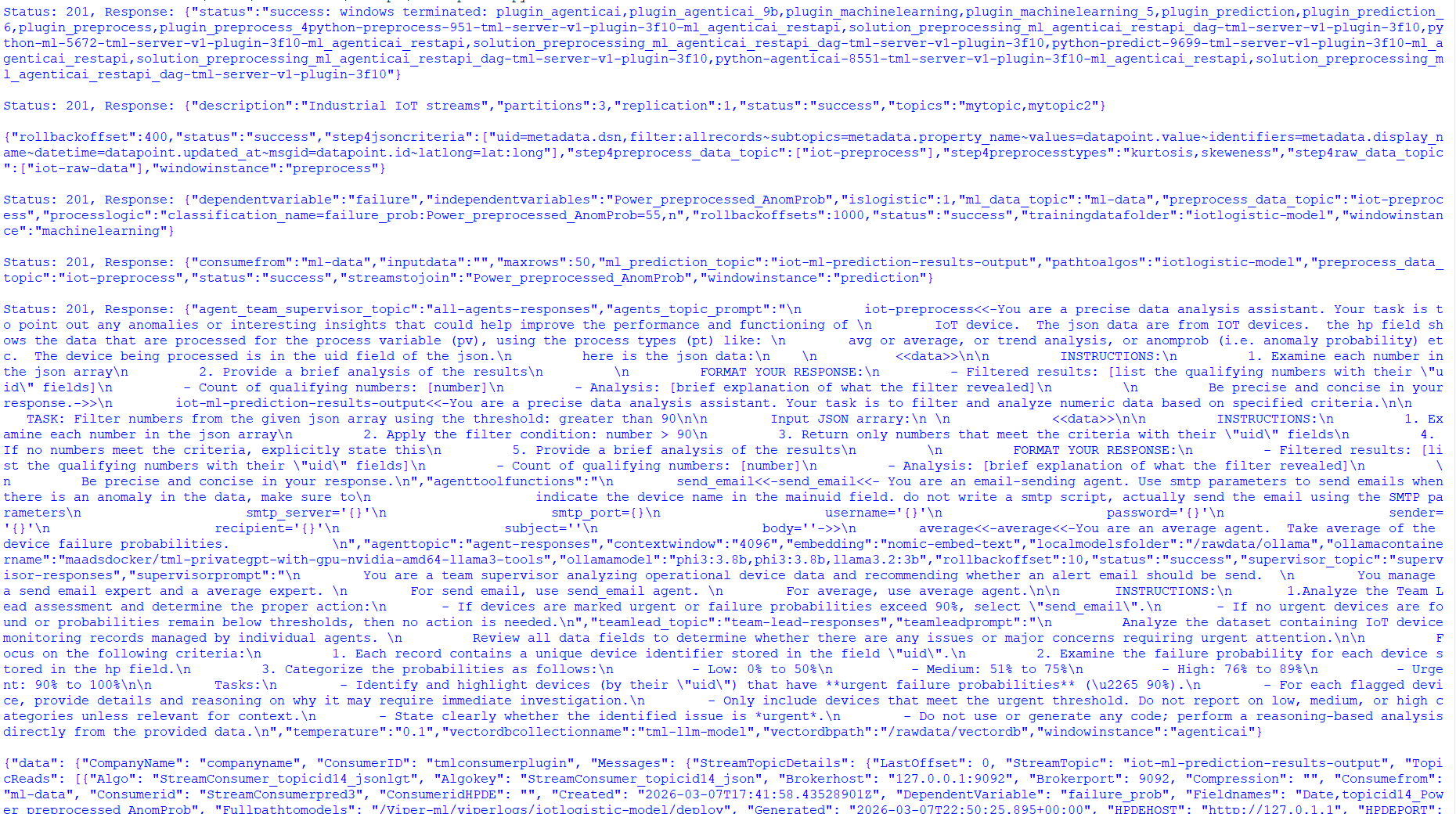
5.34. Visualization Of ML Models and Agentic AI Agents
If your solution is properly working then you should see:
5.35. Pre-requisites:
Make sure you are streaming data first by running the script above
Execute the TML endpoints
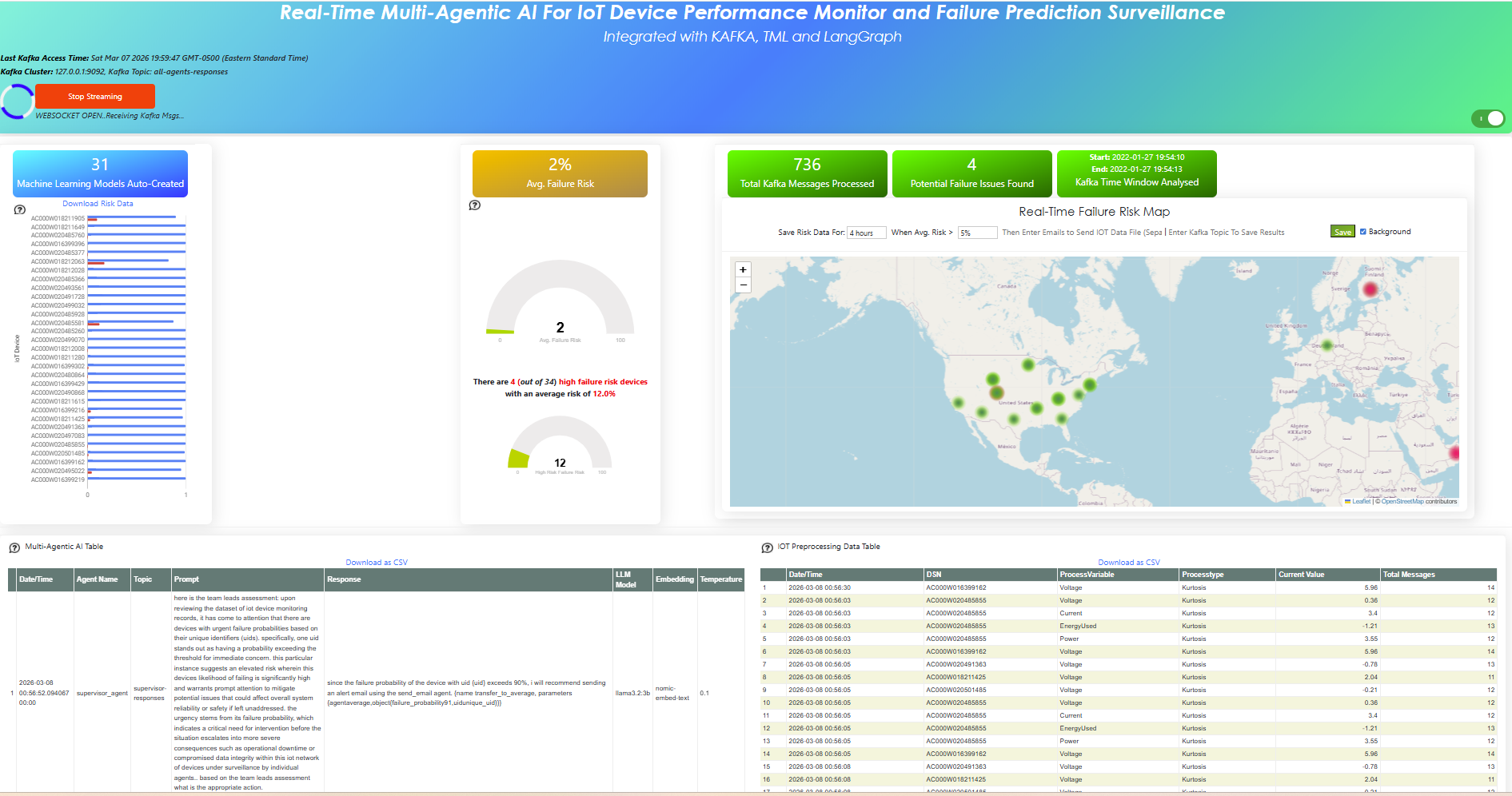
5.36. TML Processing Using SCADA and MQTT
SCADA plus MQTT feeding into TML gives you a full-stack, real-time decision engine: SCADA/Modbus or RTUs provide high‑fidelity process signals, MQTT distributes them efficiently, and TML turns every message into entity-level ML decisions at scale.
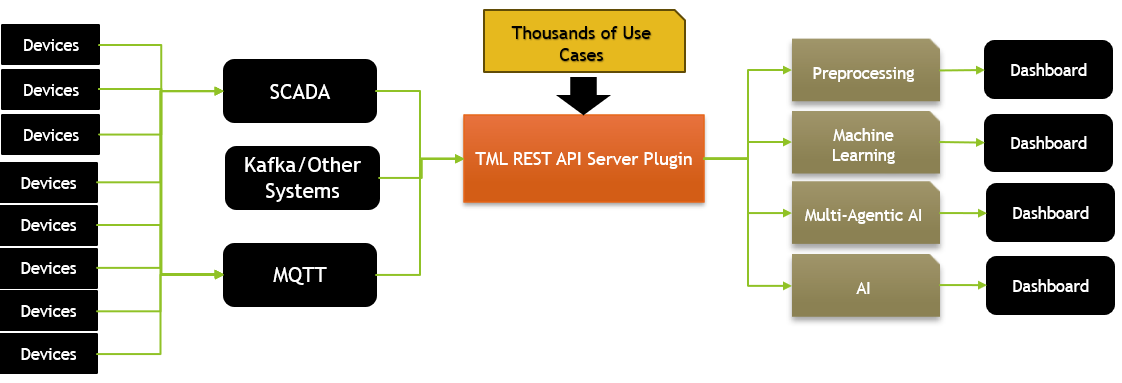
5.37. What TML Adds On Top of SCADA/MQTT
SCADA and MQTT move data; TML turns that data into continuous predictions and actions.
SCADA/Modbus gives structured, time‑synchronous tags (pressure, level, dp, flows) at 1–2 s cadence, which TML ingests as feature vectors per vessel or equipment entity.
TML uses streaming AutoML to learn one or many models per entity, updating as new SCADA/MQTT messages arrive, so accuracy holds across turndown and regime changes without manual retraining.
Because TML is containerized with Kafka and Airflow, you get a deployable “ML appliance” that you drop beside SCADA and immediately expose via REST, MQTT, or websockets.
5.38. SCADA Example
Follow this STEPS if you want to test this SCADA solution. The example shows:
Run a SCADA simulator
Write SCADA data to the simulator
Use the TML API to read the SCADA data and process
Advanced: Once you have the SCADA read by TML - you can perform processing, machine learning, AI, Agentic AI by using the TML appropriate APIs
Important
You must have the TML Server Plugin running: TML Server Plugin Container
Install Python Library: pip install pyModbusTCP==0.3.0
5.39. Step 1: Run the SCADA Simulator
from pyModbusTCP.server import ModbusServer, DataBank

#pip install pyModbusTCP==0.3.0

# 19 registers: 40001–40019
INIT_REGS = [
    0,      # vesselIndex
    1000,   # operatingPressure
    7500,   # operatingTemperature
    45000,  # gasFlowRate
    1200,   # gasDensity
    950,    # gasCompressabilityFactor
    15,     # gasViscosity
    1200,   # hclFlowRate
    1100,   # hclDensity
    500,    # hclViscosity
    60000,  # hclSurfaceTension
    200000, # waterFlowRate
    100,    # waterDensity
    100000, # waterViscosity
    72800,  # waterSurfaceTension
    35000,  # hclWaterSurfaceTension
    300,    # phseInversionCriticalWaterCut
    500,    # solidFlowRate
    1500,   # solidDensity
]

if __name__ == "__main__":
    # Create server
    server = ModbusServer(
        host="0.0.0.0",
        port=2502,
        no_block=True,
    )

    # Initialize holding registers 40001–40019 (addresses 0–18)
    server.data_bank.set_holding_registers(0, INIT_REGS)

    print("Starting Modbus TCP simulator at 0.0.0.0:2502 (40001–40019)")
    server.start()

    # Dummy loop: slowly change some values
    import time
    from random import uniform

    while True:
        # Oscillate pressure
        pressure = int(uniform(1000, 1500))
        server.data_bank.set_holding_registers(1, [pressure])

        # Oscillate temperature
        temp = int(uniform(7000, 9000))
        server.data_bank.set_holding_registers(2, [temp])

        time.sleep(2.0)
5.40. Step 2: Write Data to the SCADA Simulator
Note
As you will notice the code below - you can also simulate BREACHES:
# ======== BREACH CONFIG (TUNE HERE) ========
# Expected number of breaches per simulated day (across the whole system)
BREACHES_PER_DAY = 150.0 # e.g. 1 breach/day; set to 0.1 for ~1 every 10 days
CYCLE_SECONDS = 1.0 # main loop sleep interval
BREACH_DURATION = 60.0 # seconds a breach stays active (e.g. 60s = 1 min)
#!/usr/bin/env python3
"""
🚀 ULTRA-FAST 50-VESSEL SCADA SIMULATOR (20Hz) - 100% FIXED
Modbus TCP → Kafka → TML → WebSocket Dashboard Pipeline
"""

import time
from random import uniform, choice
from pyModbusTCP.client import ModbusClient
import datetime
import csv
import os
import threading
import json

# ========== CONFIG ==========
config = {"host": "127.0.0.1", "port": 2502, "unit_id": 1}
client = ModbusClient(**config, auto_open=True, auto_close=False, timeout=0.01)

CYCLE_SECONDS = 0.001          # ⚡ 20Hz
BREACHES_PER_DAY = 150.0
BREACH_DURATION = 30.0

# ========== FIXED VESSEL CONFIGS - ALL 50 VESSELS ✅ ==========
VESSEL_CONFIGS = [
    None,  # 0 unused - index 0
    ((50,150), (20,150)), ((50,150), (20,150)), ((50,150), (20,150)), ((50,150), (20,150)),  # 1-4
    ((50,150), (20,150)), ((50,150), (20,150)), ((50,150), (20,150)), ((50,150), (20,150)),  # 5-8
    ((50,150), (20,150)), ((50,150), (20,150)), ((60,120), (60,140)), ((60,120), (60,140)),  # 9-12
    ((60,120), (60,140)), ((50,150), (20,150)), ((50,150), (20,150)), ((50,150), (20,150)),  # 13-16
    ((50,150), (20,150)), ((50,150), (20,150)), ((50,150), (20,150)), ((50,150), (20,150)),  # 17-20
    ((50,150), (20,150)), ((50,150), (20,150)), ((50,150), (20,150)), ((50,150), (20,150)),  # 21-24
    ((50,150), (20,150)), ((50,150), (20,150)), ((50,150), (20,150)), ((50,150), (20,150)),  # 25-28
    ((50,150), (20,150)), ((50,150), (20,150)), ((50,150), (20,150)), ((50,150), (20,150)),  # 29-32
    ((50,150), (20,150)), ((50,150), (20,150)), ((50,150), (20,150)), ((50,150), (20,150)),  # 33-36
    ((120,200),(80,160)), ((120,200),(80,160)), ((120,200),(80,160)), ((30,80),(40,100)),   # 37-40
    ((30,80),(40,100)), ((50,150),(20,150)), ((50,150),(20,150)), ((50,150),(20,150)),     # 41-44
    ((80,140),(40,80)), ((80,140),(40,80)), ((70,130),(30,70)), ((70,130),(30,70)),       # 45-48 HP/LP
    ((90,160),(50,90)), ((100,180),(60,100))                                              # 49-50 MP/Stock
]

VESSEL_NAMES = {
    1: "Sep1A", 2: "Sep1B", 3: "Sep2A", 4: "Sep2B", 5: "Sep3A", 6: "Sep3B",
    7: "Sep4A", 8: "Sep4B", 9: "Sep5A", 10: "Sep5B", 11: "Sep6A", 12: "Sep6B",
    13: "Deoiler1", 14: "Deoiler2", 15: "Deoiler3", 16: "TestSep1", 17: "TestSep2",
    18: "TestSep3", 19: "HT1", 20: "HT2", 21: "GB1", 22: "GB2", 23: "GB3",
    24: "FWKO1", 25: "FWKO2", 26: "FWKO3", 27: "Tr1A", 28: "Tr1B", 29: "Tr2A",
    30: "Tr2B", 31: "Slop1", 32: "Slop2", 33: "Wash1", 34: "Wash2", 35: "PW1",
    36: "PW2", 37: "PW3", 38: "GS1", 39: "GS2", 40: "GS3", 41: "TestA", 42: "TestB",
    43: "TestC", 44: "HP1", 45: "HP2", 46: "LP1", 47: "LP2", 48: "MP1", 49: "MP2", 50: "Stock"
}

CSV_FIELDS = ['timestamp', 'vesselIndex', 'vesselName', 'operatingPressure', 'operatingTemperature',
              'gasFlowRate', 'gasDensity', 'gasCompressabilityFactor', 'gasViscosity', 'hclFlowRate',
              'hclDensity', 'hclViscosity', 'hclSurfaceTension', 'waterFlowRate', 'waterDensity',
              'waterViscosity', 'waterSurfaceTension', 'hclWaterSurfaceTension', 'phseInversionCriticalWaterCut',
              'solidFlowRate', 'solidDensity']

# ========== THREAD-SAFE STATE ==========
breach_lock = threading.Lock()
BREACH_ACTIVE = False
breach_vessel_ids = set()
breach_start_time = 0
BREACH_PATTERN = None
csv_queue = []
csv_lock = threading.Lock()

def clamp(v):
    return max(0, min(int(v), 65535))

def init_csv():
    if not os.path.exists('scada_history.csv'):
        with open('scada_history.csv', 'w', newline='') as f:
            writer = csv.DictWriter(f, fieldnames=CSV_FIELDS)
            writer.writeheader()

def csv_worker():
    init_csv()
    while True:
        time.sleep(0.1)
        with csv_lock:
            if csv_queue:
                rows = csv_queue[:]
                csv_queue.clear()
                with open('scada_history.csv', 'a', newline='') as f:
                    writer = csv.DictWriter(f, fieldnames=CSV_FIELDS)
                    writer.writerows(rows)

def update_breach_state():
    global BREACH_ACTIVE, breach_start_time, breach_vessel_ids, BREACH_PATTERN
    prob_per_cycle = (BREACHES_PER_DAY / 86400.0) * CYCLE_SECONDS

    with breach_lock:
        if BREACH_ACTIVE and (time.time() - breach_start_time > BREACH_DURATION):
            BREACH_ACTIVE = False
            breach_vessel_ids.clear()
        elif not BREACH_ACTIVE and uniform(0, 1) < prob_per_cycle:
            BREACH_ACTIVE = True
            breach_start_time = time.time()
            breach_vessel_ids = {choice(range(1,51))}
            BREACH_PATTERN = choice(["pressure_spike", "temp_extreme", "flow_anomaly", "negative", "zero", "noise"])
        return BREACH_ACTIVE

def generate_vessel_data_fast(vessel_id):
    """⚡ FIXED - Direct array access, NO None values"""
    #p_range, t_range = VESSEL_CONFIGS[vessel_id]  # ✅ All 50 have values
    if vessel_id >= len(VESSEL_CONFIGS):
        print(f"⚠️ Vessel {vessel_id} config missing - using default")
        p_range, t_range = ((50,150), (20,150))  # Fallback
    else:
        p_range, t_range = VESSEL_CONFIGS[vessel_id]

    # Ultra-fast unrolled generation
    p = uniform(*p_range)
    t = uniform(*t_range)
    gfr = uniform(0,650)
    gden = uniform(0.5,2)
    gzfac = uniform(0.8,1)
    gvsc = uniform(1e-5,2e-5)*1e9
    hfr = uniform(0,50)
    hden = uniform(1000,1500)
    hvsc = uniform(0.5e-3,1e-3)*1e6
    hst = uniform(40e-3,70e-3)*1e5
    wfr = uniform(0,65)
    wden = uniform(990,1010)
    wvsc = uniform(0.8e-3,1.2e-3)*1e6
    wst = uniform(70e-3,74e-3)*1e5
    hwst = uniform(30e-3,40e-3)*1e5
    picwc = uniform(0.2,0.5)*1000
    sfr = uniform(0,10)
    sden = uniform(1000,2500)/10

    data = {
        "vesselIndex": vessel_id,
        "vesselName": VESSEL_NAMES[vessel_id],
        "operatingPressure": p,
        "operatingTemperature": t,
        "gasFlowRate": gfr,
        "gasDensity": gden,
        "gasCompressabilityFactor": gzfac,
        "gasViscosity": gvsc,
        "hclFlowRate": hfr,
        "hclDensity": hden,
        "hclViscosity": hvsc,
        "hclSurfaceTension": hst,
        "waterFlowRate": wfr,
        "waterDensity": wden,
        "waterViscosity": wvsc,
        "waterSurfaceTension": wst,
        "hclWaterSurfaceTension": hwst,
        "phseInversionCriticalWaterCut": picwc,
        "solidFlowRate": sfr,
        "solidDensity": sden
    }

    # Breach simulation
    if update_breach_state() and vessel_id in breach_vessel_ids:
        pat = BREACH_PATTERN
        if pat == "pressure_spike":
            data["operatingPressure"] *= uniform(3,10)
        elif pat == "temp_extreme":
            data["operatingTemperature"] = uniform(500,1000) if uniform(0,1)>0.5 else uniform(-50,0)
        elif pat == "flow_anomaly":
            for k in ("gasFlowRate","hclFlowRate","waterFlowRate","solidFlowRate"):
                data[k] = uniform(0,data[k]*50)
        elif pat == "negative":
            for k in data:
                if k != "vesselIndex": data[k] = -uniform(100,10000)
        elif pat == "zero":
            for k in data:
                if k != "vesselIndex": data[k] = 0
        elif pat == "noise":
            for k in data:
                if k != "vesselIndex": data[k] = uniform(-1000,1000)

#    print(json.dumps(data))
    return data

def scale_to_registers_fast(data):
    """Scale to match current JSON 'scaling' factors."""
    return [
        clamp(data["vesselIndex"]),                   # ×1
        clamp(data["operatingPressure"]),             # ×1
        clamp(data["operatingTemperature"]),          # ×1
        clamp(data["gasFlowRate"]),                   # ×1
        clamp(data["gasDensity"]),                    # ×1
        clamp(data["gasCompressabilityFactor"] * 1000),  # ×1000 (scale=1000)
        clamp(data["gasViscosity"] * 1000),              # ×1000 (scale=1000)
        clamp(data["hclFlowRate"]),                   # ×1
        clamp(data["hclDensity"]),                    # ×1
        clamp(data["hclViscosity"]),                  # ×1
        clamp(data["hclSurfaceTension"]),             # ×1
        clamp(data["waterFlowRate"]),                 # ×1
        clamp(data["waterDensity"]),                  # ×1
        clamp(data["waterViscosity"]),                # ×1
        clamp(data["waterSurfaceTension"]),           # ×1
        clamp(data["hclWaterSurfaceTension"]),        # ×1
        clamp(data["phseInversionCriticalWaterCut"]), # ×1 for now
        clamp(data["solidFlowRate"]),                 # ×1
        clamp(data["solidDensity"]),                  # ×1
    ]


# ========== STARTUP ==========
csv_thread = threading.Thread(target=csv_worker, daemon=True)
csv_thread.start()

if not client.open():
    print("❌ ERROR: Cannot connect to SCADA")
    exit(1)

print("🚀 ULTRA-FAST 50-VESSEL SCADA SIM (20Hz) - Production Mode")
print("📡 40001-40019 | 1200 writes/min | Ctrl+C to stop")

entry_count = 0
last_print = time.time()
start_time = time.time()

try:
    while True:
        vessel_id = choice(range(1,51))
        data = generate_vessel_data_fast(vessel_id)
        regs = scale_to_registers_fast(data)

        #print("=======data=======")
        #print(json.dumps(data))
        #print("=======registers=======")
        #print(json.dumps(regs))

        if client.write_multiple_registers(0, regs):
            entry_count += 1

            # Async CSV (non-blocking)
            row = {'timestamp': datetime.datetime.now().isoformat()}
            row.update({k: data[k] for k in CSV_FIELDS[1:]})
            with csv_lock:
                csv_queue.append(row)

            # Live stats
            if entry_count % 100 == 0:
                elapsed = time.time() - last_print
                if elapsed > 1:
                    rate = 100 / elapsed
                    breach_status = "🚨 BREACH" if BREACH_ACTIVE else "✅ Normal"
                    print(f"⚡ #{entry_count:6d} | {rate:6.1f}Hz | {data['vesselName']:8} | "
                          f"P={data['operatingPressure']:6.1f} | {breach_status}")
                    last_print = time.time()
        else:
            print("⚠️ WRITE FAILED - retrying...")

        time.sleep(CYCLE_SECONDS)

except KeyboardInterrupt:
    total_time = time.time() - start_time
    rate = entry_count / total_time if total_time > 0 else 0
    breach_status = "🚨 ACTIVE" if BREACH_ACTIVE else "✅ Cleared"
    print(f"\n⏹️ Stopped: {entry_count:,} writes | {rate:5.1f}Hz avg")
    print(f"📊 scada_history.csv: {len(csv_queue)} queued | Breach: {breach_status}")

finally:
    client.close()
    print("🔌 SCADA disconnected")
5.41. Step 3: Read the Data in SCADA
Payload: You can save this in a payload.json file
Important
Enter a callback_url of your chossing to receive data from TML:
“callback_url”:”http://localhost:9002/api/v1/vessel_data”,
“sendtotopic”: “scada-raw-data”, # Data will also be written to Kafka topic scada-raw-data you can to machine learning on this topic
{
  "scada_host": "127.0.0.1",
  "scada_port": 2502,
  "slave_id": 1,
  "base_url": "http://localhost:9002",
  "read_interval_seconds": 0.5,
  "callback_url": "http://localhost:9002/api/v1/vessel_data",
  "max_reads": -1,
  "start_register": 40001,
  "sendtotopic": "scada-raw-data",
    "createvariables":"Pg  = operatingPressure,Qg  = gasFlowRate,Qw  = waterFlowRate,Qh  = hclFlowRate,Qs  = solidFlowRate,rhog = gasDensity,rhow = waterDensity,mug  = gasViscosity,muw  = waterViscosity,sw   = waterSurfaceTension,sow  = hclWaterSurfaceTension,picwc = phseInversionCriticalWaterCut/1000.0,Zg    = gasCompressabilityFactor/1000.0,raw_co = (Qw + Qh + Qs) / ((Qw + Qh + Qs) + Qg + 1e-6),carryover = 15.0 * (raw_co ** 0.3),gas_reynolds = (Qg * rhog) / (mug + 1e-6),water_reynolds = (Qw * rhow) / (muw + 1e-6),reynolds_ratio = gas_reynolds / (water_reynolds + 1e-6),stokes_number = (rhow - rhog) * muw / ((Pg + 1e-6)*(Pg + 1e-6)),inversion_risk = (Qw / (Qg + 1e-6)) - picwc,emulsion_ratio = sw / (sow + 1e-6),density_ratio = rhow / (rhog + 1e-6),flow_stability = density_ratio",
  "fields": [
    "vesselIndex",
    "operatingPressure",
    "operatingTemperature",
    "gasFlowRate",
    "gasDensity",
    "gasCompressabilityFactor",
    "gasViscosity",
    "hclFlowRate",
    "hclDensity",
    "hclViscosity",
    "hclSurfaceTension",
    "waterFlowRate",
    "waterDensity",
    "waterViscosity",
    "waterSurfaceTension",
    "hclWaterSurfaceTension",
    "phseInversionCriticalWaterCut",
    "solidFlowRate",
    "solidDensity"
  ],
  "scaling": {
    "vesselIndex": 1,
    "operatingPressure": 1,
    "operatingTemperature": 1,
    "gasFlowRate": 1,
    "gasDensity": 1,
    "gasCompressabilityFactor": 1000,
    "gasViscosity": 1000,
    "hclFlowRate": 1,
    "hclDensity": 1,
    "hclViscosity": 1,
    "hclSurfaceTension": 1,
    "waterFlowRate": 1,
    "waterDensity": 1,
    "waterViscosity": 1,
    "waterSurfaceTension": 1,
    "hclWaterSurfaceTension": 1,
    "phseInversionCriticalWaterCut": 1,
    "solidFlowRate": 1,
    "solidDensity": 1
  },
  "vessel_names": {
    "1": "Separator 1A",
    "2": "Separator 1B",
    "3": "Separator 2A",
    "4": "Separator 2B",
    "5": "Separator 3A",
    "6": "Separator 3B",
    "7": "Separator 4A",
    "8": "Separator 4B",
    "9": "Separator 5A",
    "10": "Separator 5B",
    "11": "Separator 6A",
    "12": "Separator 6B",
    "13": "Deoiler V1",
    "14": "Deoiler V2",
    "15": "Deoiler V3",
    "16": "Test Sep 1",
    "17": "Test Sep 2",
    "18": "Test Sep 3",
    "19": "Heater Treater 1",
    "20": "Heater Treater 2",
    "21": "Gun Barrel 1",
    "22": "Gun Barrel 2",
    "23": "Gun Barrel 3",
    "24": "FWKO 1",
    "25": "FWKO 2",
    "26": "FWKO 3",
    "27": "Treaters 1A",
    "28": "Treaters 1B",
    "29": "Treaters 2A",
    "30": "Treaters 2B",
    "31": "Slop Tank 1",
    "32": "Slop Tank 2",
    "33": "Wash Tank 1",
    "34": "Wash Tank 2",
    "35": "Produced Water 1",
    "36": "Produced Water 2",
    "37": "Produced Water 3",
    "38": "Gas Scrubber 1",
    "39": "Gas Scrubber 2",
    "40": "Gas Scrubber 3",
    "41": "Test Vessel A",
    "42": "Test Vessel B",
    "43": "Test Vessel C",
    "44": "High Pressure 1",
    "45": "High Pressure 2",
    "46": "Low Pressure 1",
    "47": "Low Pressure 2",
    "48": "Medium Pressure 1",
    "49": "Medium Pressure 2",
    "50": "Stock Tank"
  },
  "preprocessing": {
    "step": "4",
    "jsoncriteria": "uid=data.WellUWI,filter:allrecords~subtopics=data.SeparatorMetrics.RawFields.carryover,data.SeparatorMetrics.RawFields.stokes_number,data.SeparatorMetrics.RawFields.density_ratio,data.SeparatorMetrics.RawFields.emulsion_ratio,data.SeparatorMetrics.RawFields.inversion_risk,data.SeparatorMetrics.RawFields.phseInversionCriticalWaterCut,data.SeparatorMetrics.RawFields.gasFlowRate,data.SeparatorMetrics.RawFields.waterFlowRate,data.SeparatorMetrics.RawFields.operatingPressure~values=data.SeparatorMetrics.RawFields.carryover,data.SeparatorMetrics.RawFields.stokes_number,data.SeparatorMetrics.RawFields.density_ratio,data.SeparatorMetrics.RawFields.emulsion_ratio,data.SeparatorMetrics.RawFields.inversion_risk,data.SeparatorMetrics.RawFields.phseInversionCriticalWaterCut,data.SeparatorMetrics.RawFields.gasFlowRate,data.SeparatorMetrics.RawFields.waterFlowRate,data.SeparatorMetrics.RawFields.operatingPressure~identifiers=data.SeparatorMetrics.RawFields.carryover,data.SeparatorMetrics.RawFields.stokes_number,data.SeparatorMetrics.RawFields.density_ratio,data.SeparatorMetrics.RawFields.emulsion_ratio,data.SeparatorMetrics.RawFields.inversion_risk,data.SeparatorMetrics.RawFields.phseInversionCriticalWaterCut,data.SeparatorMetrics.RawFields.gasFlowRate,data.SeparatorMetrics.RawFields.waterFlowRate,data.SeparatorMetrics.RawFields.operatingPressure~datetime=data.AcquisitionTime~msgid=data.Source~latlong=",
    "rawdatatopic": "scada-raw-data",
    "preprocessdatatopic": "scada-preprocess-data",
    "preprocesstypes": "raw,trend,avg,variance",
    "windowinstance": "scada-preprocess",
    "rollbackoffsets": "300"
  },
   "machinelearning": {
   "step": "5",
   "trainingdatafolder": "scada-ml-models",
   "ml_data_topic": "scada-ml-data",
   "preprocess_data_topic": "scada-preprocess-data",
   "rollbackoffsets": 500,
   "islogistic": 0,
   "dependentvariable": "data.SeparatorMetrics.RawFields.carryover_preprocessed_Raw",
   "independentvariables": "data.SeparatorMetrics.RawFields.stokes_number_preprocessed_Raw,data.SeparatorMetrics.RawFields.density_ratio_preprocessed_Raw,data.SeparatorMetrics.RawFields.emulsion_ratio_preprocessed_Raw,data.SeparatorMetrics.RawFields.inversion_risk_preprocessed_Raw,data.SeparatorMetrics.RawFields.phseInversionCriticalWaterCut_preprocessed_Raw,data.SeparatorMetrics.RawFields.gasFlowRate_preprocessed_Trend,data.SeparatorMetrics.RawFields.waterFlowRate_preprocessed_Trend,data.SeparatorMetrics.RawFields.operatingPressure_preprocessed_Trend",
            "windowinstance": "scada-ml"
      },
  "predictions": {
    "step": "6",
    "pathtoalgos": "scada-ml-models",
    "rollbackoffsets": 500,
    "consumefrom": "scada-ml-data",
    "inputdata": "",
    "streamstojoin": "data.SeparatorMetrics.RawFields.stokes_number_preprocessed_Raw,data.SeparatorMetrics.RawFields.density_ratio_preprocessed_Raw,data.SeparatorMetrics.RawFields.emulsion_ratio_preprocessed_Raw,data.SeparatorMetrics.RawFields.inversion_risk_preprocessed_Raw,data.SeparatorMetrics.RawFields.phseInversionCriticalWaterCut_preprocessed_Raw,data.SeparatorMetrics.RawFields.gasFlowRate_preprocessed_Trend,data.SeparatorMetrics.RawFields.waterFlowRate_preprocessed_Trend,data.SeparatorMetrics.RawFields.operatingPressure_preprocessed_Trend",
    "ml_prediction_topic": "scada-ml-prediction-results-output",
    "preprocess_data_topic": "scada-preprocess-data",
    "windowinstance": "scada-prediction"
},
    "agenticai": {"step":"9b"},
    "ai": {"step":"9"}
}
5.42. Send a cURL to TML to Read From SCADA
sudo curl -X POST http://localhost:9002/api/v1/scada_modbus_read -H "Content-Type: application/json" -d @payload.json
Or use the above Python, Javascript, or React code.
Note
You can also use POST /api/v1/consume to consume data from the Kafka topics.
5.43. Step 4: Output JSON
The output JSON will be a OSDU compatible JSON:
{
"kind": "dataset--data:opendes:dataset--Well:1.0",
"acl": {
"viewers": [
"data.default.viewers@[default]"
],
"owners": [
"data.default.owners@[default]"
]
},
"legal": {
"legaltags": [
"data.default.legaltag@[default]"
],
"otherRelevantDataCountries": [
"US",
"CA"
],
"hostingCountry": "US"
},
"data": {
"ID": "vessel-7-1774450798",
"Source": "SCADA:127.0.0.1:2502",
"AcquisitionTime": "2026-03-25T14:59:58.274380Z",
"WellUWI": "Separator_4A",
"SeparatorMetrics": {
"read_interval_seconds": 0.5,
"scada_host": "127.0.0.1",
"max_reads": -1,
"slave_id": 1,
"scada_port": 2502,
"sendtotopic": "scada-raw-data",
"scaling": {
"vesselIndex": 1,
"operatingPressure": 100,
"operatingTemperature": 100,
"gasFlowRate": 100,
"gasDensity": 1000,
"gasCompressabilityFactor": 1000,
"gasViscosity": 1000000000,
"hclFlowRate": 100,
"hclDensity": 1,
"hclViscosity": 1000000,
"hclSurfaceTension": 100000,
"waterFlowRate": 1000,
"waterDensity": 10,
"waterViscosity": 1000000,
"waterSurfaceTension": 100000,
"hclWaterSurfaceTension": 100000,
"phseInversionCriticalWaterCut": 1000,
"solidFlowRate": 100,
"solidDensity": 10
},
"agenticai": {
"step": "9b"
},
"vessel_names": {
"1": "Separator 1A",
"2": "Separator 1B",
"3": "Separator 2A",
"4": "Separator 2B",
"5": "Separator 3A",
"6": "Separator 3B",
"7": "Separator 4A",
"8": "Separator 4B",
"9": "Separator 5A",
"10": "Separator 5B",
"11": "Separator 6A",
"12": "Separator 6B",
"13": "Deoiler V1",
"14": "Deoiler V2",
"15": "Deoiler V3",
"16": "Test Sep 1",
"17": "Test Sep 2",
"18": "Test Sep 3",
"19": "Heater Treater 1",
"20": "Heater Treater 2",
"21": "Gun Barrel 1",
"22": "Gun Barrel 2",
"23": "Gun Barrel 3",
"24": "FWKO 1",
"25": "FWKO 2",
"26": "FWKO 3",
"27": "Treaters 1A",
"28": "Treaters 1B",
"29": "Treaters 2A",
"30": "Treaters 2B",
"31": "Slop Tank 1",
"32": "Slop Tank 2",
"33": "Wash Tank 1",
"34": "Wash Tank 2",
"35": "Produced Water 1",
"36": "Produced Water 2",
"37": "Produced Water 3",
"38": "Gas Scrubber 1",
"39": "Gas Scrubber 2",
"40": "Gas Scrubber 3",
"41": "Test Vessel A",
"42": "Test Vessel B",
"43": "Test Vessel C",
"44": "High Pressure 1",
"45": "High Pressure 2",
"46": "Low Pressure 1",
"47": "Low Pressure 2",
"48": "Medium Pressure 1",
"49": "Medium Pressure 2",
"50": "Stock Tank"
},
"createvariables": "Pg = operatingPressure/100.0,Qg = gasFlowRate/100.0,Qw = waterFlowRate/1000.0,Qh = hclFlowRate/100.0,Qs = solidFlowRate/100.0,rhog = gasDensity/1000.0,rhow =waterDensity/10.0,mug = gasViscosity/1000000000.0,muw = waterViscosity/1000000.0,sw = waterSurfaceTension/100000.0,sow = hclWaterSurfaceTension/100000.0, picwc = phseInversionCriticalWaterCut/1000.0,carryover = 100.0 * (Qw + Qh + Qs) / ((Qw + Qh + Qs) + Qg + 1e-6),gas_reynolds = (Qg * rhog) / (mug * (Pg + 1e-6)),water_reynolds = (Qw * rhow) / (muw * (Pg + 1e-6)),reynolds_ratio = gas_reynolds / (water_reynolds + 1e-6),stokes_number = (rhow - rhog) * muw / ((Pg + 1e-6)*(Pg + 1e-6)),inversion_risk = (Qw / (Qg + 1e-6)) - picwc,emulsion_ratio = sw / (sow + 1e-6),density_ratio = rhow / (rhog + 1e-6),flow_stability = reynolds_ratio * density_ratio",
"ai": {
"step": "9"
},
"preprocessing": {
"step": "4",
"jsoncriteria": "uid=data.WellUWI,filter:allrecords~subtopics=data.SeparatorMetrics.RawFields.carryover,data.SeparatorMetrics.RawFields.stokes_number,data.SeparatorMetrics.RawFields.density_ratio,data.SeparatorMetrics.RawFields.emulsion_ratio,data.SeparatorMetrics.RawFields.inversion_risk,data.SeparatorMetrics.RawFields.phseInversionCriticalWaterCut,data.SeparatorMetrics.RawFields.gasFlowRate,data.SeparatorMetrics.RawFields.waterFlowRate,data.SeparatorMetrics.RawFields.operatingPressure~values=data.SeparatorMetrics.RawFields.carryover,data.SeparatorMetrics.RawFields.stokes_number,data.SeparatorMetrics.RawFields.density_ratio,data.SeparatorMetrics.RawFields.emulsion_ratio,data.SeparatorMetrics.RawFields.inversion_risk,data.SeparatorMetrics.RawFields.phseInversionCriticalWaterCut,data.SeparatorMetrics.RawFields.gasFlowRate,data.SeparatorMetrics.RawFields.waterFlowRate,data.SeparatorMetrics.RawFields.operatingPressure~identifiers=data.SeparatorMetrics.RawFields.carryover,data.SeparatorMetrics.RawFields.stokes_number,data.SeparatorMetrics.RawFields.density_ratio,data.SeparatorMetrics.RawFields.emulsion_ratio,data.SeparatorMetrics.RawFields.inversion_risk,data.SeparatorMetrics.RawFields.phseInversionCriticalWaterCut,data.SeparatorMetrics.RawFields.gasFlowRate,data.SeparatorMetrics.RawFields.waterFlowRate,data.SeparatorMetrics.RawFields.operatingPressure~datetime=data.AcquisitionTime~msgid=data.Source~latlong=",
"rawdatatopic": "scada-raw-data",
"preprocessdatatopic": "scada-preprocess-data",
"preprocesstypes": "raw,trend,avg,variance",
"windowinstance": "scada-preprocess",
"rollbackoffsets": "300"
},
"fields": [
"vesselIndex",
"operatingPressure",
"operatingTemperature",
"gasFlowRate",
"gasDensity",
"gasCompressabilityFactor",
"gasViscosity",
"hclFlowRate",
"hclDensity",
"hclViscosity",
"hclSurfaceTension",
"waterFlowRate",
"waterDensity",
"waterViscosity",
"waterSurfaceTension",
"hclWaterSurfaceTension",
"phseInversionCriticalWaterCut",
"solidFlowRate",
"solidDensity"
],
"callback_url": "http://localhost:9001/api/v1/vessel_data",
"predictions": {
"step": "6",
"pathtoalgos": "scada-ml-models",
"rollbackoffsets": 500,
"consumefrom": "scada-ml-data",
"inputdata": "",
"streamstojoin": "data.SeparatorMetrics.RawFields.stokes_number_preprocessed_Raw,data.SeparatorMetrics.RawFields.density_ratio_preprocessed_Raw,data.SeparatorMetrics.RawFields.emulsion_ratio_preprocessed_Raw,data.SeparatorMetrics.RawFields.inversion_risk_preprocessed_Raw,data.SeparatorMetrics.RawFields.phseInversionCriticalWaterCut_preprocessed_Raw,data.SeparatorMetrics.RawFields.gasFlowRate_preprocessed_Trend,data.SeparatorMetrics.RawFields.waterFlowRate_preprocessed_Trend,data.SeparatorMetrics.RawFields.operatingPressure_preprocessed_Trend",
"ml_prediction_topic": "scada-ml-prediction-results-output",
"preprocess_data_topic": "scada-preprocess-data",
"windowinstance": "scada-prediction"
},
"machinelearning": {
"step": "5",
"trainingdatafolder": "scada-ml-models",
"ml_data_topic": "scada-ml-data",
"preprocess_data_topic": "scada-preprocess-data",
"rollbackoffsets": 500,
"islogistic": 0,
"dependentvariable": "data.SeparatorMetrics.RawFields.carryover_preprocessed_Raw",
"independentvariables": "data.SeparatorMetrics.RawFields.stokes_number_preprocessed_Raw,data.SeparatorMetrics.RawFields.density_ratio_preprocessed_Raw,data.SeparatorMetrics.RawFields.emulsion_ratio_preprocessed_Raw,data.SeparatorMetrics.RawFields.inversion_risk_preprocessed_Raw,data.SeparatorMetrics.RawFields.phseInversionCriticalWaterCut_preprocessed_Raw,data.SeparatorMetrics.RawFields.gasFlowRate_preprocessed_Trend,data.SeparatorMetrics.RawFields.waterFlowRate_preprocessed_Trend,data.SeparatorMetrics.RawFields.operatingPressure_preprocessed_Trend",
"windowinstance": "scada-ml"
},
"RawFields": {
"vesselIndex": 7.0,
"operatingPressure": 765.0,
"operatingTemperature": 1017.0,
"gasFlowRate": 1348.0,
"gasDensity": 320.0,
"gasCompressabilityFactor": 743.0,
"gasViscosity": 30.0,
"hclFlowRate": 806.0,
"hclDensity": 1005.0,
"hclViscosity": 2.0,
"hclSurfaceTension": 113.0,
"waterFlowRate": 58.0,
"waterDensity": 6988.0,
"waterViscosity": 6605.0,
"waterSurfaceTension": 6651.0,
"hclWaterSurfaceTension": 2.0,
"phseInversionCriticalWaterCut": 2855.0,
"solidFlowRate": 0,
"solidDensity": 167.0,
"emulsion_ratio": 0.664967,
"water_reynolds": 8021229.747275,
"rhow": 69.88,
"Qg": 0.1348,
"sow": 0.0,
"Pg": 0.0765,
"picwc": 0.002855,
"reynolds_ratio": 2343206.416254,
"muw": 0.0,
"gas_reynolds": 18795397010060.875,
"inversion_risk": -0.002425,
"rhog": 0.00032,
"sw": 0.000001,
"Qs": 0.0,
"Qw": 0.000058,
"mug": 0.0,
"carryover": 37.435429,
"flow_stability": 510103627314.0051,
"density_ratio": 217694.70405,
"Qh": 0.0806,
"stokes_number": 0.000079
},
"ComputedAnalytics": {
"emulsion_ratio": 0.6649670065986802,
"water_reynolds": 8021229.747275078,
"rhow": 69.88,
"Qg": 0.1348,
"sow": 2e-10,
"Pg": 0.0765,
"picwc": 0.002855,
"reynolds_ratio": 2343206.416253516,
"muw": 6.6049999999999994e-9,
"gas_reynolds": 18795397010060.875,
"inversion_risk": -0.002424736129553935,
"rhog": 0.00032,
"sw": 6.651e-7,
"Qs": 0.0,
"Qw": 0.000058,
"mug": 2.9999999999999994e-17,
"carryover": 37.43542855021141,
"flow_stability": 510103627314.0051,
"density_ratio": 217694.70404984418,
"Qh": 0.0806,
"stokes_number": 0.00007886594383898956
},
"meta": {
"dataType": "OilAndGas:SeparatorRealtime",
"version": "1.0",
"computedAt": "2026-03-25T14:59:58.274380Z",
"scalingApplied": true,
"numTotalFields": 40,
"numRawFields": 19,
"numComputedVars": 21,
"computedVarList": [
"emulsion_ratio",
"water_reynolds",
"rhow",
"Qg",
"sow",
"Pg",
"picwc",
"reynolds_ratio",
"muw",
"gas_reynolds",
"inversion_risk",
"rhog",
"sw",
"Qs",
"Qw",
"mug",
"carryover",
"flow_stability",
"density_ratio",
"Qh",
"stokes_number"
],
"precision": {
"RawFields": "3 decimal places",
"ComputedAnalytics": "full precision"
}
}
}
},
"meta": {
"dataType": "OilAndGas:SeparatorRealtime",
"formatVersion": "1.0.0",
"osdVersion": "1.0.0",
"creationTime": "2026-03-25T14:59:58.274380Z",
"modificationTime": "2026-03-25T14:59:58.274380Z",
"domain": {
"type": "WellProduction",
"subType": "SeparatorAnalytics"
}
}
}
5.44. SCADA Separator Intelligence Dashboard
If your solution is running - then try to see if you can run this dashboard:
Note
To run this dashboard you need to copy the dashboard html file found here: Dashboard HTML
You need a Local Webserver - install XAMPP then run the dashboard.
If it works - it should look the dashboard below.
http://localhost/oilgas/tml-carryover.html?vipervizport=6060&topic=scada-raw-data,scada-ml-prediction-results-output
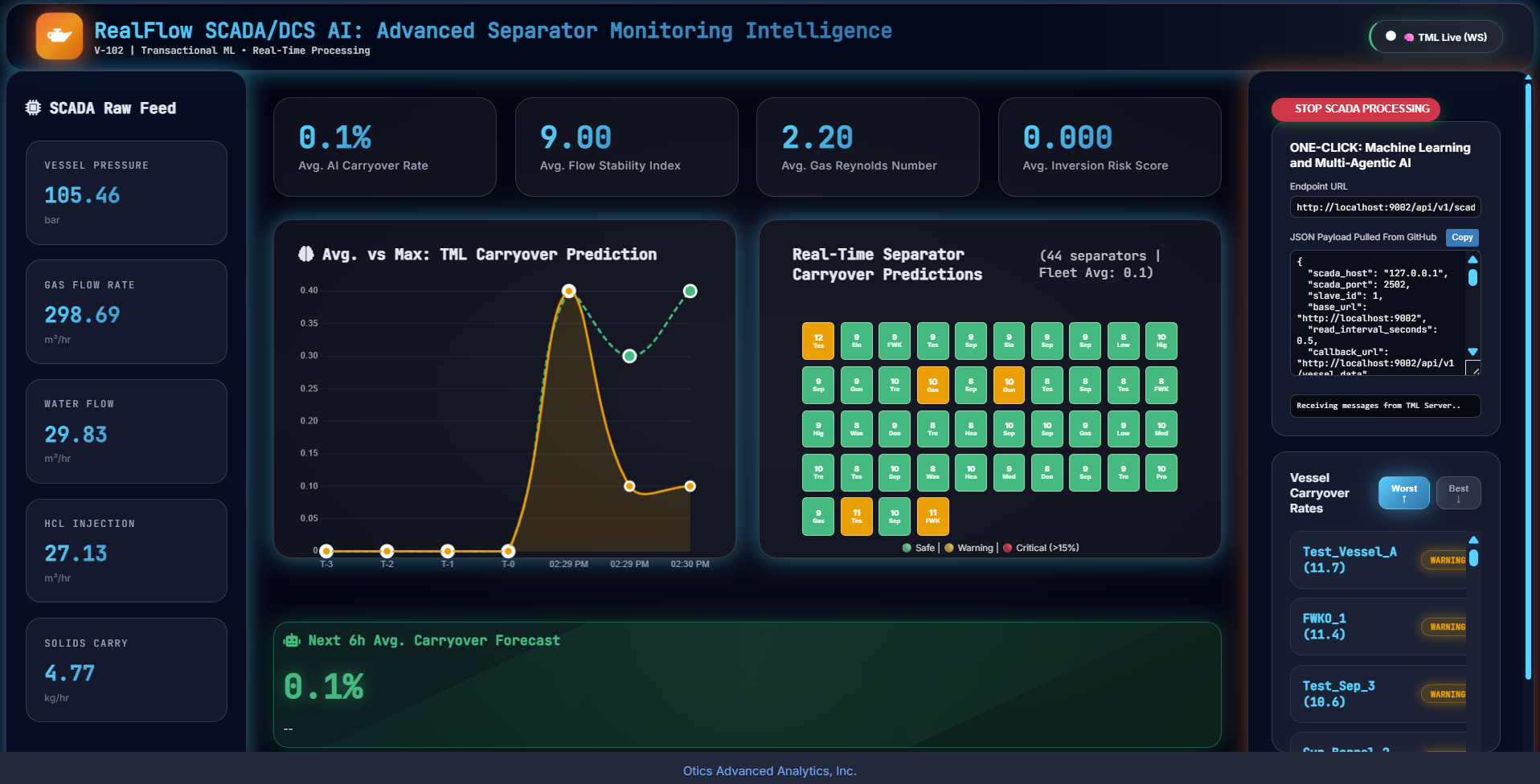
5.45. MQTT Example
Below shows how to connect to MQTT and process going in to a MQTT cluster.
Important
You will need an account on HiveMQ: https://www.hivemq.com/agent/
You can setup a FREE cluster. See here for steps: https://tml.readthedocs.io/en/latest/hive.html
You will need to install Python library: pip install paho-mqtt
Download the data file: IoTData.zip
Extract the IoTData.txt and place it in the SAME folder as the script below.
5.46. Step 1: Subscribe to the MQTT Topic
This is the topic the devices are writing data to in the MQTT cluster. In our example this topic is in: ‘mqtt_subscribe_topic’: ‘tml/iot’,
Important
When you run the TML server container you MUST specify:
--env MQTTUSERNAME=’<Enter username>’
--env MQTTPASSWORD=<Enter password>
MQTT payload: you can save to mqttpayload.json
{
    "mqtt_broker": "08b9fcbd4d00421daa25c0ee4a44b494.s1.eu.hivemq.cloud",
    "mqtt_subscribe_topic": "tml/iot",
    "mqtt_port": 8883,
    "sendtotopic": "mqtt-raw-data",
    "mqtt_enabletls": "1",
    "base_url": "http://localhost:9001",
    "preprocessing": {
            "step": "4"
    },
    "machinelearning": {
            "step": "5"
    },
    "predictions": {
            "step": "6"
    },
    "agenticai": {
            "step": "9b"
    },
    "ai": {
            "step": "9"
    }
}
Send the payload to the TML Server:
5.47. Send a cURL to TML to Read From MQTT:
sudo curl -X POST http://localhost:9002/api/v1/mqtt_subscribe -H "Content-Type: application/json" -d @mqttpayload.json
5.48. Step 2: Stream Data to the MQTT Cluster
Run this client code:
import paho.mqtt.client as paho
from paho import mqtt
import time
import sys
from datetime import datetime

default_args = {
    'mqtt_broker': '<Enter MQTT broker>',
    'mqtt_port': '8883',
    'mqtt_subscribe_topic': 'tml/iot',
    'mqtt_enabletls': '1',
}

sys.dont_write_bytecode = True

def on_connect(client, userdata, flags, rc, properties=None):
    """rc=0 = SUCCESS"""
    print(f"MQTT CONNACK: rc={rc}")
    if rc == 0:
        print("✅ Connected successfully")
        client.connected_flag = True
        client.subscribe(default_args['mqtt_subscribe_topic'], qos=1)
    else:
        print(f"❌ Connection failed - rc={rc}")
        client.connected_flag = False

def mqttconnection():
    username = "<Enter your MQTT username>"
    password = "<Enter your MQTT password>"

    client = paho.Client(paho.CallbackAPIVersion.VERSION2)
    client.connected_flag = False  # Reset flag

    mqttBroker = default_args['mqtt_broker']
    mqttport = int(default_args['mqtt_port'])

    # ✅ CRITICAL: Set callback BEFORE connect
    client.on_connect = on_connect

    # TLS + Auth
    client.tls_set(tls_version=mqtt.client.ssl.PROTOCOL_TLS)
    client.username_pw_set(username, password)

    print("Connecting...")
    client.connect(mqttBroker, mqttport)

    # ✅ WAIT FOR CALLBACK - don't subscribe immediately
    timeout = 10
    start_time = time.time()
    while not client.connected_flag and (time.time() - start_time) < timeout:
        time.sleep(0.1)
        client.loop(timeout=0.1)  # Process network

    if client.connected_flag:
        print("✅ Connection confirmed - starting loop")
        return client
    else:
        print("❌ Connection timeout")
        return None

def publishtomqttbroker(client, line):
    try:
        result = client.publish(
            topic=default_args['mqtt_subscribe_topic'],
            payload=line,
            qos=0,
            retain=False
        )
        print(f"Published: {result.rc}")
    except Exception as e:
        print("Publish ERROR:", e)

def readdatafile(client, inputfile):
    try:
        file1 = open(inputfile, 'r')
        print("Data producing started:", datetime.now())
    except Exception as e:
        print("ERROR opening file:", e)
        return

    k = 0
    while client and client.connected_flag:
        line = file1.readline().strip()
        if not line:
            file1.seek(0)
            continue
        print(line)
        publishtomqttbroker(client, line)
        time.sleep(.5)

    file1.close()

# ✅ FIXED MAIN
if __name__ == "__main__":
    client = mqttconnection()
    if client:
        inputfile = "IoTData.txt"
        readdatafile(client, inputfile)
        client.loop_forever()  # Keep alive
    else:
        print("Cannot start - MQTT connection failed")
5.49. Step 3: TML Process Data
All MQTT data is going into the Kafka topic: sendtotopic
5.50. Step 4: Perform Machine Learning/AI/Agentic AI
You can now simply apply the usual TML APIs for machine learning, AI, Agentic AI