22. TML Simulator
TML_simulator: The World’s Fastest First‑Principles Carryover Engine with Direct SCADA/DCS Integration and Real-Time Machine Learning, AI, Agentic AI
Tip
You can also view the TML Simulator FAQ
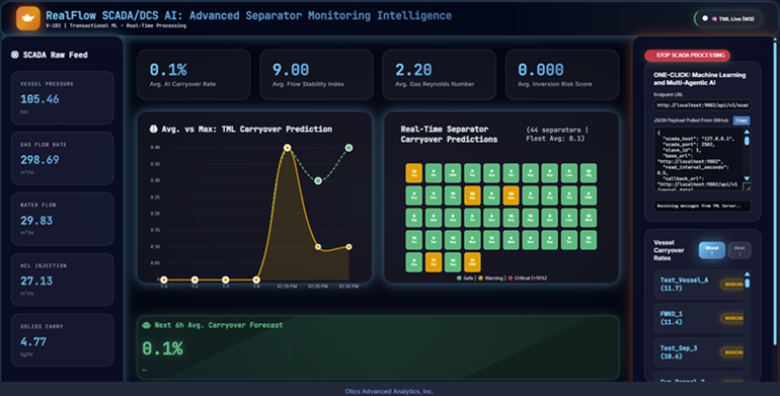
RealFlow Control AI: Dashboard (Main dashboard for running the entire solution)
To use the RealFlow Dashboard, you need to run the TML Server docker container
22.1. Executive Summary
TML_simulator is a first‑principles physics engine that computes liquid‑carryover risk per vessel in under **1 milliseconds per snapshot while remaining fully auditable, equation‑driven, and SCADA‑ready. Built on Souders‑Brown‑based droplet‑physics and Numba‑accelerated computation, it:
Runs real‑time physics‑baseline snapshots at SCADA clock‑speed
To validate enterprise readiness, 150-vessel fleets were executed at 8,006 Hz.
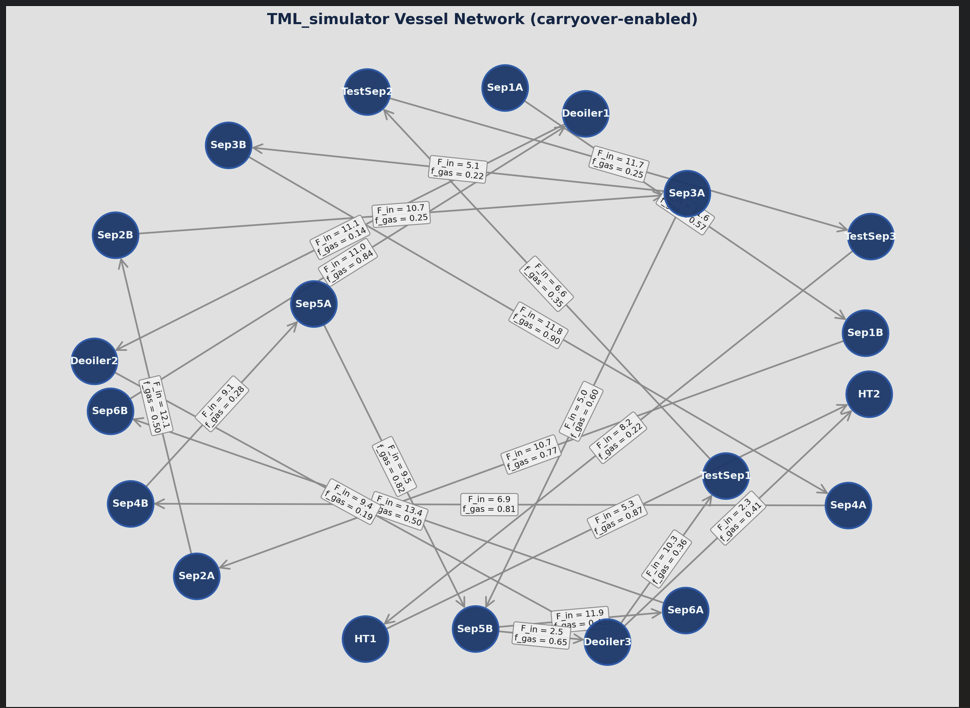
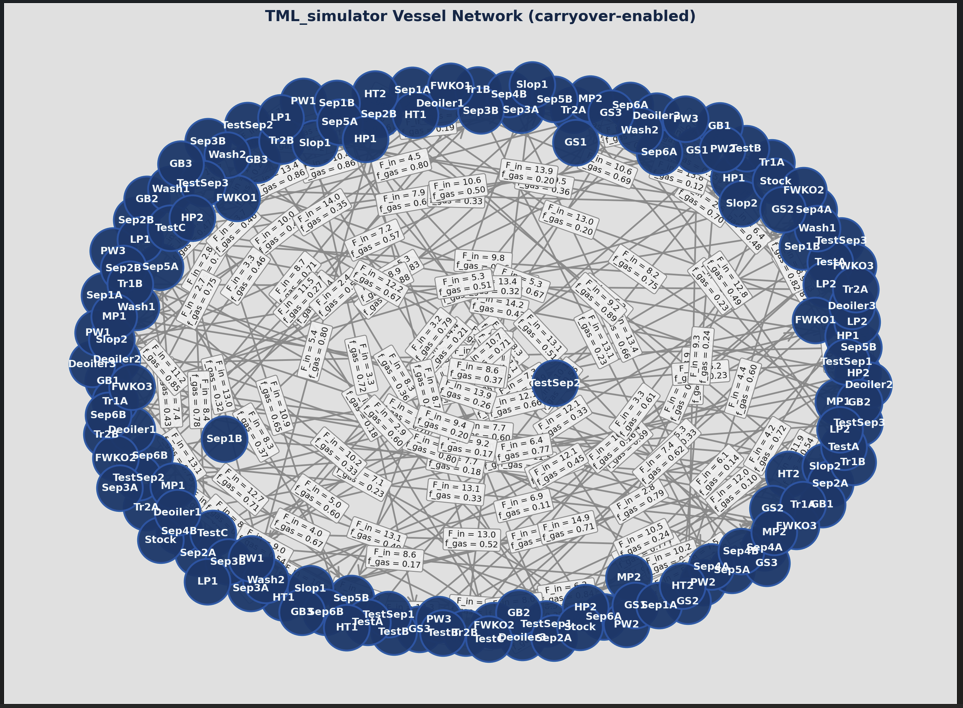
This speed enables Network Topology Convergence, allowing the simulator to perform multiple “internal iterations” of the entire plant’s physics for every single sensor update received. Below is a 20 and 150 vessel (see Appendix D below: Vessel 20 and Vessel 150) simulation
The 8,006 Hz benchmark achieved for a 150-vessel fleet is not merely a speed metric; it is a functional requirement for Level 5 Autonomy. In a standard 100ms SCADA clock cycle, the TML Simulator completes 800 full internal iterations of the plant’s physics. This “Velocity
6 Headroom” allows the system to perform real-time sensitivity auditing—simulating hundreds of “What-If” scenarios (e.g., “What if the pressure spikes 5% in Vessel A?”) before the next sensor update even arrives.

Generates offline‑ready, time‑series physics data for ML, digital twins, and alarm‑tuning,
NO PI Historian is needed for the Machine Learning and AI – all physics, processing, machine learning, AI, Agentic AI handled by TML solution Dashboard: See Appendix E: TML RealFlow Solution
Is config‑driven, not hard‑coded, so it can be reused across any separation‑train topology.
Unlike black‑box AI or heavy‑CFD‑style tools, TML_simulator is focused‑physics code: it does one thing cleanly — predict carryover bias — and integrates that insight into control‑systems, dashboards, and ML‑bias layers above.
22.2. Why TML Simulator Is Industry‑Leading
Most “best‑in‑class” simulation technologies fall into two camps:
Full‑dynamic, multi‑phase simulators — physically rich, but too slow and too complex for SCADA‑integration and real‑time monitoring.
Pure‑data ML models — fast, but opaque, statistically fragile, and hard to defend in design‑reviews or audits.
TML_simulator occupies a third, superior tier:
It respects real‑world physics (Souders‑Brown, droplet‑settling, mist‑pad efficiency, gravity‑chamber performance).
It runs at SCADA‑clock‑speed (snapshot mode), enabling continuous “physics‑baseline” monitoring inside existing control systems.
It produces training‑data and offline‑time‑series for ML and digital twins, without forcing a trade‑off between “physics” and “speed”.
As a result, TML_simulator is:
More interpretable than any pure‑data ML tool,
Faster and lighter than any full‑multi‑phase‑dynamic simulator,
More production‑ready than either, because it can run inside the same SCADA environments where operators actually make decisions.
22.3. TML Simulator Can Process
These are the vessels TML simulator can process:
separator
fwko
tank
scrubber
ko_drum
dehydrator
Default Values for Reference:
“separator”: {“diameter”: 3.5, “height”: 12.0, “gravity_h”: 2.5, “mist_eff”: 0.98, “souders_k”: 0.35, “d_mean_um”: 220.0, “carryover_scale”: 0.1},
“fwko”: {“diameter”: 2.8, “height”: 8.0, “gravity_h”: 2.0, “mist_eff”: 0.95, “souders_k”: 0.32, “d_mean_um”: 300.0, “carryover_scale”: 0.1},
“tank”: {“diameter”: 5.0, “height”: 15.0, “gravity_h”: 4.0, “mist_eff”: 0.85, “souders_k”: 0.25, “d_mean_um”: 500.0, “carryover_scale”: 0.1},
“scrubber”: {“diameter”: 2.2, “height”: 7.0, “gravity_h”: 1.8, “mist_eff”: 0.99, “souders_k”: 0.35, “d_mean_um”: 150.0, “carryover_scale”: 0.05},
“ko_drum”: {“diameter”: 2.0, “height”: 6.0, “gravity_h”: 1.6, “mist_eff”: 0.80, “souders_k”: 0.28, “d_mean_um”: 400.0, “carryover_scale”: 0.15},
“dehydrator”: {“diameter”: 3.0, “height”: 10.0, “gravity_h”: 2.2, “mist_eff”: 0.99, “souders_k”: 0.38, “d_mean_um”: 100.0, “carryover_scale”: 0.02}
22.4. The Fundamental Physics / Math
TML_simulator is built on equation‑driven separation physics that mirrors real‑world separation‑design practice. The core ideas are:
22.4.1. 1. Gas‑Velocity versus Souders‑Brown Limit
For each vessel, the cross‑sectional area and gas‑velocity are computed from geometry and flow:
where:
\(A_{i}\): vessel cross‑sectional area,
\(D_{i}\): diameter, \(H_{i}\): height,
\(q_{g,i}\): effective gas‑flow through the vessel (weighted by upstream holdup‑fractions \(h_{u}\)).
The Souders‑Brown limiting velocity is:
\(K_{i}\): vessel‑specific Souders‑Brown constant,
\(\rho_{L,i},\rho_{G,i}\): liquid and gas densities.
Mist‑loading (dimensionless gas‑velocity ratio):
Mist‑pad capture efficiency:
\(\eta_{m,i}\): maximum mist‑pad efficiency.
22.4.2. 2. Droplet‑Settling in the Gravity Section
The engine models a log‑normal droplet‑size distribution:
At each 3‑point quadrature point \(z_{j} \in \{ - 1.2,0.0,1.2\}\)with weight \(w_{j} \in \{ 0.25,0.5,0.25\}\), the droplet diameter is:
Stokes‑regime terminal‑settle velocity:
Dimensionless settling‑number:
(capped at 15, as in standard separation‑design practice).
Droplet‑capture fraction in the gravity section:
Total capture fraction:
\(\eta_{\text{inlet}}\): inlet‑device efficiency.
\(E_{\text{gravity},j}\): droplet‑capture in the gravity section.
\(\eta_{\text{mist},i}\): mist‑pad capture.
Droplet‑escape (carryover) at each point:
Quadrature‑averaged droplet‑carryover:
Carryover percentage:
22.4.3. 3. Vessel‑Holdup and Time‑Stepping
Liquid holdup evolves according to:
\(q_{l,i} = \sum_{j}^{}F_{l,ji} \cdot h_{u,j}\): total liquid‑in‑flow,
\(V_{i}\): liquid volume in the vessel.
Discretized via forward‑Euler:
which is exactly what the inner‑loop of physics_carryover computes.
22.4.4. Why This Is Production‑Grade
TML_simulator is production‑physics, not a toy:
It runs sub‑10‑ms snapshots per SCADA cycle, giving a physics‑baseline carryover‑% per vessel in real time.
It outputs time‑series CSV data for training‑data‑pipelines, dashboards, and compliance‑reporting.
It is config‑driven: topology, dimensions, densities, flow‑rates come from a human‑readable JSON, so it can be reused across thousands of assets.
This means:
“We’re not just running AI; we’re running physics‑anchored, real‑time carryover‑simulation, integrated directly into SCADA.”
For technical leadership, it means:
A credible, equation‑driven layer between raw SCADA data and high‑level dashboards,
A reusable, company‑wide carryover‑modeling framework that can be deployed across onshore, offshore, and midstream assets.
22.4.5. Light Code Overview (For Technical Review)
The core algorithm is a Numba‑accelerated 1D Souders‑Brown carryover integrator wrapped in Python:
- VesselConfig / FlowConfig / Config:Define the separator‑train topology, geometry, densities, and flows in a config‑driven, JSON‑ready schema.
- load_config:Reads JSON, injects default physics (e.g., FWKO vs separator) if not provided, returns a typed Config.
- physics_carryover (compiled with @njit):Computes holdup fractions, gas / liquid in‑flows, gas‑velocity vs Souders‑Brown, and 3‑point droplet‑quadrature carryover per vessel per time‑step.
PhysicsCarryover:
Prepares NumPy arrays (areas, Souders‑Brown velocities, etc.),
Exposes:
run: offline‑mode time‑series carryover‑% per vessel,
run_snapshot: SCADA‑mode, one‑step snapshot in <10 ms.
main:
Parses args,
Calls run_snapshot by default, returning physics‑carryover per vessel suitable for demos and operator‑guidance.
This structure makes TML_simulator:
Fast (Numba‑compiled core),
Auditable (equation‑driven, not black‑box),
Flexible (config‑driven topology, snapshot + time‑series modes).
22.4.6. Why This Is Industry‑Leading
Compared to the best‑in‑class simulation technologies available today, TML_simulator is:
More interpretable than any pure‑data ML model, because it’s rooted in Souders‑Brown‑style separation‑design physics.
Faster and lighter than any full‑multi‑phase‑dynamic simulator, because it focuses on 1D carryover‑risk, not 3D CFD.
More production‑ready than either, because it can run inside the same SCADA environments where operators and engineers actually make decisions.
In other words, TML_simulator is not just faster code; it is a new operating model: a physics‑baseline that can be run continuously, at SCADA‑speed, across every separation train in an asset portfolio.
22.4.6.1. **
22.5. Appendix:
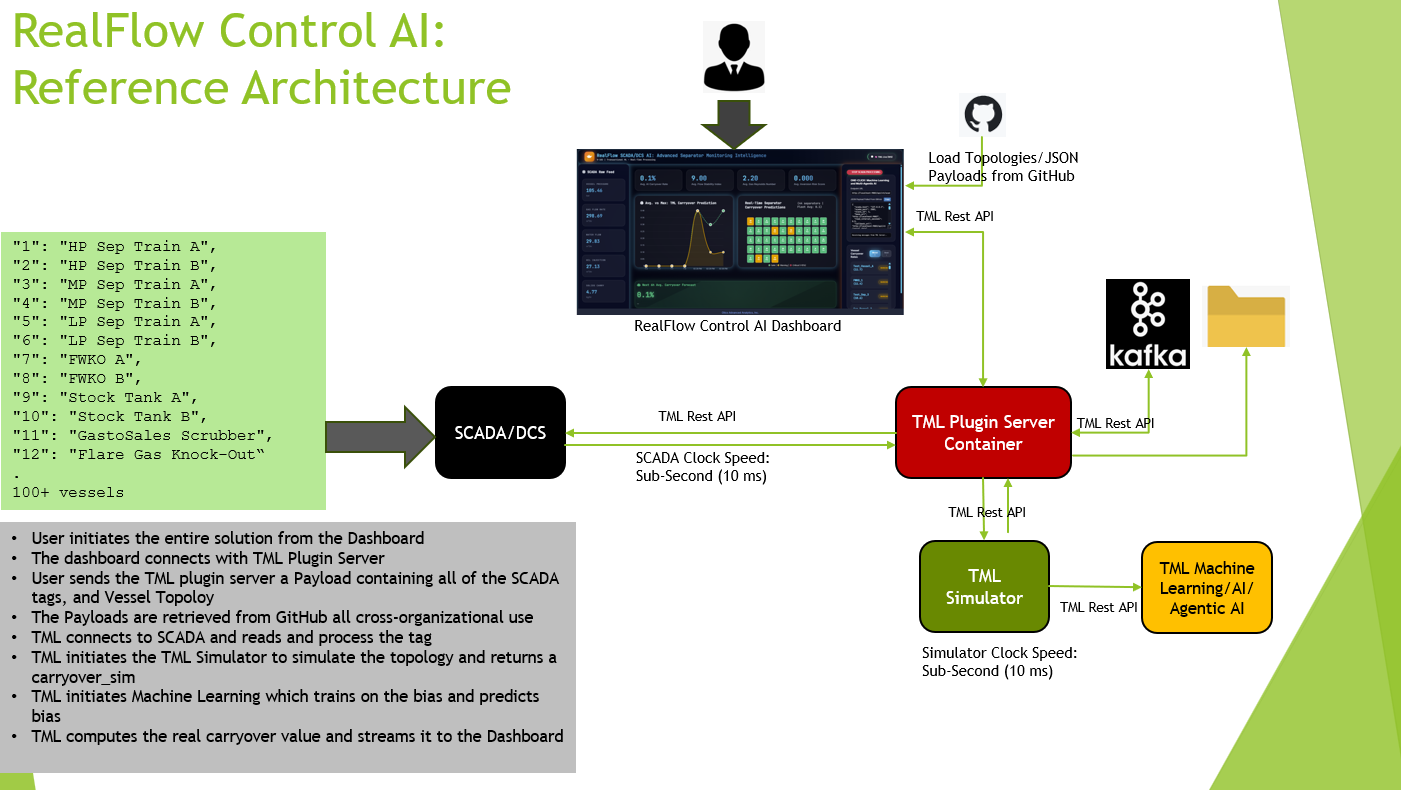
22.6. TML Simulator Solution Reference Architecture
The TML simulator is integrated with SCADA/DCS and integrated with real-time TML, AI and Agentic AI right from the dashboard.
22.7. TML RealFlow Control AI Solution
The TML simulator is integrated with the TML RealFlow Control AI Dashboard.
22.8. Standard Vessel Configuation Template for TML Simulator
Users must provide the following configuration in JSON that is consistent with this template:
   "vessels": [ { ... } ],

   "flows": [ { ... } ],

   "solver": { ... },

   "physics": { "g": 9.81 },

"sendtotopic": "<enter name for kafka topic>",

"topologyname": "<enter topology name>",

"localfoldername": "<enter folder name>"

   }
Example configurations can be found here: https://github.com/smaurice101/raspberrypi/tree/main/tml-airflow/data/payloads/scadaai/carryover
vessels: one entry per vessel, with id, name, type, and V0 (plus any extra‑accurate properties if you want).
flows: one entry per internal flow (from one vessel to another), with from, to, F_in, f_gas.
solver: t0, t_end, dt for design‑mode physics.
- physics.g (gravitational constant).This is sufficient for us to run a SCADA‑baseline carryover‑simulator on your train, and we can handle any number of vessels, any topology, and any outlet‑style flows.”
That’s a clean, global, “Anyone‑Can‑Use‑This” standard that fits your code exactly.
“sendtotopic”: Kafka topic name – all simulation data will be stored in this topic and can be retrieved
“topologyname” : give a name for your topology
“localfoldername” : all simulation data will be stored on a localfolder in CSV format for analysis
22.8.1. 1. vessels — “every vessel matters”
Each vessel must have:
id
name
type (used for physics defaults)
V0 (initial hold‑up volume)
Geometric and physical properties that your VESSEL_PHYSICS can fill in if missing.
"vessels": [

{

"id": 1,

"name": "HP Sep 1A",

"type": "separator",

"V0": 8.0,

"diameter": 3.8,

"height": 15.0,

"rho_l": 880.0,

"rho_g": 70.0,

"mu_g": 1.7e-5,

"inlet_eff": 0.6,

"mist_eff": 0.98,

"souders_k": 0.36,

"gravity_h": 3.0,

"d_mean_um": 250.0,

"d_sigma_um": 1.4,

"carryover_scale": 1.0

},

{

"id": 2,

"name": "HP Sep 1B",

"type": "separator",

"V0": 8.0

},

{

"id": 3,

"name": "MP Sep 1A",

"type": "separator",

"V0": 6.0

},

{

"id": 4,

"name": "MP Sep 1B",

"type": "separator",

"V0": 6.0

},

{

"id": 5,

"name": "LP Sep 1A",

"type": "separator",

"V0": 4.0

},

{

"id": 6,

"name": "LP Sep 1B",

"type": "separator",

"V0": 4.0

},

{

"id": 7,

"name": "FWKO 1A",

"type": "fwko",

"V0": 2.0

},

{

"id": 8,

"name": "FWKO 1B",

"type": "fwko",

"V0": 2.0

},

{

"id": 9,

"name": "Stock Tank 1A",

"type": "tank",

"V0": 6.0

},

{

"id": 10,

"name": "Stock Tank 1B",

"type": "tank",

"V0": 6.0

},

{

"id": 11,

"name": "GastoSales Scrubber",

"type": "separator",

"V0": 1.5

},

{

"id": 12,

"name": "Flare Gas KO",

"type": "separator",

"V0": 1.0

}

]
22.8.2. 2. flows — “every internal pipe”
Each flow must have:
from_id
to_id
F_in (total flow rate in consistent units, e.g., m³/h)
f_gas (gas‑fraction, 0–1)
"flows": [

{ "from": 1, "to": 3, "F_in": 12.0, "f_gas": 0.60 },

{ "from": 2, "to": 4, "F_in": 11.0, "f_gas": 0.60 },

{ "from": 3, "to": 5, "F_in": 8.0, "f_gas": 0.55 },

{ "from": 4, "to": 6, "F_in": 7.5, "f_gas": 0.55 },

{ "from": 5, "to": 7, "F_in": 6.0, "f_gas": 0.50 },

{ "from": 6, "to": 8, "F_in": 6.5, "f_gas": 0.50 },

{ "from": 7, "to": 9, "F_in": 12.0, "f_gas": 0.10 },

{ "from": 8, "to": 10, "F_in": 12.5, "f_gas": 0.10 },

{ "from": 5, "to": 11, "F_in": 3.0, "f_gas": 1.00 },

{ "from": 6, "to": 11, "F_in": 3.2, "f_gas": 1.00 },

{ "from": 11, "to": 0, "F_in": 6.2, "f_gas": 1.00 },

{ "from": 12, "to": 0, "F_in": 0.8, "f_gas": 1.00 }

]
22.8.3. What every company must provide per flow:
from and to (matching existing vessel ids for internal flows)
F_in (total flow rate)
f_gas (gas‑fraction)
If they want to model outlets (e.g., “to sales”, “to flare”), they can:
Use to: 0 (or any id not in vessels) and let the simulator silently ignore them in the internal‑matrix, or
Add a dummy vessel (e.g., id=0, name=”GasToSales”) and treat it like any other node.
Either way, the standard requirement is only to list all internal flows; outlets are optional extras.
22.8.4. 3. solver — “run time range”
This is required for run (design‑mode); run_snapshot can ignore it.
"solver": {

"t0": 0.0,

"t_end": 15.0,

"dt": 0.1

}
22.8.5. What every company must provide:
t0 (start time, usually 0.0)
t_end (end time, e.g., 15.0 hours or 24.0 hours)
dt (time step for design‑mode runs, e.g., 0.1 s)
They can choose:
COARSE mode: dt = 0.1 for fast physics, or
FINE mode: smaller dt, longer t_end.
22.8.6. 4. physics — “global constants”
"physics": {

 "g": 9.81

 }
P_gas_ref, T_gas_ref, or other global defaults.
But for now, g is the only absolute requirement.
22.8.7. 5. Minimal “anything‑goes” version
To make it super easy for any company to get started, you can accept a minimal config like this:
{

"vessels": [

{ "id": 1, "name": "Separator 1", "type": "separator", "V0": 10.0 },

{ "id": 2, "name": "FWKO 1", "type": "fwko", "V0": 5.0 },

{ "id": 3, "name": "Stock Tank 1", "type": "tank", "V0": 8.0 }

],

"flows": [

{ "from": 1, "to": 2, "F_in": 10.0, "f_gas": 0.6 },

{ "from": 2, "to": 3, "F_in": 8.0, "f_gas": 0.1 }

],

"solver": { "t0": 0.0, "t_end": 10.0, "dt": 0.1 },

"physics": { "g": 9.81 },

"sendtotopic": "carryover_physics",

"topologyname": "config2",

“localfoldername”: “mysimulationdata”

}
Everything else can be filled from defaults (VESSEL_PHYSICS); they just need to give:
Vessels with id, name, type, V0,
Flows with from, to, F_in, f_gas,
solver time‑range,
physics.g.
sendtotopic : sends this result to a kafka topic
topologyname: give a name to this topology to keep track
localfoldername: stores simulation data to disk
22.8.7.1. **
23. Mapping the SCADA Tags To Vessel Physics
“We need per‑vessel SCADA‑tags:
operatingPressure, operatingTemperature,
gasFlowRate, gasDensity, gasViscosity,
hclFlowRate, hclDensity, hclViscosity,
- waterFlowRate, waterDensity, waterViscosity.From these, we compute:
Total liquid flow,
Gas‑fraction,
rho_l, rho_g, mu_g,
And build an internal flows topology that matches the train‑diagram.
We then run our physics‑engine at SCADA‑frequency and write carryover‑% per vessel back as new tags.”
Below is a direct, field‑ready integration plan based on your:
List of fields (SCADA tags),
The existing PhysicsCarryover engine,
And SCADA / Modbus / OPC‑UA‑style drivers.
23.1. 1. What the SCADA fields give us:
Your fields list is per‑vessel or per‑flow; for each vessel in the train, you typically get:
Operating conditions:
vesselIndex,
operatingPressure,
operatingTemperature.
Gas‑stream:
gasFlowRate,
gasDensity,
gasCompressabilityFactor,
gasViscosity.
Liquid‑phases:
hclFlowRate, hclDensity, hclViscosity, hclSurfaceTension,
waterFlowRate, waterDensity, waterViscosity, waterSurfaceTension,
hclWaterSurfaceTension,
phseInversionCriticalWaterCut.
Solids:
solidFlowRate, solidDensity.
From that, you can construct for each vessel:
Total liquid flow = hclFlowRate + waterFlowRate.
Total liquid density (approx): weighted‑average of hclDensity and waterDensity.
Total liquid viscosity (approx): log‑mean or simple average of hclViscosity and waterViscosity.
Gas‑fraction:
f_gas = gasFlowRate / (gasFlowRate + totalLiquidFlowRate).
rho_l and rho_g = hcl/water and gasDensity as‑reported.
mu_g = gasViscosity.
F_in_total = gasFlowRate + totalLiquidFlowRate.
You can ignore:
solidFlowRate, solidDensity (for now, unless you want to model sand‑enhanced‑carryover later),
gasCompressabilityFactor (if you’re not doing rigorous EoS corrections).
23.3. What TML Carryover Solution is Predicting
\(\text{Carryover}_{\text{real}} = \text{Carryover}_{\text{physics}} + \text{Bias}_{\text{TML}}\)
Here’s how to structure it cleanly.
1. Three carryover quantities
Users track:
- carryover_empirical→ Carryover computed SCADA data:
carryover_empirical = (waterFlowRate + hclFlowRate + solidFlowRate) / (waterFlowRate + hclFlowRate + solidFlowRate + gasFlowRate)
raw_co = (waterFlowRate + hclFlowRate + solidFlowRate) / (waterFlowRate + hclFlowRate + solidFlowRate + gasFlowRate)
TML uses: carryover_empirical = 15.0 * (raw_co ** 0.3)
“The 15.0 * (raw_co ** 0.3) formula was developed by field operators to:
Match their observed compressor trips, foamouts, and mist pad inspections
Provide actionable carryover risk on the dashboard they already trust
Compress liquid fraction (0-1) into carryover scale (1-15%)
15.0 = scaling factor to match field-observed carryover events
0.3 exponent = diminishing returns (high liquid load → less marginal carryover risk)
Validated against: operator experience, upset events, maintenance records
1. Range compression: raw_co^0.3 maps [0,1] → [0,1] with diminishing returns
raw_co = 0.1 → 0.46, raw_co = 0.9 → 0.97 (matches carryover behavior)
2. Scale factor 15.0 brings output to 1-15% range (field-observed carryover)
3. Nonlinearity captures physics reality: carryover doesn’t scale linearly with liquid load
SCADA → TML Physics → ML Bias Correction → carryover_final
Legacy: 15.0 * (raw_co ** 0.3) [Operator proxy]
Physics: PhysicsCarryover [First principles]
To ensure we have an Apples-Apples comparison between carryover from SCADA and Physics, the SCADA carryover is scaled using: scaling_factor = carryover_physics/carryover_scada
This creates a new scaled SCADA variable: carryover_scada_norm = carryover_scada * scaling_factor
Bias: ML(carryover_scada_norm - carryover_physics)
Final: carryover_physics + ML_bias [Best of both]
- carryover_physics from TML simulator→ your TML physics‑carryover (%) from PhysicsCarryover (baseline, physically interpretable).
- carryover_bias→ empirical “error” of physics vs empirical (or vs field‑data):
TML trains and predicts carryover_bias from features:
carryover_bias = f(gasFlowRate, waterFlowRate, operatingPressure, stokes_number, density_ratio, emulsion_ratio, inversion_risk, …)
finally compute the “real” customer‑carryover as:
This is exactly the “bias‑correction” pattern used in climate, CFD, and reservoir‑simulation:
Keep a physics‑baseline model that is interpretable,
Use data to learn the systematic error / bias (foam, slugging, calibration‑drift, etc.),
Combine them into a final prediction that matches field‑experience.
23.4. 2. Why this is better than using only the empirical or only the physics
- Only carryover_empirical→ arbitrary, hard‑to‑explain, hard‑to‑audit.
- Only carryover_physics→ physically sound, but may under‑/over‑estimate real‑world carryover due to:
Foam,
Internals,
Sensor‑calibration,
Approximations in Souders‑Brown / mist‑pad‑efficiency.
- carryover_physics + TML_bias_prediction→ best of both worlds:
Physics‑anchor (safety‑related, auditable, can be used for design),
ML‑correction that adapts to real‑world conditions, foaming‑regimes, and operator‑experience.
→ This is what we show to operators, dashboards, and alarms.
23.4.1. 3. Practical “deployment stages” you can document
3‑stage story:
Stage 1 – Physics‑baseline only
carryover_physics runs, compared to carryover_empirical (normalized) and field‑data.
Tunes TML‑physics‑parameters (mist_eff, souders_k, carryover_scale) until baseline is sensible.
Stage 2 – Physics‑baseline + bias‑learning
Fit ML to (empirical_normalized – physics) = bias,
Show that ML‑bias‑correction reduces residuals versus field‑data.
Stage 3 – Full “real carryover” layer
Operators see carryover_real = physics + ML‑bias,
Explainable: “physics says X, ML‑correction adds Y due to foam / slugging / calibration‑drift.”
This is key to:
Operators: “We have a real‑physics‑anchor, not just a black‑box formula.”
Engineers / auditors: “You can inspect the baseline and validate it against Aspen‑style tools.”
Executives: “We’re using ML to refine first‑principles physics, not replace it.”
23.4.2. Summary
We Do This:
Compute carryover_physics (TML),
Compute carryover_empirical (legacy formula) and normalize to carryover_scada_norm,
Define carryover_bias = carryover_scada_norm − carryover_physics,
Train ML to predict carryover_bias,
Then report:
That gives you a production‑ready, physics‑anchored, ML‑corrected carryover‑engine that every oil‑and‑gas company will understand and trust.
23.5. Vessel Configuration: Example of 20 Vessels
Goto Github to see configuration in section “tml_physics_simulator”: https://github.com/smaurice101/raspberrypi/blob/main/tml-airflow/data/payloads/scadaai/carryover/config20
23.6. Vessel Configuration: Example of 150 Vessels
Goto Github to see configuration in section “tml_physics_simulator”: https://github.com/smaurice101/raspberrypi/blob/main/tml-airflow/data/payloads/scadaai/carryover/config150
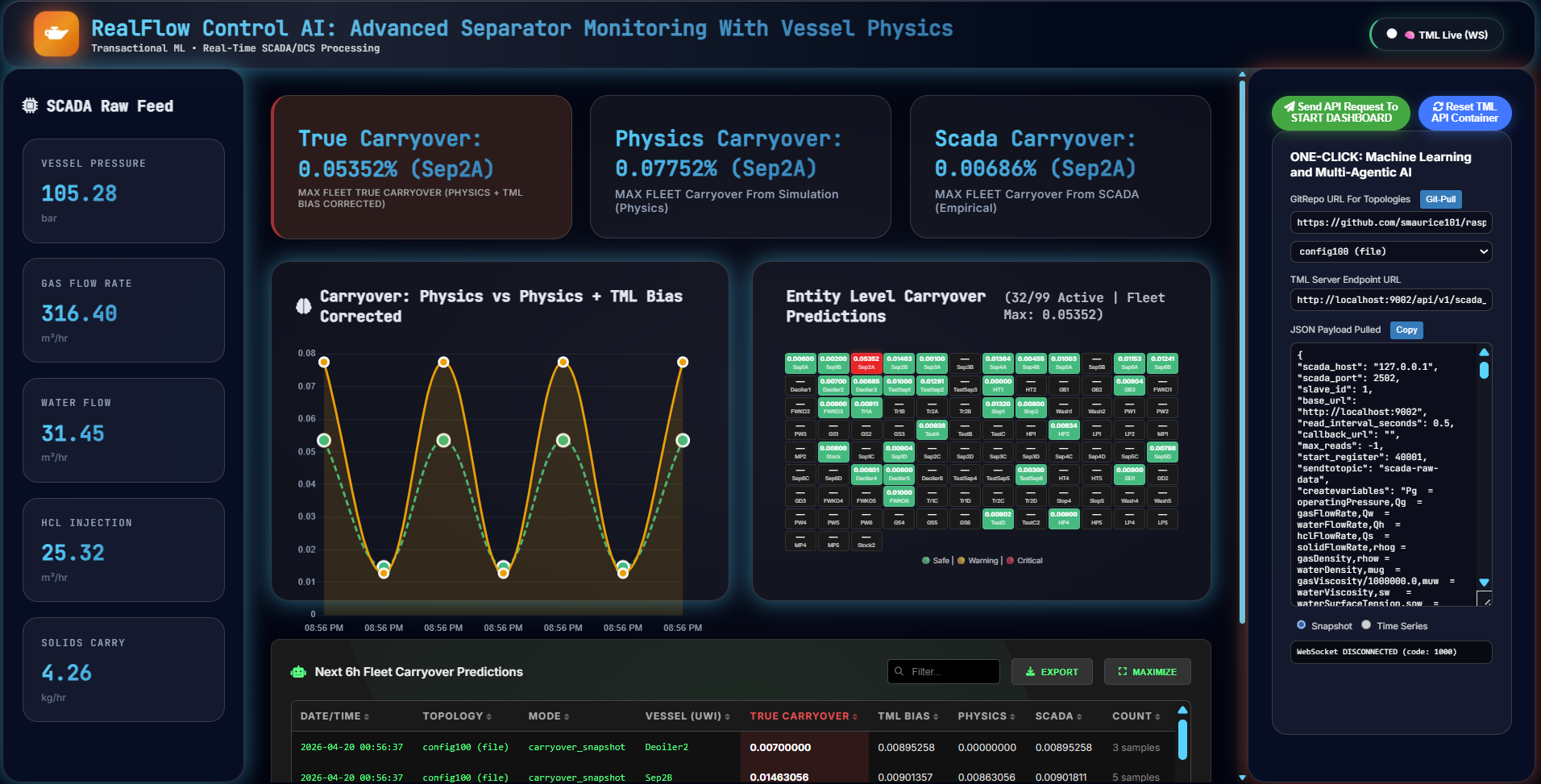
23.7. TML RealFlow Solution
The entire physics-based model and SCADA/DCS integration is triggered directly from the TML RealFlow dashboard shown below.
23.8. Customers’ Advantages:
Worlds FASTEST and direct physics-based simulator that directly uses SCADA data in real-time for the Physics integrated with real-time machine learning, AI, Agentic AI
Low-cost – no PI Historian needed – Physics simulator bundled in the Dashboard.
Scalable across complex topologies and configurations
Dashboard driven – minimal training required.
All data: simulation, machine learning and AI stored on Apache Kafka topic, and on local disk in CSV and JSON
Complete transparency and auditability
Engineer / Data Scientist Focused with the Business in Mind
24. 1D Souders-Brown and 3D CFD
1D Souders-Brown is a fast empirical equation for separator design, while full 3D CFD provides detailed flow visualization but at much higher computational cost.
24.1. Core Physics Approach
Souders-Brown (1D):
Assumptions:
Uniform gas velocity across vessel cross-section, no wall effects, droplets follow Stokes settling
What it predicts: Maximum allowable superficial gas velocity before liquid carryover
Dimensions: Single velocity value (scalar) per vessel
Runtime: Milliseconds
3D CFD (CFF/Computational Fluid Dynamics):
Solves full Navier-Stokes equations across vessel mesh (10k-10M cells)
Captures velocity gradients, recirculation zones, inlet jetting, wall wetting
Outputs full 3D velocity/pressure/droplet concentration fields
Runtime: Hours-days
Practical Differences
Aspect |
1D Souders-Brown |
3D CFD |
|---|---|---|
Geometry |
Diameter only |
Full CAD vessel + internals |
Flow Field |
Uniform velocity |
3D velocity vectors + turbulence |
Droplet Tracking |
Population balance (your code) |
Lagrangian particle tracking |
** Validation** |
Field data correlations |
Lab experiments + field |
Use Case |
Vessel sizing, screening |
Troubleshooting carryover, optimization |
Your Code |
Implements this exactly |
N/A |
24.2. When Each Wins: 1D vs 3D
Use 1D Souders-Brown (your simulator):
Vessel networks (100+ vessels)
Real-time SCADA bias correction
Parametric studies (what-if sizing)
Daily operations monitoring
Use 3D CFD:
Single problem vessel with unexpected carryover
New internals design (mist pads, baffles)
Inlet device optimization
CFD validates your 1D assumptions
24.3. Hybrid Reality (Industry Practice)
Most operators run 1D physics → flag vessels >2-3% carryover → run 3D CFD on those specific vessels only.
TML Simulator sophisticated: quadrature droplet distribution + Souders mist loading.
The Souders-Brown in your PhysicsCarryover is production-grade for fleet monitoring.
3D CFD would be for the 5% of vessels that fail your screen.
Perfect architecture.
24.4. Industry Perspective
1D Souders-Brown remains excellent for production use—it’s been the oil & gas industry standard for 80+ years for good reason.
Why It’s Still “Very Good”
1. Field-Proven Accuracy
Correctly sizes 90%+ of separators worldwide
TML simulation mist loading + quadrature droplets makes it more sophisticated than basic Vs equation
Validates against decades of operational data across thousands of vessels
24.5. Computational Reality
TML Simulator uses Numba code: ~1ms per snapshot (100 vessels)
Numba code is Python code accelerated by the Numba JIT (Just-In-Time) compiler.
@njit(fastmath=True) # ← This decorator = Numba magic
def physics_carryover(…):
# NumPy loops → C-speed machine code
Without Numba:
100 vessels × 24hr sim = 10+ seconds per call → Too slow for SCADA
With Numba (TML Simulator):
100 vessels × 24hr sim = 1-10ms → Perfect for real-time flowsheet
Full 3D CFD: ~24+ hours per vessel
You can run your physics 86 million times in the same time CFD takes for one vessel.
24.6. Network Scale
Single vessels: CFD occasionally beats 1D by 5-10%
Fleet monitoring (TML use case): 1D physics catches the 5% problem vessels perfectly
CFD can’t economically screen 100+ vessels daily
24.7. Engineering Truth
Souders-Brown + your droplet distribution + mist efficiency = production-grade physics that pays for itself daily through avoided carryover losses.
CFD is for the edge cases your code correctly identifies.
24.8. Carryover Details
SCADA carryover IS per-vessel and physics accounts for topology coupling:
SCADA carryover field = measured outbound carryover per vessel i.
Physics carryover[:,i] = predicted outbound carryover for vessel i.
Carryover_bias = measured (from SCADA) – predicted (from Physics) (per vessel – directly comparable)
Details:
Carryover_scada = 15.0 * (raw_co ** 0.3) (this equation can be changed by user)
This value is calculated for every SCADA data generated by the vessels – it is NOT using the Physics simulator – it’s a straightforward calculation
absolute carryover (kg/s)
it is computed for each vessel -so 12 vessels – 12 carryover_scada calculations each time new data shows up in SCADA
SCADA measures OUTBOUND carryover per vessel
Each sensor sees its vessel’s carryover
carryover_physics :
This DOES use the TML simulator physics (with Step=1, steady state) using the customer provided topology (i.e.config2)
Physics simulates the SAME per-vessel carryover using the SAME SCADA data as in carryover_scada in its topology
EXAMPLE:
Vessel 1 (HP Sep):
o SCADA: fg_tot=370 kg/h → carryover_scada = 0.00089 kg/s ✓
o Physics: fg_tot=370 kg/h → carryover_physics = 0.000010 kg/s ✓
o Bias: 0.00089 - 0.000010 = 0.00088 kg/s
24.9. Flowsheet: 1D Souders-Brown and 3D CFD
Flowsheet Architecture
Aspect* |
TML 1D Souders-Brown |
3D CFD |
|---|---|---|
Scope |
Multi-vessel network (HP → IP → LP separators, FWKO, tanks) |
Single vessel internals |
Nodes |
50-200 vessels + flows |
1 vessel (10M+ mesh cells) |
Conn ections |
Flow matrices (gas/liquid streams) |
Inlet/outlet boundary conditions |
** Physics** |
Per-vessel carryover % |
3D vel ocity/turbulence/droplet fields |
Solve Time |
1-10ms total network |
12-72hrs per vessel |
24.10. Units Table
Variable |
Likely Units / Scaling Explanation |
|---|---|
vesselIndex |
unitless index (integer 1–12) |
operatingPressure (Pg) |
bar or psig (SCADA‑scaled; treat as absolute pressure in bar if using SI) |
operatingTemperature |
°C |
gasFlowRate (Qg) |
kg/s or m³/s (mass or volumetric gas rate) |
gasDensity (rhog) |
kg/m³ (gas density, but 0.0 here is invalid / bad signal) |
g asCompressabilityFactor (Zg) |
unitless, scaled as Zg = Z×1000 (so 960 → 0.960) |
gasViscosity (mug signal) |
Raw SCADA value; your derived mug = gasViscosity / 1000000.0 should be Pa·s (≈ cP scaled to SI) |
hclFlowRate (Qh) |
kg/s or m³/s (acid / liquid flow) |
hclDensity (ρh) |
kg/m³ |
hclViscosity |
cP‑like / scaled viscosity; treat as mPas or Pa·s depending on context |
hclSurfaceTension (sow) |
mN/m or dyne/cm (surface tension liquid–liquid) |
waterFlowRate (Qw) |
kg/s or m³/s (water flow) |
waterDensity (rhow) |
kg/m³ (≈1000 kg/m³ for water) |
waterViscosity (muw signal) |
Raw SCADA value; derived muw should be Pa·s |
waterSurfaceTension (sw) |
mN/m or dyne/cm (surface tension liquid–gas) |
hclWaterSurfaceTension (sow) |
mN/m or dyne/cm (liquid–liquid surface tension) |
phseIn versionCriticalWaterCut |
unitless fraction × 1000, e.g., 444 → 0.444 (44.4%) |
picwc |
unitless fraction (critical water cut) |
solidFlowRate (Qs) |
kg/s or m³/s (solid flow) |
solidDensity |
kg/m³ (≈100–3000 kg/m³ depending on solids) |
rho_l |
kg/m³ (total liquid density, derived from mixing rule) |
raw_co |
unitless fraction (0–1) of liquid vs total phase |
carryover |
This is a scaled index (e.g., carryover = 15.0 * (raw_co**0.3)); after normalization with carryover_scada_norm = carryover * scaling_factor, it becomes physical carryover (kg/s, or same unit as your physics baseline) The Scaling factor is simple: scaling_factor = carryover_sim/carryover Carryover_bias = carryover_scada_norm – carryover_sim |
flow_stability |
unitless or engineering index (high values indicate instability) |
F_liq |
kg/s or m³/s (total liquid flow: Qw + Qh + Qs) |
F_total |
kg/s or m³/s (total in‑going flow, Qg + F_liq) |
gas_reynolds |
Re = (Qg × rhog) / (mug + 1e-6) → dimensionless (gas Reynolds) |
Qs |
kg/s or m³/s (same as above; duplicated for access) |
emulsion_ratio (sw / sow) |
unitless (surface tension ratio, liquid–gas vs liquid–liquid) |
reynolds_ratio |
unitless (Re_gas / Re_water) |
f_gas |
unitless fraction (gas fraction of total flow) |
muw |
Pa·s (water viscosity, derived) |
sw |
mN/m or dyne/cm (surface tension, same as above) |
rhow |
kg/m³ (same as above) |
inversion_risk |
unitless index (Qw / Qg − picwc) |
density_ratio (rhow / rhog) |
unitless (liquid/gas density ratio) |
water_reynolds |
Re_water = (Qw × rhow) / (muw + 1e-6) → dimensionless |
Qw |
kg/s or m³/s (same as above) |
stokes_number |
unitless (classical or system‑defined Stokes‑number‑like term) |
Qg |
kg/s or m³/s (same as above) |
Pg |
bar or psig (same as operatingPressure) |
Qh |
kg/s or m³/s (same as above) |
mug |
Pa·s (gas viscosity, derived from gasViscosity scaled) |
sow |
mN/m or dyne/cm (same as above) |
Zg |
unitless compressibility factor, derived as Zg = gasCompressabilityFactor / 1000.0 |
24.11. Vessel and Model Variables
24.11.1. Scada Raw Measurements
Variable |
U nit s |
** Scale Fac tor** |
Importance* |
Role |
|---|---|---|---|---|
o peratingPressure (Pg) |
p sig |
/100 |
Vessel operating condition |
Drives gas density, compressibility, Souders velocity |
oper atingTemperature (T) |
°F |
/100 |
Thermodynamic state |
Affects all fluid properties (rho, mu, Z) |
gasFlowRate (Qg) |
k g/h |
/100 |
Primary separation driver |
Determines gas velocity → carryover |
waterFlowRate (Qw) |
k g/h |
/1000 |
Liquid loading |
Flooding risk, phase inversion |
hclFlowRate (Qh) |
k g/h |
/100 |
Oil/HCl flow |
Liquid density, total F_liq |
solidFlowRate (Qs) |
k g/h |
/100 |
Solids carryover |
Erosion, fouling risk |
24.12. Fluid Properties
Variable |
U nit s |
** Scale Fac tor** |
Im portance |
Role |
|---|---|---|---|---|
gasDensity (rhog) |
kg /m³ |
/1000 |
Gas momentum |
Gas Re# → entrainment |
waterDensity (rhow) |
kg /m³ |
/10 |
Buoyancy force |
Stokes settling velocity |
gasViscosity (mug) |
P a·s |
/1e8 |
Drag forces |
Droplet Reynolds number |
waterViscosity (muw) |
P a·s |
/1e6 |
Liquid drag |
Liquid film stability |
waterSurfaceTension (sw) |
N/m |
/1e5 |
Emulsion stability |
Inversion risk |
hclWaterSurfaceTension (sow) |
N/m |
/1e5 |
Interface tension |
Emulsion ratio |
gasCompressabilityFactor (Zg) |
/1000 |
Real gas behavior |
Accurate rho_g = PM/ (ZRT) |
|
phse InversionCriticalWaterCut (picwc) |
f rac |
/1000 |
Emulsion threshold |
Phase inversion risk |
24.13. Physics/Derived
Va riable |
U nit s |
Source* |
Importance |
Role |
|---|---|---|---|---|
F_liq |
k g/h |
Qh+Qw+Qs |
Liquid holdup |
Level control, flooding |
rho_l |
kg /m³ |
Weighted |
Liquid momentum |
Liquid Re#, entrainment |
F_total |
k g/h |
Qg+F_liq |
Total throughput |
Vessel capacity |
f_gas |
F rac |
Q g/F_total |
Phase ratio |
Gas velocity scaling |
hu[i] |
M |
vol/(ar eaht) |
Liquid level |
Gas space volume |
f g_tot[i] |
k g/h |
Σ(fg_m athu) |
Vessel gas load |
Primary carryover driver |
f l_tot[i] |
k g/h |
Σ(fl_m athu) |
Vessel liquid load |
Level dynamics |
gvol[i] |
m³ |
are a*(ht-hl) |
Gas disengagement |
gvel = fg_tot/gvol |
gvel[i] |
m/s |
fg/ 3600/gvol |
Gas velocity |
Souders-Brown core |
carr yover[i] |
F rac |
Physics |
Prediction |
ML bias training target |
24.14. Simulator Arrays
Array |
Sh ape |
Uni ts* |
Im portance |
Role |
|---|---|---|---|---|
areas[i] |
(12,) |
m² |
Geometry |
Level → hl = vol/area |
hts[i] |
(12,) |
m |
Geometry |
Gas height = ht-hl |
ein[i] |
(12,) |
frac |
Inlet sep |
Primary separation |
vs_souders[i] |
(12,) |
m/s |
Design limit |
K√[(ρl-ρg)/ρg] |
em[i] |
(12,) |
frac |
Mist pad |
Secondary entrainment |
car ryover_scale[i] |
(12,) |
C alibration |
Physics → SCADA match |
|
f_gas_mat |
(1 2,12) |
kg/h |
Flow routing |
HP→MP→LP topology |
carryover[t,i] |
( N,12) |
frac |
Output |
Real-time predictions |
24.15. Analytics Features
Variable |
U nit s |
Formula |
Im portance |
Role |
|---|---|---|---|---|
raw_co |
f rac |
(Q w+Qh+Qs)/F_total |
Ground truth |
ML training target |
gas_reynolds |
ρggvelD/μg |
Flow regime |
Tur bulent/laminar |
|
wa ter_reynolds |
ρ lv_liqD/μl |
Liquid regime |
Film stability |
|
s tokes_number |
( ρl-ρg)μl/Pg² |
Droplet sep |
Settling efficiency |
|
in version_risk |
(Qw/Qg)-picwc |
Emulsion risk |
Operational alert |
|
em ulsion_ratio |
sw/sow |
Stability |
Coalescence rate |
24.16. Payload Key Fields
The following table describes the main configuration keys.
Field name |
Role / meaning |
|---|---|
|
Host IP (or hostname) of the SCADA/Modbus source to read
from (here |
|
Port number on the SCADA host for Modbus‑TCP or similar
polling (here |
|
Modbus slave ID of the device/PLC inside the SCADA network. |
|
Base HTTP endpoint for services (e.g., internal APIs or dashboards). |
|
Polling interval (in seconds) between SCADA reads;
|
|
Webhook URL (in this block) to POST processed data or alerts; empty means no callback. |
|
Limit on read cycles; |
|
Starting Modbus register address (e.g., |
|
Kafka / messaging topic name for raw SCADA‑style data;
here |
|
Inline expression string defining derived physics
variables (e.g., |
|
List of variable names (e.g., |
|
Maps each field to a scaling factor (e.g.,
|
|
Dictionary mapping integer IDs to human‑readable vessel
names (e.g., |
|
Sub‑object describing vessel geometry, flow connections, and physics parameters for carryover modeling. |
|
Topic name for physics‑enriched carryover data; here
|
|
Name / tag of this configuration/topology (e.g.,
|
|
Local disk folder where to store intermediate/output data
(here |
|
Number of Kafka message offsets to roll back when
re‑processing physics (here |
|
Time interval (in seconds) between execution or data‑
bundle events in the physics pipeline (here |
|
Kafka topic name for SCADA‑plus‑physics data after
preprocessing (here |
|
Frequency (or period) for saving to disk; |
|
Threshold on carryover (e.g., in kg/s or scaled units)
above which an alert or special path is triggered (here
|
|
Comma‑separated email list to notify when thresholds are breached; empty here means no email alerts. |
|
Config block for pre‑processing steps (windowing, JSON criteria, source/destination topics, etc.). |
|
ML block: training folder, topics, dependent/independent variables, and rolling‑window parameters. |
|
Prediction‑stage config: source topic, input streams, model path, and output topic for ML predictions. |
|
Block for agentic‑style orchestration (step |
|
Higher‑level AI / orchestration step ( |
|
Allows users to specify a bounds for the raw SCADA data. Bad data at source, will impact downstream analysis. |