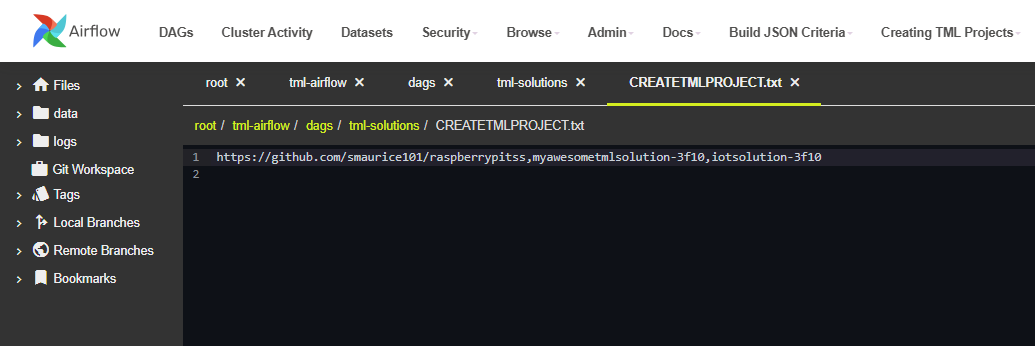
The process of copying from others Git repo is simple:
Goto the TSS and select from the top menu item: Admin -> Dags Code Editor
Navigate to the File: root/tml-airflow/dags/tml-solutions/CREATETMLPROJECT.txt
Once you are in the CREATETMLPROJECT.txt file - you can do the following scenarios:
12.1. You Want to Copy ALL TML Projects From Another Users Git Repo
To do this:
You need the other persons Git repo
Enter -1 after the repo, using comma as the separator.
For example:
- Say you want to copy all TML Project from: https://github.com/smaurice101/raspberrypitss
- Then Enter:
https://github.com/smaurice101/raspberrypitss,-1
Then press Save:
TSS will pull all TML projects from the other user’s Git Repo and commit them to your repo. TSS will take care of file changes. Within few seconds, on your Git Repo you will see ALL of the other user’s TML projects.
12.2. You Want to Copy SPECIFIC TML Projects From Another Users Git Repo
To do this:
You need the other persons Git repo
Enter the specific projects, using comma as the separator.
For example:
- Say you want to copy ONLY myawesometmlsolution-3f10 and iotsolution-3f10 TML Projects from: https://github.com/smaurice101/raspberrypitss
- Then Enter:
Here you are copying TWO projects: myawesometmlsolution-3f10,iotsolution-3f10
Then press Save:
TSS will pull ONLY those TML projects from the other user’s Git Repo and commit them to your repo. TSS will take care of file changes. Within few seconds, on your Git Repo you will see those specific projects of the other user’s TML projects.