Welcome to Transactional Machine Learning (TML) and TML Solution Studio (TSS) Documentation!
Building Real-Time Solutions to Process the World’s Real-Time data with, entity-based, TML and Multi-Agentic AI
TSS is a revolutionary platform for building, entity-based, enterprise-ready, process-driven, advanced, scalable, intelligent real-time TML solutions with NO CODE using Pre-Written 10 Apache Airflow DAGs To Speed Up TML Solution Builds - within minutes - what can take organizations up to 6 months to build.
IDC estimates that 30% of global data will be real-time data by 2025 - so learning how to process real-time data with TML is becoming critical.
Here are the TSS Screens:
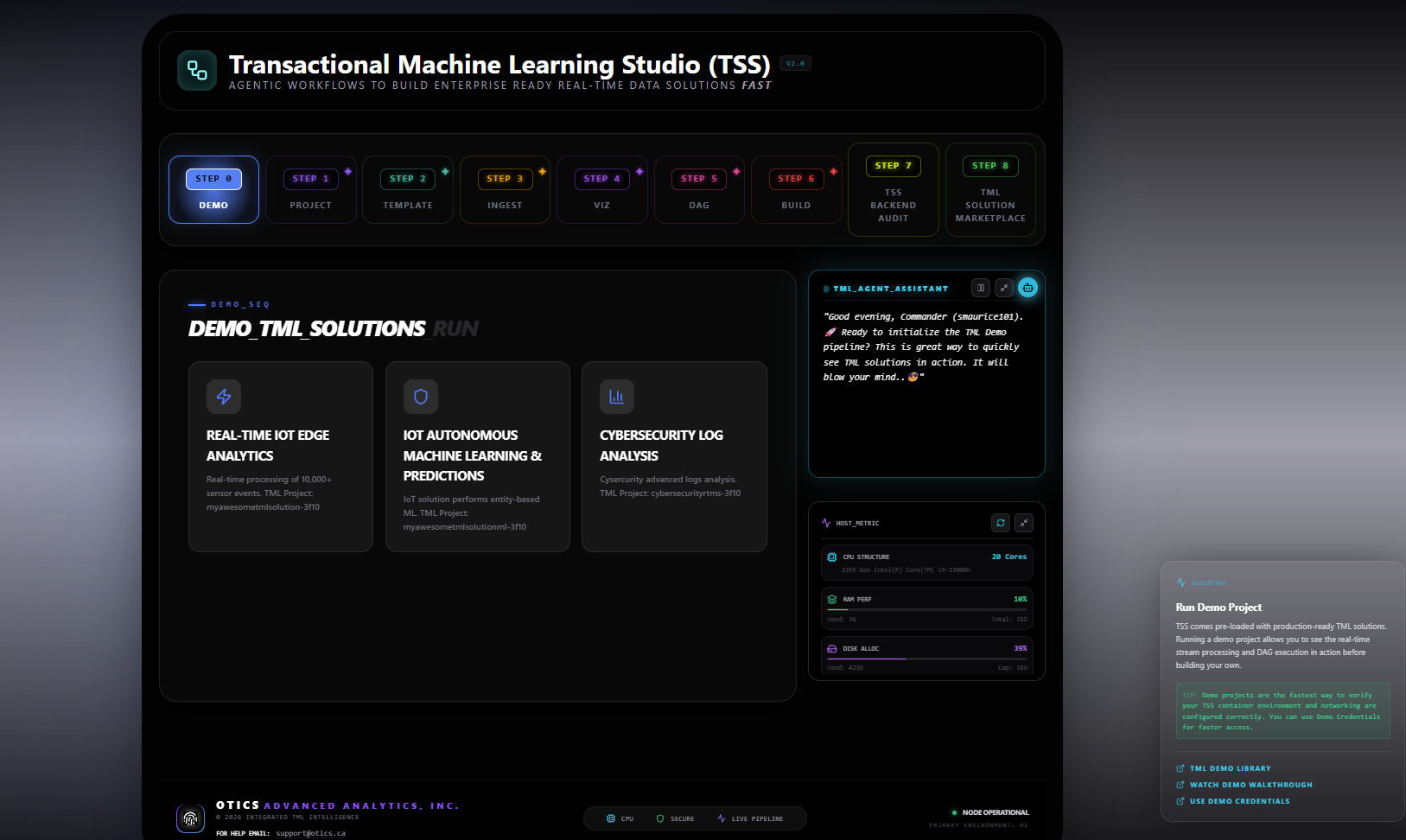
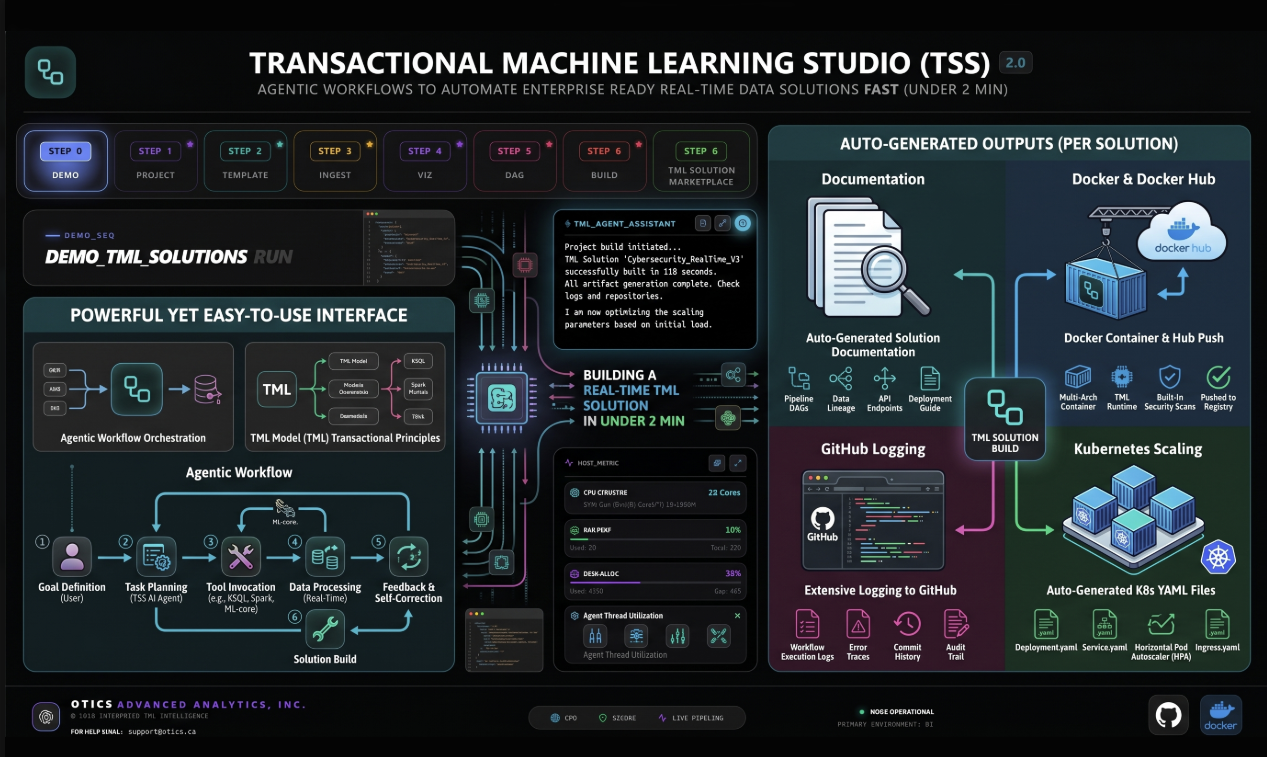
TML solutions can process any real-time data from devices and systems. The real-time data are ingested using RESTful, gRPC, MQTT APIs or localfile on the file system.
Important
All TML solutions are containerized with Docker (scale with Kubernetes), come with automated documentation about the solution, automated commits to Github for real-time logging, and automated real-time dashboard for visualization using websockets.
TML solutions can be deployed on the cloud (with Internet) or on-premise (without Internet) to process unlimited real-time data globally. TML solutions can run on any cloud infrastructure - anywhere.
PDF Version
Tip
A PDF version of this documentation can be found here.
Watch The TSS Youtube Videos
Video Name |
YouTube URL |
TSS Video: |
|
Managing TML Projects (Creating, deleting, copying and stopping): |
Youtube Video See details here |
Scaling TML Solutions with Kubernetes |
Youtube Video See details here |
Storing Secure Passwords in Kubernetes |
Describes how to store secure passwords in Kubernetes to make your TML solutions more secure and in compliance with IT security standards. |
Running TML Projects in TSS: |
Describes how to run a TML project. See details |
Ingesting Real-Time Data into TML Solutions: |
Describes how to ingest real-time data using: MQTT, RESTful API, gRPC API or Local file. See here STEP 3: Produce to Kafka Topics |
How To Create Amazing TML Real-Time Dashboards: |
Describes how to create TML real-time dashboards using websockets, and no third-party tools. See here TML Real-Time Dashboards and, STEP 7: Real-Time Visualization: tml-system-step-7-kafka-visualization-dag |
TML Examples Video: |
Describes examples shown here: TML Solution Examples |
TML JSON Criteria Creator: |
Describes Json Criteria creation for Json Processing shown here: JSON PROCESSING |
Zoom student meeting at Seneca Polytechnic: |
YouTube Video Zoom meeting to students to show how to run Examples 1 nand 3 with data streaming to a MQTT broker in HiveMQ. See here TML Solution Examples |
TML Step 1 Dag Configurations: |
Describes key parameter configurations in: STEP 1: Get TML Core Params: tml_system_step_1_getparams_dag |
TML Step 2 Dag Configurations: |
Describes key parameter configurations in: STEP 2: Create Kafka Topics: tml_system_step_2_kafka_createtopic_dag |
TML Step 3 Dag Configurations: |
Refer to Ingesting Real-Time Data into TML Solutions: |
TML Step 4 Dag Configurations: |
Describes key parameter configurations in: STEP 4: Preprocesing Data: tml-system-step-4-kafka-preprocess-dag |
TML Step 4a and 4c for RTMS Dag Configurations: |
Describes key parameter configurations for the RTMS solution: STEP 4a: Preprocesing Data: tml-system-step-4a-kafka-preprocess-dag STEP 4c: Preprocesing 3 Data: tml-system-step-4c-kafka-preprocess-dag |
TML Step 4b Dag Configurations: |
Describes key parameter configurations in: STEP 4b: Preprocesing 2 Data: tml-system-step-4b-kafka-preprocess-dag |
TML Step 5 Dag Configurations: |
Describes key parameter configurations in: STEP 5: Entity Based Machine Learning : tml-system-step-5-kafka-machine-learning-dag |
TML Step 6 Dag Configurations: |
Describes key parameter configurations in: STEP 6: Entity Based Predictions: tml-system-step-6-kafka-predictions-dag |
TML Step 7 Dag Configurations: |
Refer to How To Create Amazing TML Real-Time Dashboards: STEP 7: Real-Time Visualization: tml-system-step-7-kafka-visualization-dag |
TML Step 8 Dag: |
Step 8 Dag for docker container - Does not require any configurations. See STEP 8: Deploy TML Solution to Docker : tml-system-step-8-deploy-solution-to-docker-dag |
TML Step 9 Dag Configurations: |
Describes key parameter configurations in: STEP 9: PrivateGPT and Qdrant Integration: tml-system-step-9-privategpt_qdrant-dag |
TML Step 9b Dag Configurations: |
Describes key parameter configurations in: STEP 9b: Multi-Agentic Agentic A: tml-system-step-9b-agenticai-dag |
TML Step 10 Dag Configurations: |
Describes key parameter configurations in: STEP 10: Create TML Solution Documentation: tml-system-step-10-documentation-dag |
Important
TML Solution Studio (TSS)
You will learn how to use the TML Solution Studio (TSS) Container to build advanced, scalable, end-end real-time TML solutions easily with little to no- code. The TSS redefines how complex real-time solutions can be built by anyone, using pre-written Apache Airflow TML DAGs, that are integrated Github, AI (PrivateGPT), Docker, and Kubernetes, with automated online documentation of your entire solution.
TSS enables TML solutions to be developed WITHOUT WRITING ANY CODE - ONLY CONFIGURATIONS TO DAGS - dramatically accelerating real-time solution builds.
Transactional Machine Learning (TML) Overview
Important
Transactional Machine Learning (TML): The Machine Learning and AI Platform for Real-Time Data Streams
TML Is Based On the Belief that “Fast data requires fast machine learning and AI for fast decision-making” that provides a faster way to build advanced, scalable, cost- effective and secure real-time solutions that can be built by anyone.
TML gives rise in the industy to a Data Stream Scientist versus a Data Scientist in conventional machine learning (CML).
Transactional Machine Learning (TML) using Data Streams and AutoML is a platform for building and streaming cloud native (or on-prem) solutions using Apache Kafka or Redpanda as the data backbone, with Kubernetes and Docker as core infrastucture components, running on Confluent, AWS, GCP, AZURE, for advanced machine learning solutions using transactional data to learn from, and provide insights, quickly and continuously to any number of devices and humans in any format!
TML Book Details Found Here: Springer (Publisher) site
TML Video: Watch the Youtube Video
Apply data preprocessing and auto machine learning to data streams and create transactional machine learning (TML) solutions that are:
1. frictionless: require minimal to no human intervention
2. elastic: machine learning solutions that can scale up or down using Kubernetes to control or enhance the number of data streams, algorithms (or machine learning models) and predictions instantly and continuously.
Note
TML is ideal when data are highly erratic (nonlinear) and you want the machine to learn from the latest dataset by creating sliding windows of training datasets and auto creating micro-machine learning models quickly, that can be easily scaled, managed and the insights used immediately from any device! There are many TML use cases such as:
IoT: Capture real-time, fast, data, and build custom micro-machine learning models for every IoT device specific to the environment that the device operates in and predict failures, optimize device settings, and more.
IoT Edge: TML is ideal for edge devices with No Internet connections. Simply use the On-Prem version of TML software, with On-Prem Kafka and create large and powerful, real-time, edge solutions.
HealthCare: TML is ideal for health data processing for patients, payers, and providers. Open access to health data has been mandated by CMS, which opens up enormous opportunities for TML.
Banking/Finance Fraud Detect: Detect fraud using unsupervised learning on data streams and process millions of transactions for fraud - see the LinkedIn blog
Financial Trading: Use TML to analyse stock prices and predict sub-second stock prices!
Pricing: Use TML to build optimal pricing of products at scale.
Oil/Gas: Use TML to optimize oil drilling operations sub-second and drill oil wells faster and cheaper with minimal downtime
SO MUCH MORE…
The above usecases are not possible with conventional machine learning methods that require frequent human interventions that create lots of friction, and not very elastic.
By using Apache Kafka On-Premise many advanced, and large, TML usecases are 80-90% cheaper than cloud-native usecases, mainly because storage, compute, Egress/Ingress and Kafka partitions are localized. Given Compute and Storage are extremely low-cost On-Premise solutions with TML are on the rise. TML On-Prem is ideal for small companies or startups that do not want to incur large cloud costs but still want to provide TML solutions to their customers.
Strengthen your knowledge of the inner workings of TML solutions using data streams with auto machine learning integrated with Apache Kafka. You will be at the forefront of an exciting area of machine learning that is focused on speed of data and algorithm creation, scale, and automation.
Contents
- 1. QUICK START: Run TWO TML Solutions Right Now!
- 2. TML Book
- 3. Transactional Machine Learning (TML): Atomic State Intelligence for Real-Time Entity-Based AI
- 3.1. Introduction: The Latency of Static Intelligence
- 3.2. Data Cleaning and Stream Processing
- 3.3. The Theoretical Foundation: ACID for AI
- 3.4. Mathematical Formalism
- 3.5. Implementation: TML Solution Studio (TSS)
- 3.6. JSON Processing within the TML Pipeline
- 3.7. Integration: Agentic AI and T-LTM
- 3.8. Transactional Machine Learning API Integration
- 3.9. Case Study: RealFlow Control AI – Physics-ML Fusion
- 3.10. Results and Performance Analysis
- 3.11. Conclusion
- 3.12. Limitations and Future Scope
- 3.13. References
- 4. TML Solution Studio (TSS) Container
- 4.1. TML Solution Container Global Deployment
- 4.2. TSS Pre-Requisites
- 4.3. TSS Contains a TML Dev Environment
- 4.4. TSS Docker Run Command
- 4.5. Backing Up TML Solutions Locally
- 4.6. How To Use the TML Solution Container
- 4.7. TSS Code Editor
- 4.8. TSS Demo Github, Docker and Readthedocs Site Credentials
- 4.9. Readthedocs Documentation URL
- 4.10. Common Docker and TMUX Commands
- 4.11. TSS Logging
- 5. TML REST API Endpoints and Examples
- 5.1. TML Server Plugin Container
- 5.2. Reference Architecture
- 5.3. API For Kafka Topic Creation
- 5.4. API For Preprocessing / ML / Predictions
- 5.5. API For AI and Agentic AI
- 5.6. API For Reading or Consuming Data From Kafka Topics
- 5.7. API For Writing or Producing Raw Data to Kafka Topics
- 5.8. Industrial API For Ingesting Data From SCADA and MQTT
- 5.9. API For System Maintenance
- 5.10. RUN The TML Server Plugin Container
- 5.11. Docker Run Parameters
- 5.12. POST /api/v1/createtopic
- 5.13. POST /api/v1/preprocess
- 5.14. POST /api/v1/ml
- 5.15. POST /api/v1/predict
- 5.16. POST /api/v1/consume
- 5.17. POST /api/v1/jsondataline
- 5.18. POST /api/v1/jsondataarray
- 5.19. POST /api/v1/external_payload
- 5.20. POST /api/v1/terminatewindow
- 5.21. POST /api/v1/health
- 5.22. POST /api/v1/ai
- 5.23. POST /api/v1/agenticai
- 5.24. POST /api/v1/scada_modbus_read
- 5.25. POST /api/v1/scada_modbus_carryover
- 5.26. POST /api/v1/mqtt_subscribe
- 5.27. STEP 1: Run the TML Server Plugin Container
- 5.28. STEP 2: Download IoT Demo Data
- 5.29. Step 3: Send some data to the TML Server Line by Line
- 5.30. Step 3b: Send some data to the TML Server in Batch
- 5.31. Step 4: Visualize The Output in a Dashboard
- 5.32. TML Endpoint Examples
- 5.33. Output Results
- 5.34. Visualization Of ML Models and Agentic AI Agents
- 5.35. Pre-requisites:
- 5.36. TML Processing Using SCADA and MQTT
- 5.37. What TML Adds On Top of SCADA/MQTT
- 5.38. SCADA Example
- 5.39. Step 1: Run the SCADA Simulator
- 5.40. Step 2: Write Data to the SCADA Simulator
- 5.41. Step 3: Read the Data in SCADA
- 5.42. Send a cURL to TML to Read From SCADA
- 5.43. Step 4: Output JSON
- 5.44. SCADA Separator Intelligence Dashboard
- 5.45. MQTT Example
- 5.46. Step 1: Subscribe to the MQTT Topic
- 5.47. Send a cURL to TML to Read From MQTT:
- 5.48. Step 2: Stream Data to the MQTT Cluster
- 5.49. Step 3: TML Process Data
- 5.50. Step 4: Perform Machine Learning/AI/Agentic AI
- 6. TML Solution Templates
- 6.1. The Solution Template Naming Conventions
- 6.2. Here are the solution templates provided
- 6.3. 1. Solution Template: solution_template_processing_ai_dag_grpc.py
- 6.4. 2. Solution Template: solution_template_processing_ai_dag_mqtt.py
- 6.5. 3. Solution Template: solution_template_processing_ai_dag_restapi.py
- 6.6. 4. Solution Template: solution_template_processing_ai_dag.py
- 6.7. 5. Solution Template: solution_template_processing_dag_grpc.py
- 6.8. 6. Solution Template: solution_template_processing_dag_mqtt.py
- 6.9. 7. Solution Template: solution_template_processing_dag_restapi.py
- 6.10. 8. Solution Template: solution_template_processing_dag.py
- 6.11. 9. Solution Template: solution_template_processing_ml_ai_dag_grpc.py
- 6.12. 10. Solution Template: solution_template_processing_ml_ai_dag_mqtt.py
- 6.13. 11. Solution Template: solution_template_processing_ml_ai_dag_restapi.py
- 6.14. 12. Solution Template: solution_template_processing_ml_ai_dag.py
- 6.15. 13. Solution Template: solution_template_processing_ml_dag_grpc.py
- 6.16. 14. Solution Template: solution_template_processing_ml_dag_mqtt.py
- 6.17. 15. Solution Template: solution_template_processing_ml_dag_restapi.py
- 6.18. 16. Solution Template: solution_template_processing_ml_dag.py
- 6.19. How To Read a Solution Template
- 6.20. Running A Solution Container
- 7. Scaling TML Solutions with Kubernetes
- 7.1. Auto-Generated YAML Files
- 7.2. Example Kubernetes Run From Applying YAML Files
- 7.3. Scaling with NGINX Ingress and Ingress Controller
- 7.4. Making Secure TLS Connection with gRPC
- 7.5. Using gRPcurl to Write Data to the TML gRPC Server
- 7.6. How To Store Secure Passwords in Kubernetes
- 7.7. NVIDIA GPU On Windows WSL
- 7.8. Installing minikube
- 7.9. Confirming CUDA Installation in Kubernetes (minikube)
- 7.10. Minikube Setup Command
- 7.11. Mounting Local Filesystem in Minikube
- 7.12. Scaling EXAMPLE: Scaling Cybersecurity with privateGPT solution
- 8. TML Solution Building
- 8.1. Why Do I Need TML?
- 8.2. Where Is TML Used?
- 8.3. TML Solutions Can Be Built In 10 Steps Using Pre-Written DAGs (Directed Acyclic Graphs)
- 8.4. Where Do I Start?
- 8.5. Pre-Written 10 Apache Airflow DAGs To Speed Up TML Solution Builds
- 8.5.1. DAG Solution Process Explanation
- 8.5.2. DAG Table
- 8.5.3. STEP 1: Get TML Core Params: tml_system_step_1_getparams_dag
- 8.5.4. STEP 2: Create Kafka Topics: tml_system_step_2_kafka_createtopic_dag
- 8.5.5. STEP 3: Produce to Kafka Topics
- 8.5.5.1. Four Ways to Ingest Data Into Your TML Solution Container
- 8.5.5.2. STEP 3a: Produce Data Using MQTT: tml-read-MQTT-step-3-kafka-producetotopic-dag
- 8.5.5.3. DAG STEP 3a: Parameter Explantion
- 8.5.5.4. STEP 3a.i: MQTT CLIENT
- 8.5.5.5. MQTT Reference Architecture
- 8.5.5.6. STEP 3b: Produce Data Using RESTAPI: tml-read-RESTAPI-step-3-kafka-producetotopic-dag
- 8.5.5.7. STEP 3b: Parameter Explanation
- 8.5.5.8. STEP 3b.i: REST API CLIENT
- 8.5.5.9. STEP 3b.i: REST API CLIENT: Explanation
- 8.5.5.10. REST API Reference Architecture
- 8.5.5.11. STEP 3c: Produce Data Using gRPC: tml-read-gRPC-step-3-kafka-producetotopic-dag
- 8.5.5.12. STEP 3c: Parameter Explanation
- 8.5.5.13. STEP 3c.i: gRPC API CLIENT
- 8.5.5.14. STEP 3c.i: gRPC API CLIENT: Explanation
- 8.5.5.15. gRPC Reference Architecture
- 8.5.5.16. STEP 3d: Produce Data Using LOCALFILE: tml-read-LOCALFILE-step-3-kafka-producetotopic-dag
- 8.5.5.17. Core Parameter Explanation
- 8.5.5.18. Producing Data Using a Local File
- 8.5.5.19. Local File Reference Architecture
- 8.5.6. STEP 4: Preprocesing Data: tml-system-step-4-kafka-preprocess-dag
- 8.5.7. Data Cleaning
- 8.5.8. STEP 4: Preprocesing Data Dag: tml-system-step-4-kafka-preprocess-dag
- 8.5.9. STEP 4a: Preprocesing Data: tml-system-step-4a-kafka-preprocess-dag
- 8.5.10. STEP 4b: Preprocesing 2 Data: tml-system-step-4b-kafka-preprocess-dag
- 8.5.11. STEP 4c: Preprocesing 3 Data: tml-system-step-4c-kafka-preprocess-dag
- 8.5.12. STEP 5: Entity Based Machine Learning : tml-system-step-5-kafka-machine-learning-dag
- 8.5.13. TML Physical Location of Machine Learning Models
- 8.5.14. Entity 53 Trained Algorithm Information
- 8.5.15. STEP 6: Entity Based Predictions: tml-system-step-6-kafka-predictions-dag
- 8.6. Machine Learning Prediction Sample JSON Output
- 8.7. Visualization DAG Parameter Explanation
- 8.8. STEP 9 DAG Core Parameter Explanation
- 8.9. Vector Dimensions
- 8.10. privateGPT Processing Explanation
- 8.11. Using Qdrant VectorDB for Local Document Analysis
- 8.12. TML, PrivateGPT and Qdrant Example Scenarios
- 8.13. STEP 9b: Multi-Agentic Agentic A: tml-system-step-9b-agenticai-dag
- 8.14. STEP 9b DAG Core Parameter Explanation
- 8.15. Example of 9b Configuration Parameters
- 8.16. STEP 9b: Agents’ Tools
- 8.17. STEP 10: Create TML Solution Documentation: tml-system-step-10-documentation-dag
- 8.18. Example Of Setting Docker Instructions in Step 10
- 8.19. Creating Your Own DAG
- 8.20. Github Push Issues
- 8.21. Example TML Solution Container Reference Architecture
- 8.22. Lets Start Building a TML Solution
- 8.23. STEP 0. Go into tml-airflow folder
- 8.24. STEP 0. tml-airflow -> dags -> tml-solutions
- 8.25. STEP 1. Click the file: CREATETMLPROJECT.txt - you will see the following as shown in figure below:
- 8.26. STEP 1. Type the name of your project
- 8.27. STEP 1. You just created a TML Project and committed to Github. Congratulations!
- 8.28. Deleting a Project
- 8.29. STEP 2. Click the folder: myawesometmlproject-3f10
- 8.30. STEP 2. Confirm Your New Project Was Created in TSS and Committed to Github
- 8.31. STEP 3. Make Parameter Modifications to Your Project’s TML DAGs
- 8.32. STEP 4. Choose the Solution Template You Want to Run
- 8.33. STEP 5. Run Your Solution
- 8.34. STEP 6: Go To the Solution Documentation
- 8.35. STEP 7: Your Solution Docker Run Command
- 8.36. STEP 8: Stream Your Solution Dashboard
- 8.37. STEP 9: TML Solution Built in Less than 2 Minutes
- 8.38. Project Action Commands Summary
- 9. TML Solution Examples
- 9.1. Real-Time IoT Data Preprocessing Example
- 9.2. Solution Documentation Example
- 9.3. Github Commits
- 9.4. Real-Time IoT Data Preprocessing With Secondary Preprocessing and With Map Example
- 9.5. Solution Documentation Example
- 9.6. Real-Time IoT Data Preprocessing With RESTAPI, Secondary Preprocessing and With Map Example
- 9.7. Real-Time IoT Data Preprocessing With gRPC, Secondary Preprocessing and With Map Example
- 9.8. Real-Time IoT Data Preprocessing and Machine Learning Example
- 9.9. Cybersecurity Solution with PrivateGPT, MQTT, HiveMQ
- 10. TML Solution Studio’s Tight Integration with GitHub
- 11. TML Solution Components
- 11.1. 1. TML Components: Three Binaries
- 11.2. 2. TML Component: One Core Python Library
- 11.3. 3. TML Component: Apache Kafka
- 11.4. 4. TML Component: Docker Containers
- 11.5. 5. TML Component: Kubernetes
- 11.6. 6. TML Component: PrivateGPT for Generate AI
- 11.7. 7. TML Component: TML Solution Studio Container
- 11.8. How The TML Components Are Integrated
- 12. Copying TML Project(s) From Others Git Repo
- 13. Set Up Readthedocs
- 14. Set Up HiveMQ
- 15. Set Up Personal Access Tokens in Github
- 16. TML Real-Time Logs
- 17. TML Core Technology Integration
- 17.1. 1. Apache Kafka
- 17.2. 2. Apache Airflow
- 17.3. 3. TML Binaries
- 17.4. 4. TML Python Library
- 17.5. 5. TML GenAI With PrivateGPT and Qdrant Vector DB
- 17.6. 6. TMUX (Terminal Multiplexing)
- 17.7. 7. MariaDB (MySQL)
- 17.8. 8. Docker
- 17.9. 9. Kubernetes
- 17.10. 10. Github
- 17.11. 11. Python and DAGs (Directed Acylic Graphs)
- 18. TML Real-Time Dashboards
- 19. MAADSTML Python Library API
- 20. RealFlow Control AI: Sub-Millisecond Physics-TML Fusion
- 21. FAQ: TML Simulator
- 22. TML Simulator
- 22.1. Executive Summary
- 22.2. Why TML Simulator Is Industry‑Leading
- 22.3. TML Simulator Can Process
- 22.4. The Fundamental Physics / Math
- 22.5. Appendix:
- 22.6. TML Simulator Solution Reference Architecture
- 22.7. TML RealFlow Control AI Solution
- 22.8. Standard Vessel Configuation Template for TML Simulator
- 23. Mapping the SCADA Tags To Vessel Physics
- 23.1. 1. What the SCADA fields give us:
- 23.2. 2. Mapping SCADA tags to physics inputs
- 23.3. What TML Carryover Solution is Predicting
- 23.4. 2. Why this is better than using only the empirical or only the physics
- 23.5. Vessel Configuration: Example of 20 Vessels
- 23.6. Vessel Configuration: Example of 150 Vessels
- 23.7. TML RealFlow Solution
- 23.8. Customers’ Advantages:
- 24. 1D Souders-Brown and 3D CFD
- 24.1. Core Physics Approach
- 24.2. When Each Wins: 1D vs 3D
- 24.3. Hybrid Reality (Industry Practice)
- 24.4. Industry Perspective
- 24.5. Computational Reality
- 24.6. Network Scale
- 24.7. Engineering Truth
- 24.8. Carryover Details
- 24.9. Flowsheet: 1D Souders-Brown and 3D CFD
- 24.10. Units Table
- 24.11. Vessel and Model Variables
- 24.12. Fluid Properties
- 24.13. Physics/Derived
- 24.14. Simulator Arrays
- 24.15. Analytics Features
- 24.16. Payload Key Fields
- 25. TML Performs Entity Level Machine Learning and Processing
- 26. Real-Time Message/Mutation Scoring (RTMS): How TML Maintains Past Memory of Events Using Sliding Time Windows in Real-Time
- 27. Output Explanation
- 27.1. How TML Accomodates Evolving Threats
- 27.2. Regular Expressions Example
- 27.3. RegEx Cheat Sheets
- 27.4. TML Real-Time Message Scoring (RTMS) vs AI RAG
- 27.5. How RTMS Integrates with MITRE ATT&CK Framework
- 27.6. Integrating RTMS with Real-Time AI Using PrivateGPT Containers and MITRE ATT&CK Classification
- 27.7. RTMS MITRE ATT&CK Dashboard
- 27.8. RTMS Solution: Steps to Run It Yourself
- 27.9. RTMS Solution Architecture
- 27.10. Summary
- 28. JSON PROCESSING
- 29. MAADS-VIPER Environmental Variable Configuration (Viper.env)
- 30. TML and Generative AI
- 31. PrivateGPT Special Containers
- 32. TML and Agentic AI Special Container
- 33. Test The Ollama Model for GPU
- 34. Ollama LLM Model for CPU
- 35. TML and Vision Models
- 36. TML and Video ChatGPT
- 37. TML API for GenAI Using MAADSTML Python Library
- 38. TML and Agentic AI
- 38.1. What is an Agent?
- 38.2. TML and Agentic AI: A Powerful Combination for Real-Time Data
- 38.3. TML and Multi-Agentic AI Process Flow in Real-Time: GenAI Reasoning and Actions
- 38.4. TML and Multi-Agentic AI Solution Reference
- 38.5. Building TML and Agentic AI Solutions with TML Solution Studio (TSS)
- 38.6. TML and (Multi) Agentic AI Architecture
- 38.7. Advantages of TML with Agentic AI
- 38.8. EXAMPLE: TML Agentic AI For Drones
- 39. PrecisionOdds AI: The Most Accurate Sports Odds Engine
- 39.1. Production Bayesian Engine with TML and Multi-Agentic AI for NHL, NBA, NFL, and MLB In-Game Predictions
- 39.2. The motivation behind PrecisionOdds AI
- 39.3. TML and Multi-Agentic Framework:
- 39.4. What PrecisionOdds engine actually does
- 39.5. Benchmarking PrecisionOdds Against Industry
- 39.6. The core mathematical model
- 39.7. Team goals and win probability
- 39.8. From probabilities to betting metrics
- 39.9. What the model metrics actually mean
- 39.10. Why these metrics matter for betting outcomes
- 39.11. Why this beats typical “best-in-market” tools
- 39.12. Backtesting and business impact
- 39.13. What the model metrics actually mean
- 39.14. Interpretation of R̂ from the LSAI model
- 39.15. Additional Metrics on the Lamdas: Goals, Assists, Penalties and Shot
- 39.16. Complete Model Performance
- 39.17. Summary
- 40. Can I Run TML Binaries in Standalone?